

FANUC ROBOGUIDE Version 10: 64-Bit Architecture, VR Walk-Throughs, and a Modernized UI for Robot Simulation
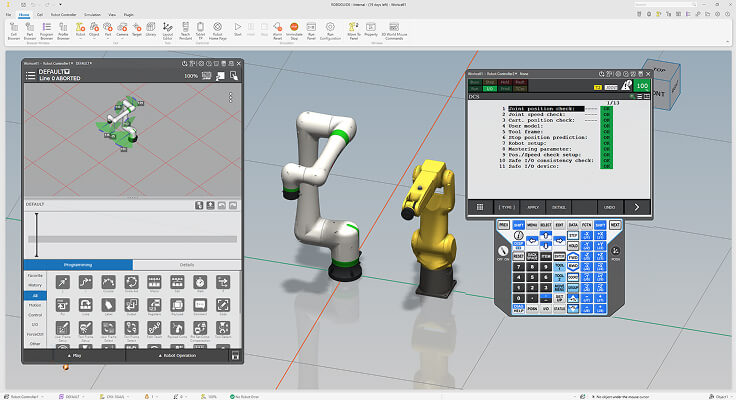
FANUC Launches ROBOGUIDE Version 10: A Major Leap in Offline Robot Simulation
FANUC has officially released ROBOGUIDE Version 10 (V10), a significant upgrade to its industry-leading offline robot programming and simulation platform. Announced in June 2025, this release introduces a 64-bit architecture, immersive virtual reality capabilities, a modernized user interface, and expanded CAD format support — making it one of the most comprehensive updates to the software in years.
What Is ROBOGUIDE?
ROBOGUIDE is FANUC's flagship offline programming (OLP) and simulation environment, widely used by system integrators, automation engineers, and manufacturing teams to design, program, and validate robotic workcells in a virtual 3D environment — without requiring physical hardware. By enabling full simulation of robot motion, cycle times, reach envelopes, and collision detection before deployment, ROBOGUIDE significantly reduces commissioning time and risk on the factory floor.
Key New Features in Version 10
64-Bit Architecture for Higher Performance
The most foundational change in V10 is the transition from a 32-bit to a 64-bit application architecture. This upgrade unlocks access to significantly more system memory, enabling engineers to build and simulate larger, more complex workcells with multiple robots, conveyors, fixtures, and peripheral equipment — all without hitting the memory ceiling that constrained previous versions.

Immersive Virtual Reality Capabilities
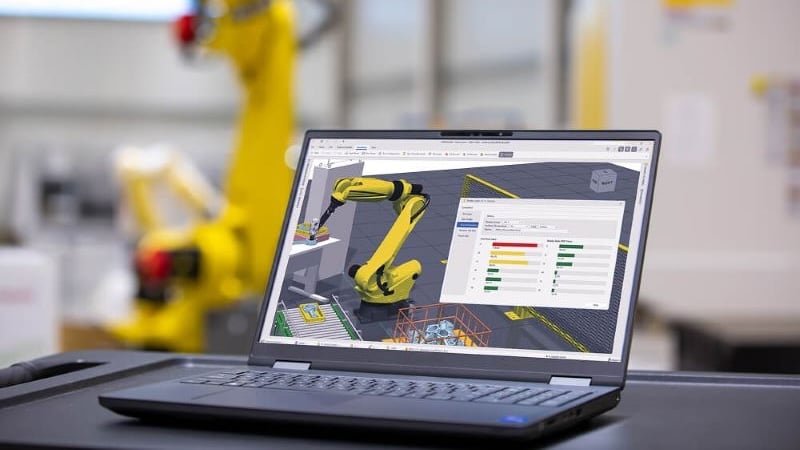
ROBOGUIDE V10 introduces a new VR application that allows users to record workcell simulations as 3D video and play them back in a VR headset. Engineers can now perform virtual walk-throughs of their automation layouts, gaining spatial awareness and line-of-sight insights that are impossible to achieve from a traditional 2D monitor view. This is particularly valuable for ergonomics reviews, safety assessments, and customer presentations.
Modernized User Interface
The interface has been completely redesigned with a ribbon-style toolbar, floating and dockable windows, and improved graphics rendering. The new drag-and-drop robot placement tool streamlines the process of adding and positioning robots within a workcell. FANUC has also adopted a Windows 11-style aesthetic and aligned CAD-related operations with mainstream CAD software conventions, reducing the learning curve for engineers already familiar with tools like SolidWorks or CATIA.
To ease the transition, V10 ships with both the new and classic UI, allowing teams to migrate at their own pace without disrupting ongoing projects.
Expanded Native CAD Format Support
ROBOGUIDE V10 now supports a broader range of native CAD file formats, simplifying the import of geometry from various design tools. This reduces the need for intermediate file conversions (e.g., STEP or IGES), preserving model fidelity and accelerating the workcell setup process.
Sustainability and Maintenance Tools
New features include tools for estimating robot power consumption to support energy-saving initiatives, as well as a reducer service life estimator that helps maintenance teams plan preventive maintenance schedules based on simulated usage patterns.
Licensing and Availability
ROBOGUIDE V10 shares a single license with previous versions, meaning existing customers can access the new version without purchasing a separate license. An upgrade package is available for users who want to transition fully to the new interface and features. The software is available via both a one-time permanent license and a subscription-based model.
Why This Matters for Automation Engineers
The shift to 64-bit architecture and VR integration positions ROBOGUIDE V10 as a more capable platform for the increasingly complex automation systems being deployed in automotive, electronics, food & beverage, and logistics industries. As robot workcells grow in scale — incorporating collaborative robots, vision systems, and multi-robot coordination — the ability to simulate these environments with high fidelity before physical installation becomes a critical competitive advantage.
For teams evaluating or already using FANUC robots, upgrading to ROBOGUIDE V10 is a straightforward path to improved simulation performance and richer visualization capabilities.