

Insight Maker: Hybrid System Dynamics and Agent-Based Modeling for Social Systems
Insight Maker: Web-Based System Dynamics and Agent-Based Modeling for Social System Analysis
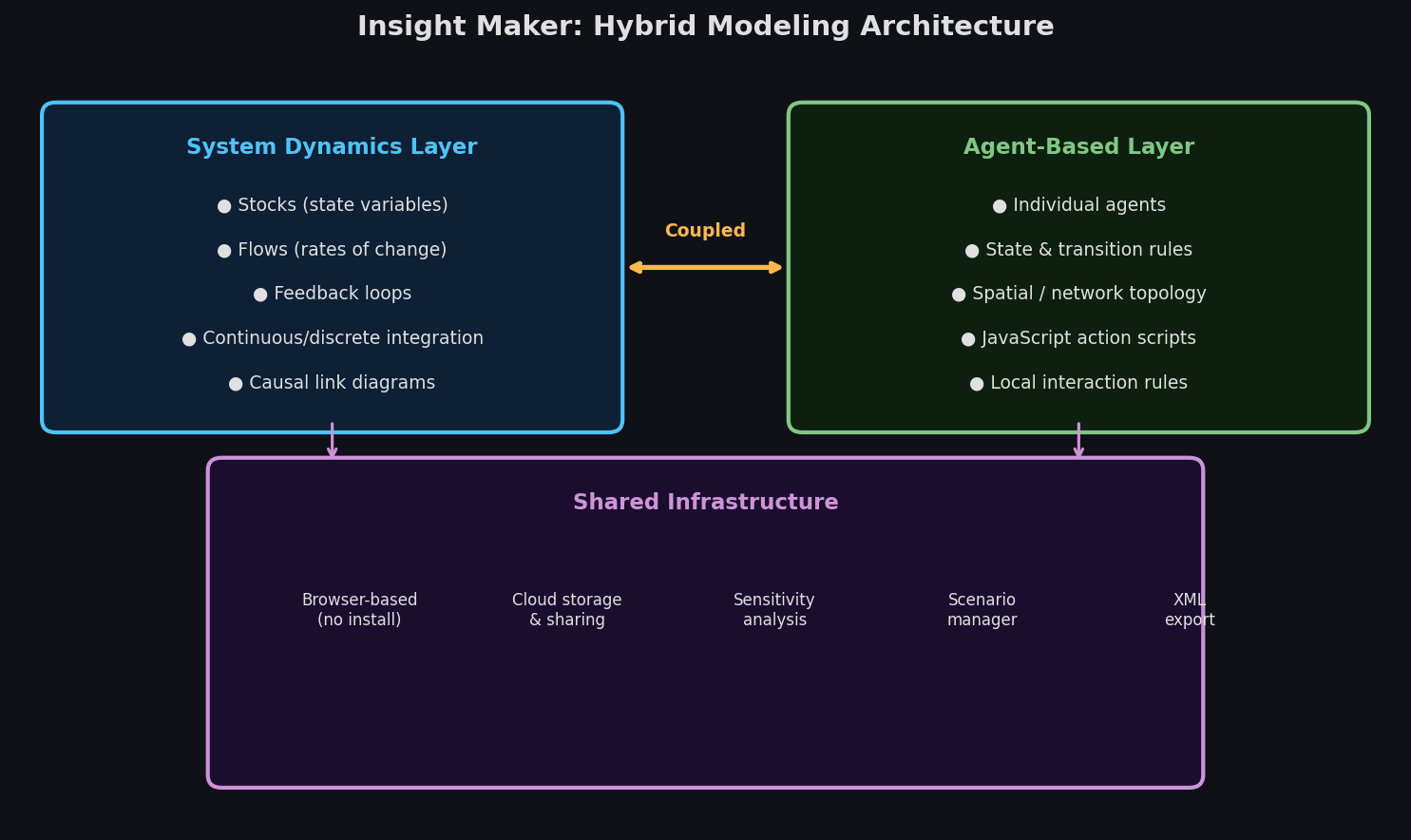
Insight Maker is a free, browser-based simulation platform that uniquely combines system dynamics (stock-and-flow) modeling with agent-based simulation in a single, unified environment. Developed by Scott Fortmann-Roe and hosted at insightmaker.com, it has become a widely adopted tool in social science research, policy analysis, and education — requiring no software installation and supporting real-time collaboration.
Why Insight Maker Stands Apart
Most simulation platforms force a choice: either system dynamics (Vensim, Stella) or agent-based modeling (NetLogo, Mesa). Insight Maker dissolves this boundary. A single model can contain stocks and flows governing aggregate population dynamics alongside individual agents whose behaviors are driven by local rules and spatial proximity. This hybrid capability is particularly valuable for social systems where macro-level feedback loops (e.g., resource depletion, institutional constraints) interact with micro-level agent decisions (e.g., household migration, firm entry/exit).
The platform runs entirely in the browser using JavaScript, which means models are immediately shareable via URL — a significant advantage for collaborative research and teaching. Models can be embedded in web pages, making Insight Maker a natural fit for interactive policy dashboards and educational simulations.

Core Modeling Constructs
Stocks, Flows, and Variables
The system dynamics layer uses the standard Forrester notation: Stocks accumulate quantities over time, Flows control rates of change, and Variables compute intermediate values. Causal links (arrows) define the feedback structure. Insight Maker supports both continuous (differential equation) and discrete (Euler or RK4) integration methods, selectable per model.
Stock: Population
Flow: Birth Rate → Population (rate = Population × birth_fraction)
Flow: Population → Death Rate (rate = Population × death_fraction)
Variable: birth_fraction = 0.03 - 0.001 × Crowding_Index
This feedback loop captures density-dependent birth suppression — a common pattern in social-ecological models.
Agent-Based Layer
Agents in Insight Maker are defined with State variables, Transition rules, and optional Actions that execute each time step. Agents can be placed on a grid, a network, or in continuous 2D space. Interaction rules can reference spatial neighbors, network connections, or global stocks.
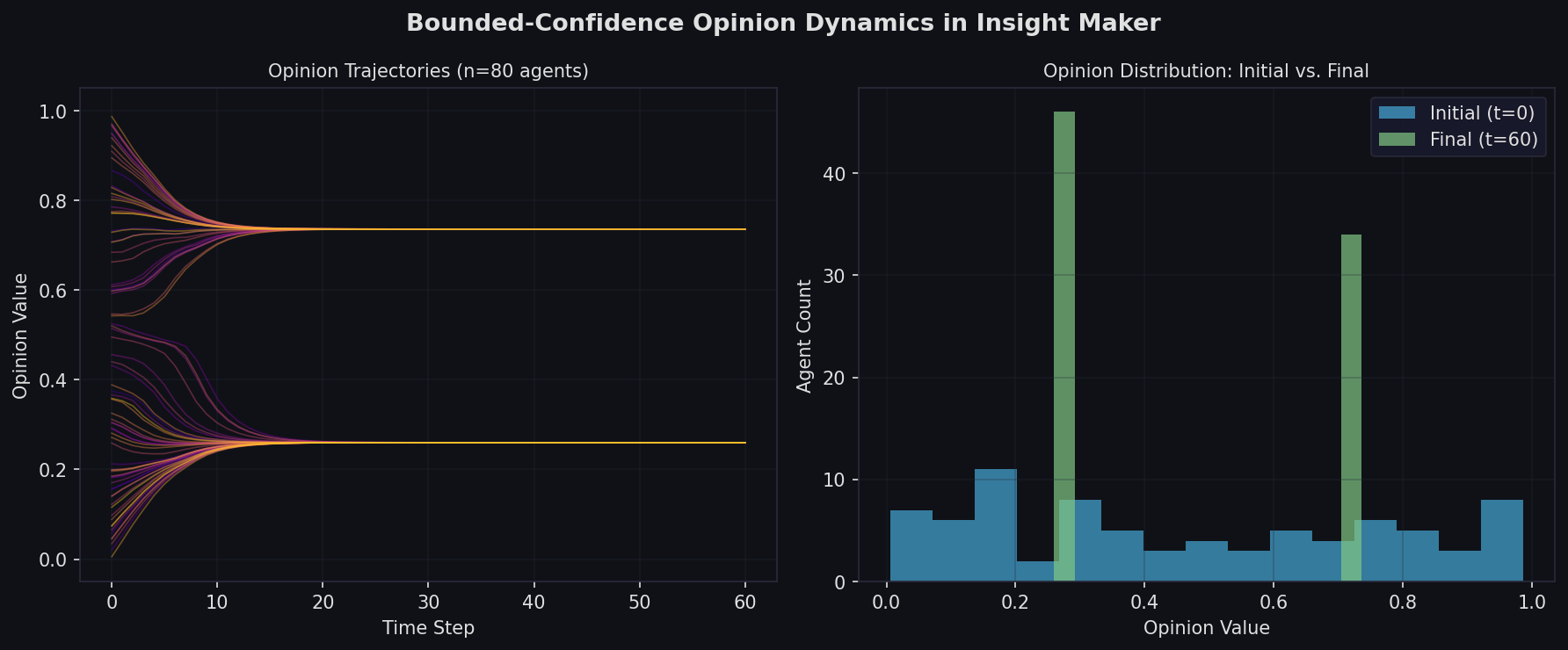
A typical agent definition for a bounded-confidence opinion dynamics model:
// Agent Action (runs each time step)
var neighbors = findNearby(Self, 5); // within radius 5
neighbors.forEach(function(n) {
  if (Math.abs(Self.Opinion - n.Opinion) < Self.Tolerance) {
    Self.Opinion += 0.3 * (n.Opinion - Self.Opinion);
  }
});
This concise JavaScript syntax lowers the barrier for social scientists who are not professional programmers.
Hybrid Model Example: Urban Migration and Housing Markets
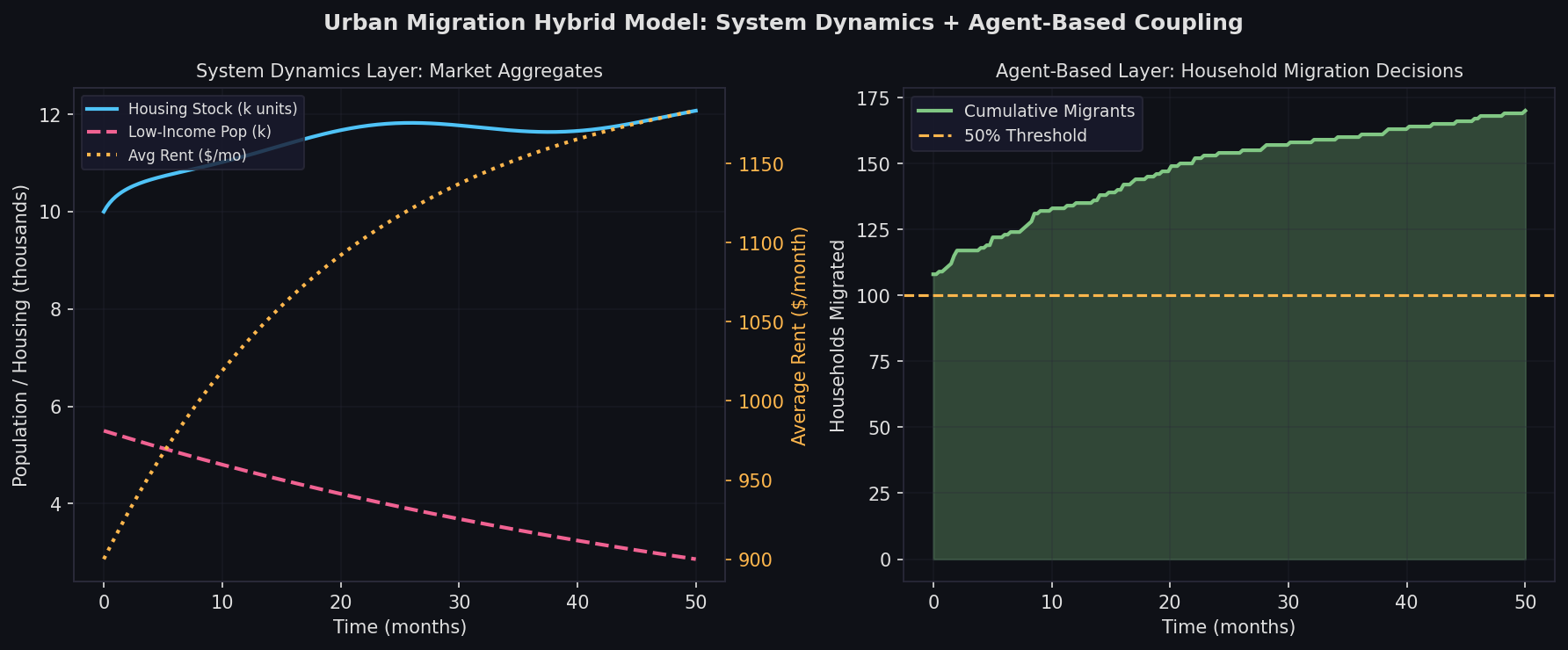
A compelling use case for Insight Maker's hybrid capability is modeling urban migration dynamics. The system dynamics layer tracks aggregate housing stock, construction rates, and average rent levels. Individual household agents decide whether to migrate based on local rent relative to their income threshold and social network ties.
The feedback structure works as follows:
- Rising rents (SD layer) increase migration pressure on low-income agents.
- Departing agents reduce local demand, dampening rent growth.
- Network effects (ABM layer) create clustering — agents follow neighbors who have already migrated.
This interplay between aggregate market dynamics and individual network-driven decisions cannot be captured by either modeling paradigm alone.
Sensitivity Analysis and Scenario Comparison
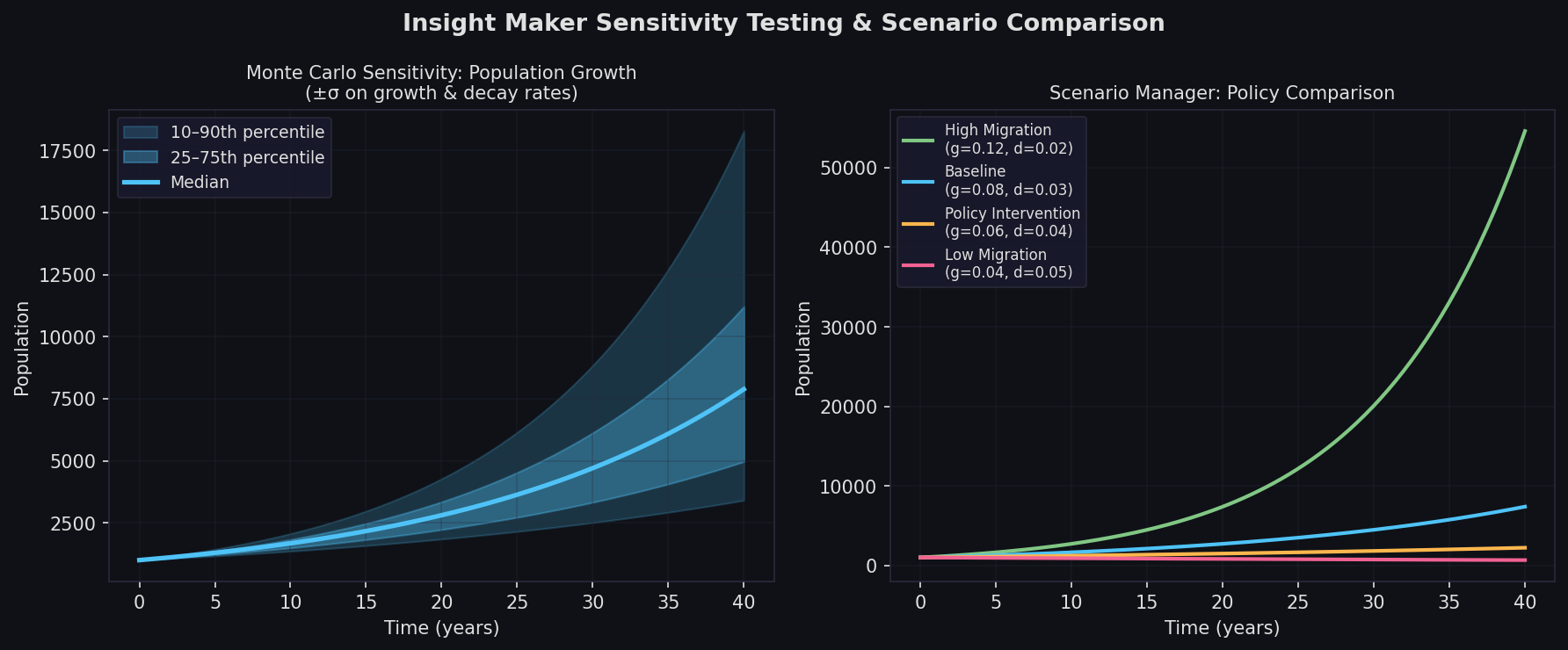
Insight Maker includes a built-in Sensitivity Testing tool that runs Monte Carlo sweeps over user-defined parameter ranges. Results are displayed as fan charts showing the distribution of outcomes across runs — a critical feature for communicating uncertainty to policy audiences.
The Scenario Manager allows analysts to define named parameter sets (e.g., "High Migration," "Low Migration," "Policy Intervention") and overlay their time-series outputs on a single chart. This workflow is particularly effective for stakeholder presentations where decision-makers need to compare policy alternatives visually.
Collaboration and Reproducibility
Every Insight Maker model is stored in the cloud and assigned a permanent URL. Sharing a model is as simple as sharing a link — collaborators can fork the model, modify it, and share their version without affecting the original. This Git-like branching model (without the command-line complexity) makes Insight Maker well-suited for iterative, multi-stakeholder modeling processes common in participatory policy design.
Models can be exported as XML for archival or imported into other tools. The underlying simulation engine is open-source (github.com/scottfr/simulation), enabling reproducibility audits and custom extensions.
Limitations and When to Use Alternatives
Insight Maker's browser-based architecture imposes performance constraints. Models with more than ~5,000 agents or requiring sub-second time steps will encounter slowdowns. For large-scale social simulations, platforms like FLAME GPU 2, Repast4Py, or Agents.jl are more appropriate.
The platform also lacks built-in GIS integration — spatial models are limited to abstract 2D grids rather than real geographic coordinates. For spatially explicit social simulations tied to real-world geography, GAMA Platform or AnyLogic with GIS layers are better choices.
Getting Started
- Navigate to insightmaker.com and create a free account.
- Browse the Model Library — over 10,000 community models cover topics from epidemic spread to organizational learning.
- Fork an existing model relevant to your domain and modify parameters to match your system.
- Use Tools → Sensitivity Testing to explore parameter uncertainty before drawing conclusions.
Further Resources
- Insight Maker Documentation
- Insight Maker Model Library
- Fortmann-Roe, S. (2014). Insight Maker: A general-purpose tool for web-based modeling and simulation. Simulation Modelling Practice and Theory, 47, 28–45.
- System Dynamics Society — resources on stock-and-flow modeling methodology
- OpenABM — repository of agent-based models across social science domains
Insight Maker occupies a unique niche: it is the most accessible hybrid simulation environment available, making it the tool of choice for rapid prototyping, teaching, and participatory modeling with non-technical stakeholders. Its limitations in scale and GIS are well-compensated by its zero-installation deployment, permanent sharing URLs, and the rare ability to combine system dynamics and agent-based paradigms in a single model.