
NetLogo BehaviorSpace: Systematic Parameter Sweeps and Experiment Design for Agent-Based Models
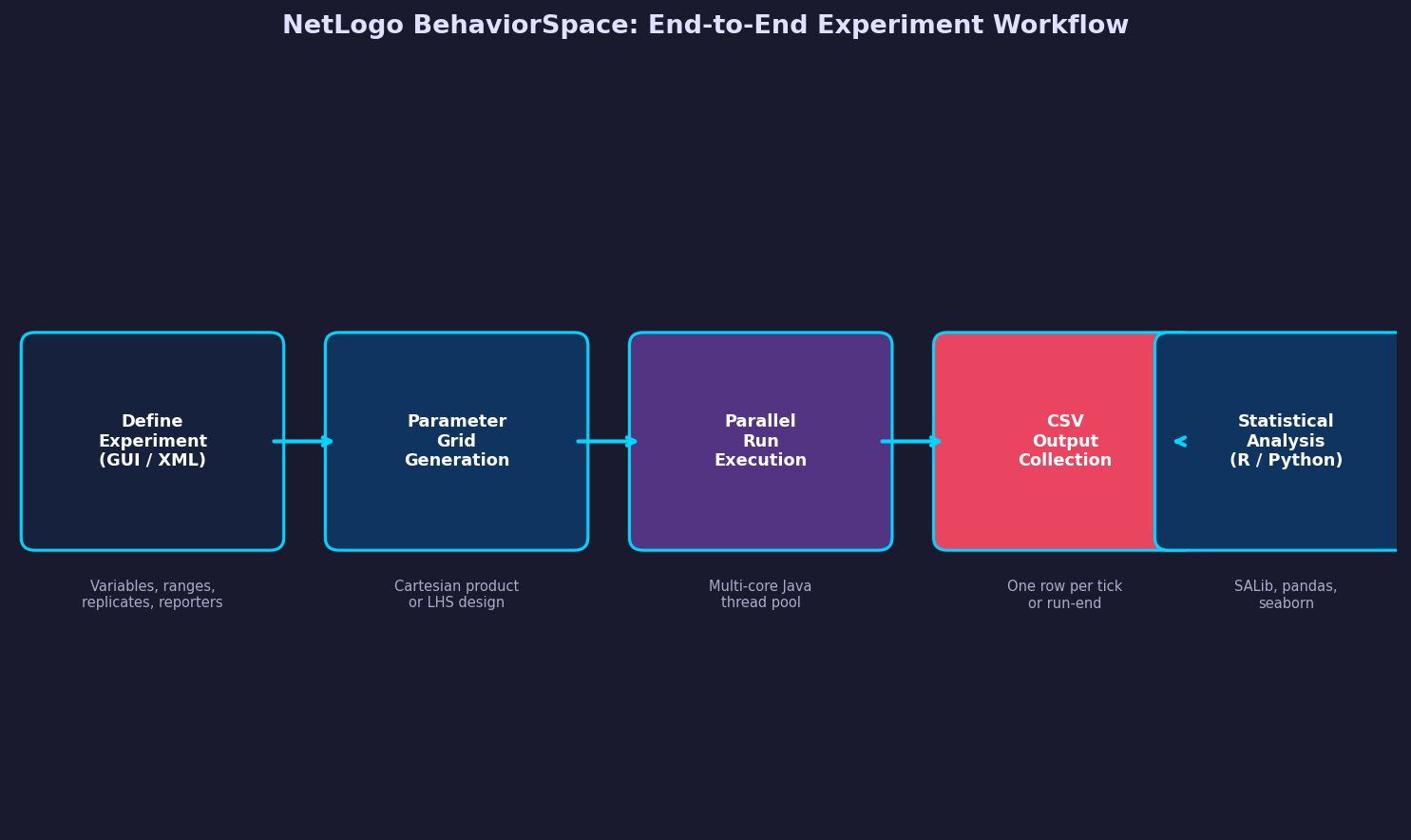
Agent-based models are inherently stochastic and parameter-rich. A single NetLogo model may expose a dozen sliders — population size, interaction radius, decay rate, rewiring probability — and understanding how each parameter (and their interactions) shapes emergent outcomes requires far more than manual slider adjustments. BehaviorSpace, NetLogo's built-in experiment framework, provides a structured, reproducible workflow for running factorial parameter sweeps, collecting time-series and summary statistics, and exporting results directly to CSV for downstream analysis. This article examines BehaviorSpace's architecture, experiment design patterns, and practical strategies for extracting maximum insight from large parameter spaces.
What BehaviorSpace Does
BehaviorSpace is a GUI and command-line tool embedded in NetLogo that automates the execution of multiple model runs across a defined parameter grid. Each experiment specifies:
- Variable definitions — which parameters to vary and over what ranges or enumerated values
- Repetitions — how many stochastic replicates to run per parameter combination
- Measurement reporters — NetLogo reporter expressions evaluated at each tick or at run end
- Stop condition — a Boolean reporter or a fixed tick count that terminates each run
When an experiment is launched, BehaviorSpace iterates over the full Cartesian product of parameter values, executes the specified number of replicates for each combination, and writes results to a structured CSV file. The output contains one row per measurement event, with columns for run number, step, all varied parameters, and all reporter values.

Defining Experiments: GUI vs. XML
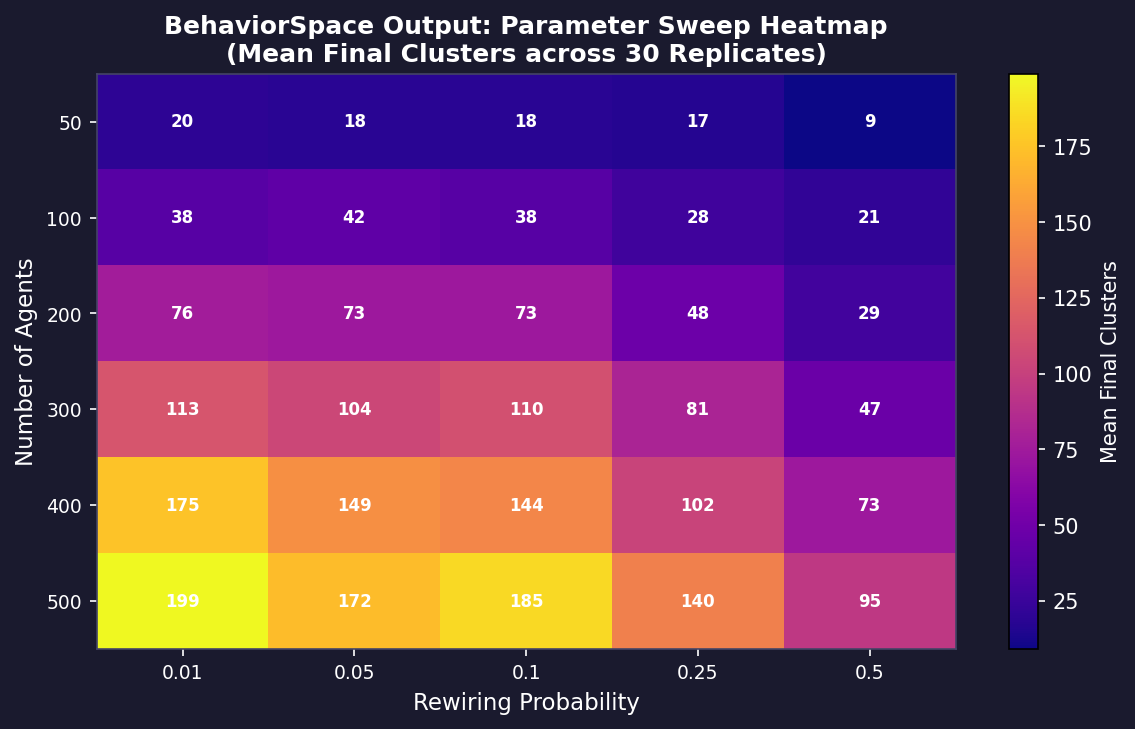
The BehaviorSpace dialog (accessible via Tools → BehaviorSpace) provides a point-and-click interface for defining experiments. Each variable entry uses NetLogo's ["variable-name" [min increment max]] syntax for ranges or ["variable-name" value1 value2 ...] for enumerated lists. For example:
["num-agents" [50 50 500]]
["rewiring-prob" 0.01 0.05 0.1 0.25 0.5]
This creates a 10 × 5 = 50-combination grid. With 30 replicates each, BehaviorSpace will execute 1,500 runs automatically.
For version-controlled workflows, experiments can be stored as XML in the model's .nlogo file or exported to a standalone .xml file. This enables reproducible experiment definitions that can be committed to Git alongside the model source. The command-line interface (netlogo-headless.sh --model mymodel.nlogo --experiment myexperiment --table results.csv) supports automated execution in HPC or CI/CD pipelines without a display server.
Measurement Strategy: What to Report and When
BehaviorSpace supports two measurement modes:
- Run-end reporters — evaluated once when the stop condition is met. Ideal for equilibrium metrics such as final cluster size, convergence tick, or mean opinion at steady state.
- Every-tick reporters — evaluated at each simulation step. Necessary for time-series analysis, phase transition detection, or models that never reach a fixed point.
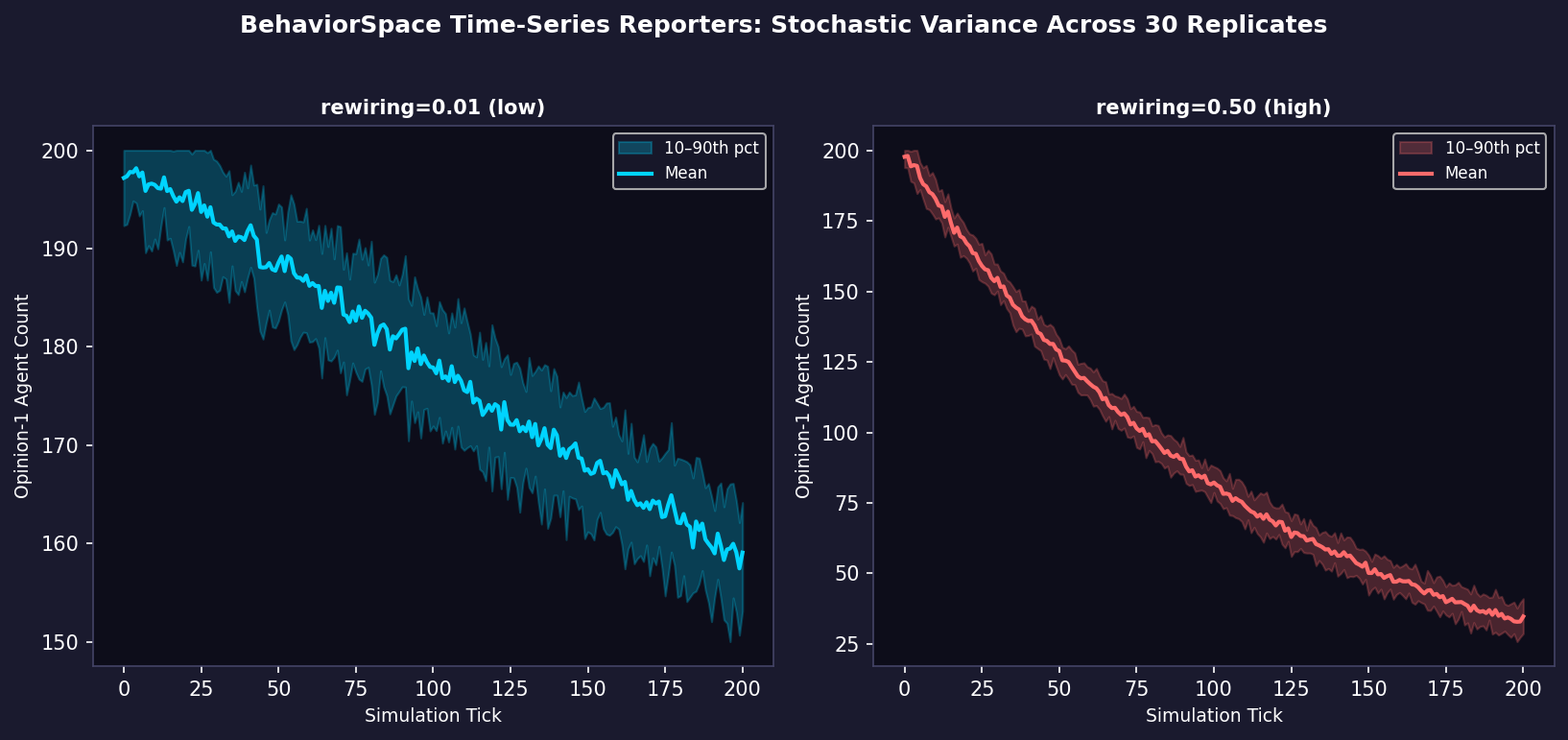
A common best practice is to report both: a lightweight every-tick reporter for a single key variable (e.g., count turtles with [opinion = 1]) and a richer set of run-end reporters for derived statistics. This keeps file sizes manageable while preserving temporal resolution for the primary outcome.
Reporters can be any valid NetLogo expression, including calls to custom procedures that return computed values. For network models, reporters like mean [nw:clustering-coefficient] of turtles or nw:mean-path-length from the nw extension are fully supported.
Parallel Execution and Performance
By default, BehaviorSpace runs experiments sequentially. For large sweeps, the parallel runs checkbox (NetLogo 6.x) distributes runs across available CPU cores using Java's thread pool. Each run gets its own isolated model instance, so there are no shared-state race conditions.
Practical performance guidance:
- Disable visualization — uncheck "Update view" and "Update plots and monitors" in the experiment dialog. Rendering is the dominant cost for small models; disabling it can yield 10–50× speedups.
- Use headless mode for HPC —
netlogo-headless.sheliminates all GUI overhead and is the recommended approach for cluster submissions. - Profile before scaling — run a single combination with verbose tick reporting to estimate per-run wall time before committing to a 10,000-run sweep.
Analyzing BehaviorSpace Output
The CSV output from BehaviorSpace is structured for direct import into R, Python (pandas), or Julia. A typical analysis pipeline:
import pandas as pd
import seaborn as sns

df = pd.read_csv("results.csv", skiprows=6)  # skip NetLogo header block
# Aggregate replicates
summary = df.groupby(["num-agents", "rewiring-prob"])["final-clusters"].agg(["mean","std"]).reset_index()
sns.heatmap(summary.pivot("num-agents", "rewiring-prob", "mean"), annot=True)
The skiprows=6 offset skips NetLogo's metadata header. After that, the file is standard CSV with parameter columns followed by reporter columns.
For sensitivity analysis, the output integrates directly with the SALib library (Python) for Sobol indices or Morris screening, or with the sensitivity package in R. This allows modelers to move beyond visual inspection to quantified, ranked parameter importance.
Latin Hypercube Sampling for High-Dimensional Spaces
When the parameter space has more than four or five dimensions, full factorial sweeps become computationally prohibitive. BehaviorSpace does not natively support Latin Hypercube Sampling (LHS), but a common workaround is to generate an LHS design externally (using pyDOE2 in Python or lhs() in R), write each sample as an enumerated BehaviorSpace variable list, and run the resulting experiment. This reduces the required number of runs from exponential to linear in the number of parameters while maintaining good space-filling coverage.
Integration with R via RNetLogo
For teams working primarily in R, the RNetLogo package provides programmatic control of NetLogo from an R session. This enables tighter integration between experiment design (using R's expand.grid or lhs packages) and result analysis, without the intermediate CSV step. RNetLogo is particularly useful for adaptive experiment designs where subsequent parameter choices depend on earlier results.
Best Practices Summary
- Always set a fixed random seed range — use BehaviorSpace's repetitions count rather than a single seeded run to properly characterize stochastic variance.
- Version-control experiment XML — store
.xmlexperiment files alongside the.nlogomodel for full reproducibility. - Separate exploration from confirmation — use coarse sweeps to identify interesting regions, then refine with denser grids or LHS in those regions.
- Document reporter semantics — add comments in the experiment XML explaining what each reporter measures and at what model state.
- Validate against known cases — before a large sweep, verify that BehaviorSpace reproduces manually-checked single-run results.
Further Resources
- NetLogo BehaviorSpace Guide — official documentation covering all dialog options and command-line flags
- NetLogo Models Library — reference models with pre-configured BehaviorSpace experiments
- SALib Documentation — Python library for global sensitivity analysis compatible with BehaviorSpace CSV output
- RNetLogo CRAN Package — R interface for programmatic NetLogo control
- OpenMOLE Platform — workflow engine that wraps NetLogo models for large-scale distributed BehaviorSpace-style sweeps on HPC clusters
BehaviorSpace transforms NetLogo from an interactive exploration tool into a rigorous scientific instrument. By combining structured experiment definitions, parallel execution, and direct integration with statistical analysis libraries, it enables the kind of systematic, reproducible parameter exploration that peer-reviewed agent-based modeling research demands.