

ANSYS MAPDL Parametric Scripting: Automating Structural Simulations with APDL
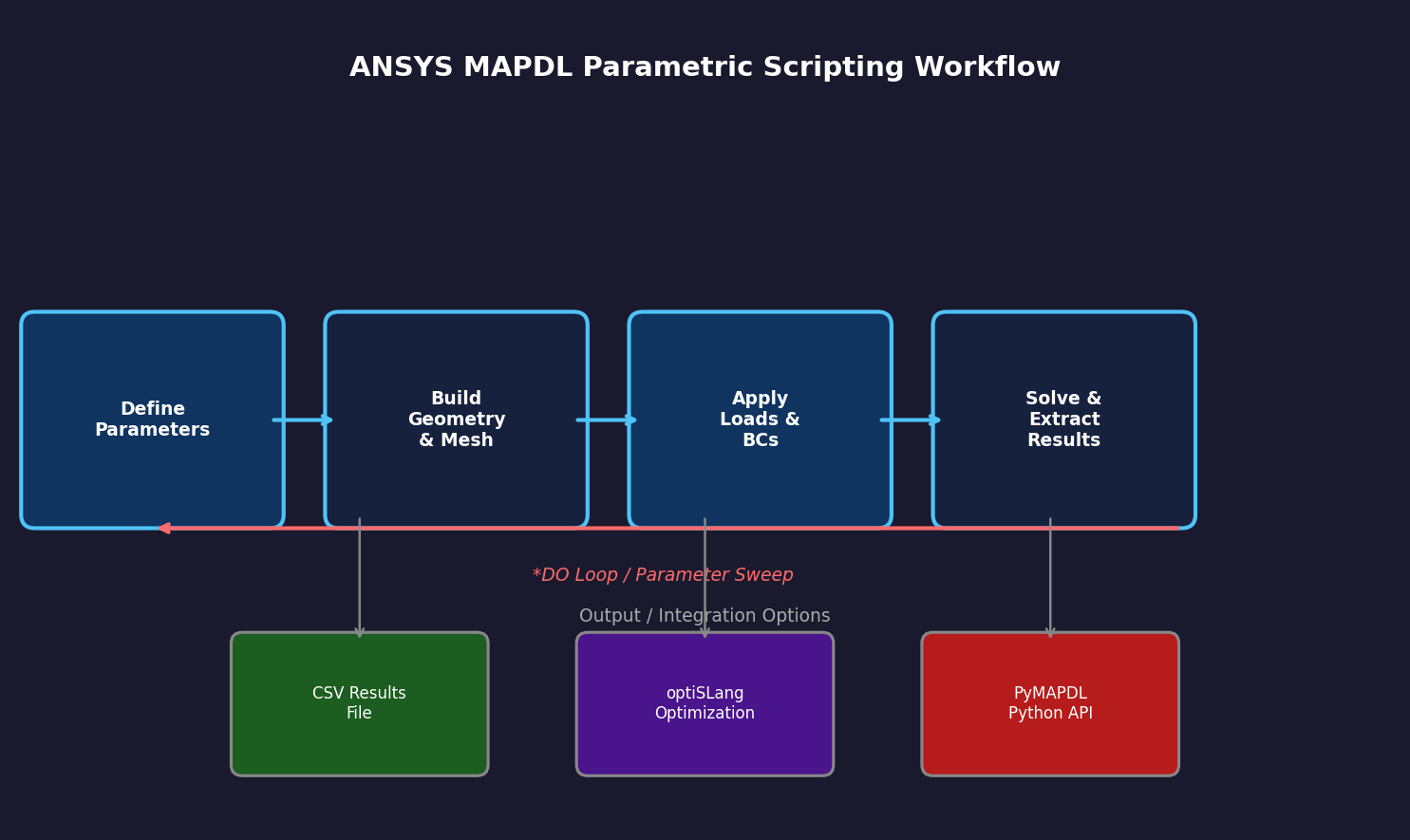
Mechanical APDL (MAPDL) — the scripting backbone of ANSYS Mechanical — remains one of the most powerful yet underutilized capabilities in the structural simulation toolkit. While the Workbench GUI handles routine analyses efficiently, MAPDL's parametric scripting unlocks automation, design-space exploration, and batch processing that GUI workflows simply cannot match. This article covers the core patterns every intermediate ANSYS user should master.
What Is MAPDL Parametric Scripting?
ANSYS Parametric Design Language (APDL) is a macro language embedded in ANSYS Mechanical APDL. It supports variables, arrays, loops, conditionals, and user-defined functions — making it possible to build fully parameterized simulation models that can be driven from a single input file or integrated into optimization frameworks.
MAPDL scripts (.mac or .inp files) are executed either interactively through the MAPDL command line, in batch mode via the -b flag, or called from Workbench through a Command Object. PyMAPDL, the Python client library, extends this further by allowing MAPDL to be driven programmatically from Python scripts and Jupyter notebooks.

Core APDL Scripting Patterns
1. Parameterizing Geometry and Loads
The foundation of any parametric study is replacing hard-coded values with named parameters:
! Define parameters
THICKNESS = 5.0       ! mm
LOAD_PRESSURE = 1.5   ! MPa
YOUNGS_MOD = 200e3    ! MPa (steel)

! Use parameters in model definition
ET,1,SOLID186
MP,EX,1,YOUNGS_MOD
MP,PRXY,1,0.3

! Apply pressure load using parameter
SF,ALL,PRES,LOAD_PRESSURE
Parameters can be modified at the top of the script and the entire model rebuilds automatically — no manual GUI interaction required.
2. Looping for Design Studies
APDL's *DO loop enables systematic parameter sweeps:
*DO,I,1,5
  THICKNESS = 3.0 + (I-1)*1.0   ! Sweep 3mm to 7mm
  /PREP7
  ! Rebuild geometry with new thickness
  VDELE,ALL
  BLC4,0,0,100,50,THICKNESS
  VMESH,ALL
  /SOLU
  SOLVE
  /POST1
  SET,LAST
  *GET,MAX_STRESS,PLNSOL,0,MAX
  STRESS_ARRAY(I) = MAX_STRESS
*ENDDO
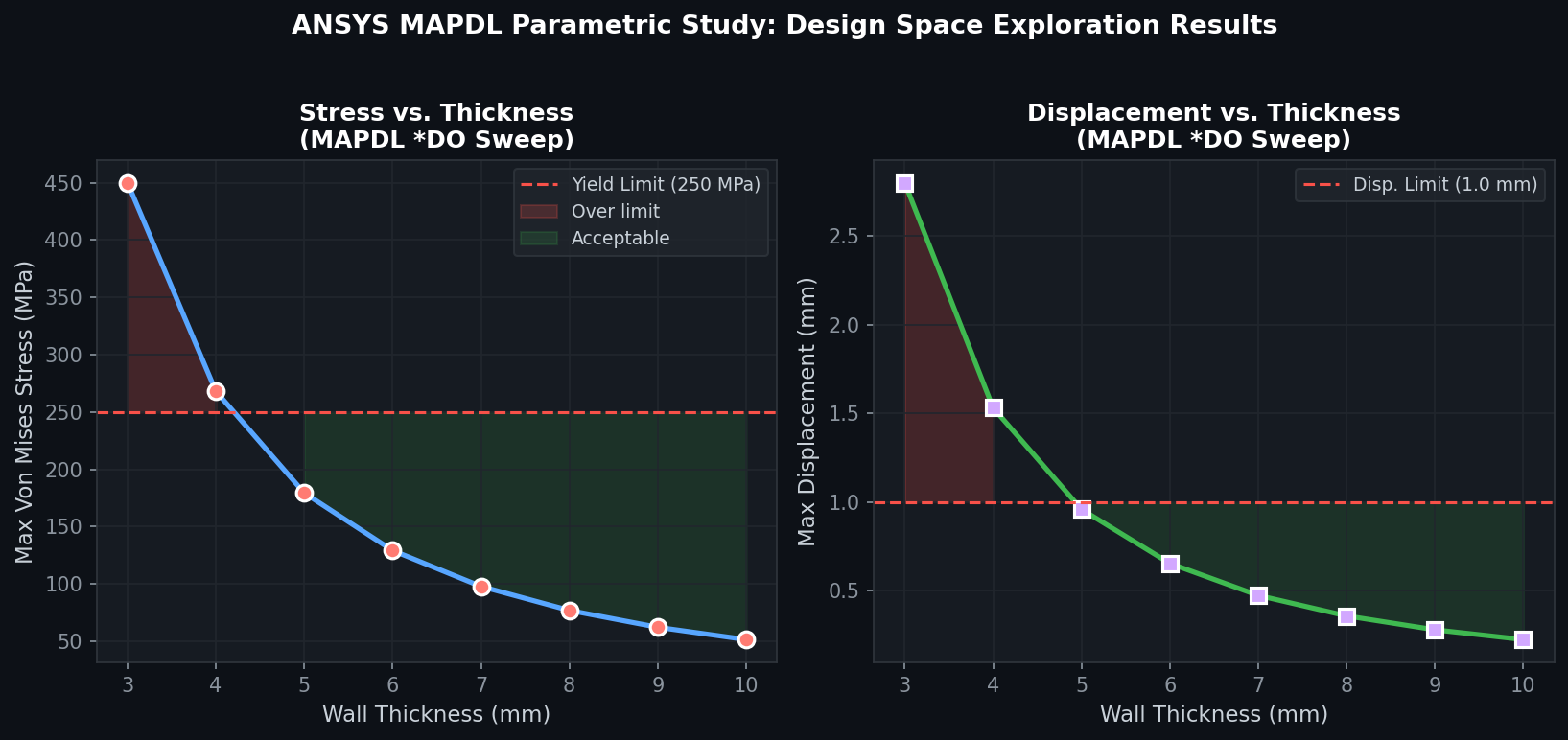
This pattern is particularly effective for thickness optimization studies, where running five analyses in a single batch job replaces five separate GUI sessions.
3. Conditional Logic for Adaptive Workflows
APDL conditionals (*IF, *ELSEIF, *ELSE, *ENDIF) allow scripts to branch based on simulation results:
/POST1
SET,LAST
*GET,MAX_DISP,NODE,0,U,SUM,MAX

*IF,MAX_DISP,GT,2.0,THEN
  /OUT,warning_log,txt
  *MSG,UI,'Displacement exceeds 2mm limit: %G mm',MAX_DISP
  /OUT
*ELSE
  *MSG,UI,'Design acceptable. Max displacement: %G mm',MAX_DISP
*ENDIF
This is invaluable for automated pass/fail checks in design verification workflows.
4. Arrays and Result Extraction
APDL arrays store multi-dimensional data and enable post-processing automation:
*DIM,RESULTS,ARRAY,10,3   ! 10 rows, 3 columns
! Column 1: Load, Column 2: Max Stress, Column 3: Max Disp

*DO,I,1,10
  LOAD_VAL = I * 100       ! 100N to 1000N
  ! ... apply load, solve ...
  *GET,SIG_MAX,PLNSOL,0,MAX
  *GET,U_MAX,NODE,0,U,SUM,MAX
  RESULTS(I,1) = LOAD_VAL
  RESULTS(I,2) = SIG_MAX
  RESULTS(I,3) = U_MAX
*ENDDO

! Write results to CSV
*CFOPEN,results_output,csv
*VWRITE,RESULTS(1,1),RESULTS(1,2),RESULTS(1,3)
(F10.2,',',F12.4,',',F12.6)
*CFCLOS
The resulting CSV can be imported directly into Excel, Python (pandas), or MATLAB for further analysis.
PyMAPDL: MAPDL Scripting in Python
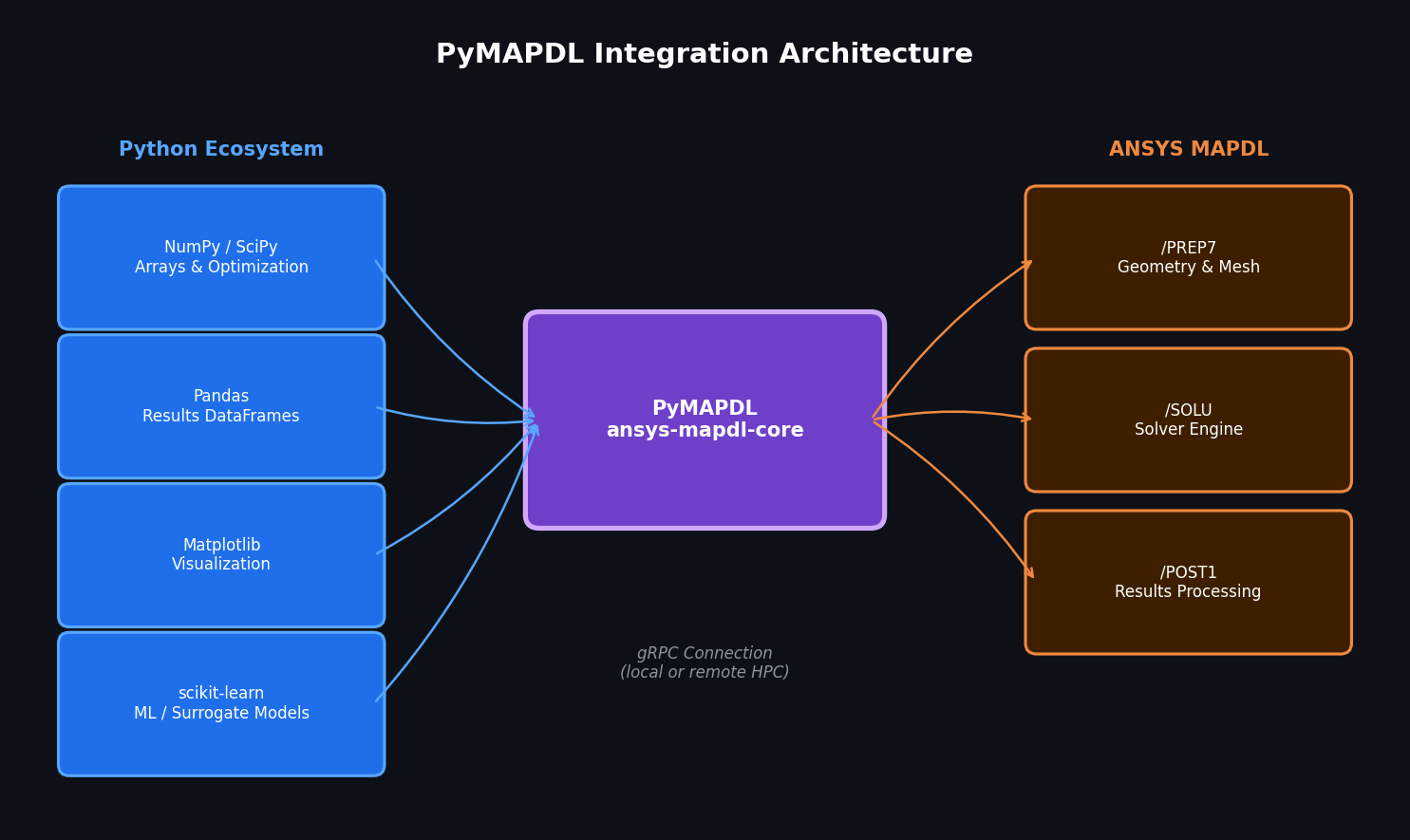
For teams already working in Python, PyMAPDL provides a Pythonic interface to MAPDL that integrates naturally with scientific computing libraries:
from ansys.mapdl.core import launch_mapdl
import numpy as np

mapdl = launch_mapdl()
mapdl.prep7()

thicknesses = np.linspace(3, 10, 8)  # 8 thickness values
stresses = []

for t in thicknesses:
    mapdl.clear()
    mapdl.prep7()
    mapdl.block(0, 100, 0, 50, 0, t)
    mapdl.et(1, "SOLID186")
    mapdl.mp("EX", 1, 200e3)
    mapdl.mp("PRXY", 1, 0.3)
    mapdl.vmesh("ALL")
    mapdl.run("/SOLU")
    mapdl.solve()
    mapdl.post1()
    mapdl.set("LAST")
    stresses.append(mapdl.get("MAX_STRESS", "PLNSOL", 0, "MAX"))

mapdl.exit()
PyMAPDL is open-source and available via pip install ansys-mapdl-core. It supports both local MAPDL installations and remote gRPC connections, making it suitable for HPC cluster integration.
Best Practices for Production MAPDL Scripts
Modularize with macros. Break large scripts into reusable .mac files called via *USE. A geometry macro, a meshing macro, and a post-processing macro can be combined in different configurations without duplication.
Use /NERR to control error handling. Setting /NERR,0,99999 prevents MAPDL from aborting on non-fatal warnings during batch runs. Always review the .err file afterward.
Version-control your scripts. APDL scripts are plain text — store them in Git. Tag releases that correspond to validated simulation configurations.
Validate against GUI results. Before deploying a parametric script, run one case manually in Workbench and compare results. APDL element type and material property definitions can differ subtly from Workbench defaults.
Log all parameters. Write a header block to the output file that records every parameter value used in the run. This is essential for traceability in regulated industries.
Integration with Optimization Frameworks
MAPDL scripts integrate cleanly with external optimization tools:
- ANSYS optiSLang: Reads APDL parameter files directly and manages design-of-experiments (DOE) and sensitivity studies
- Dakota (Sandia National Laboratories): Open-source optimization framework with ANSYS interface templates
- Python scipy.optimize: Drive MAPDL via PyMAPDL as the objective function evaluator
A typical optimization loop calls the MAPDL script, reads the output CSV, evaluates the objective function (e.g., minimize mass subject to stress constraints), and updates the design variables — all without human intervention.
When to Use MAPDL vs. Workbench
MAPDL scripting is the right choice when:
- Running more than ~5 parametric variations
- Integrating ANSYS into a larger automated pipeline
- Performing operations not exposed in the Workbench GUI (e.g., advanced contact algorithms, custom element formulations)
- Reproducing analyses exactly across different machines or software versions
Workbench remains preferable for one-off analyses, complex CAD import workflows, and teams without scripting experience.
Further Resources
- ANSYS MAPDL Command Reference — complete command documentation
- PyMAPDL Documentation — Python client library and examples
- ANSYS Learning Hub — structured APDL training courses
- PADT ANSYS Blog — practical APDL tips from experienced practitioners
- Cornell CAE APDL Tutorial — free academic tutorials
Mastering MAPDL parametric scripting transforms ANSYS from a point-and-click analysis tool into a programmable simulation engine — one that can run overnight design sweeps, integrate with CI/CD pipelines, and deliver reproducible, auditable results at scale.