

ARGoS: High-Performance Swarm Robotics Simulation with Pluggable Physics Engines
Swarm robotics research demands simulation environments that can faithfully model hundreds—or thousands—of interacting agents without sacrificing speed or physical accuracy. ARGoS (A Parallel, Multi-Engine Simulator for Swarm Robotics) was purpose-built for exactly this challenge. Developed at the Université Libre de Bruxelles and now maintained by an international community, ARGoS offers a unique combination of parallel execution, pluggable physics engines, and a clean C++/Lua scripting interface that makes it the tool of choice for large-scale swarm experiments.
Architecture: Parallel Physics by Design
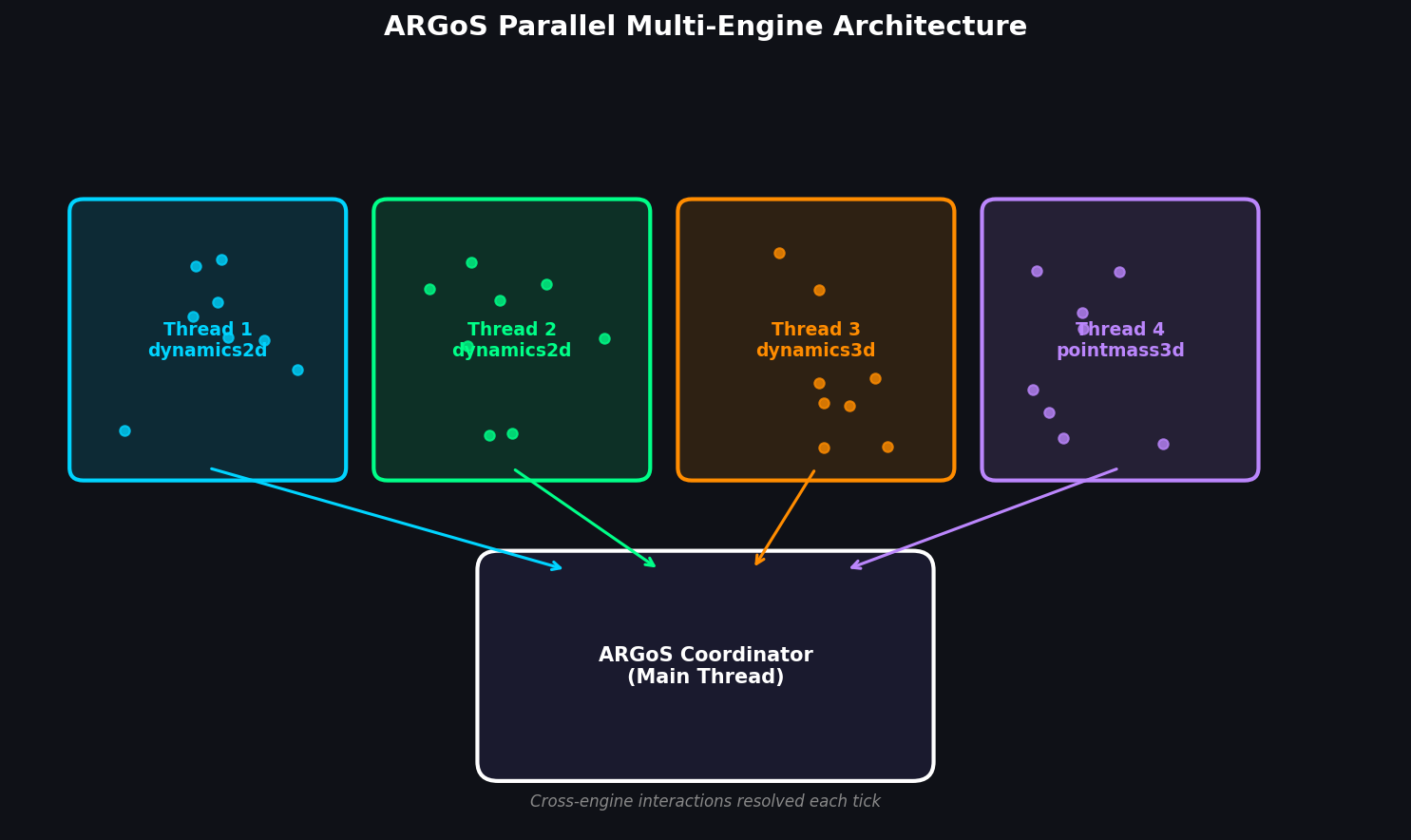
Unlike general-purpose simulators that bolt on parallelism as an afterthought, ARGoS was architected from the ground up around a multi-threaded, multi-engine model. The simulator partitions the arena into spatial regions and assigns each region to a dedicated physics engine thread. This means a 1,000-robot experiment can distribute collision detection and dynamics across all available CPU cores, achieving near-linear scaling on modern multi-core workstations.
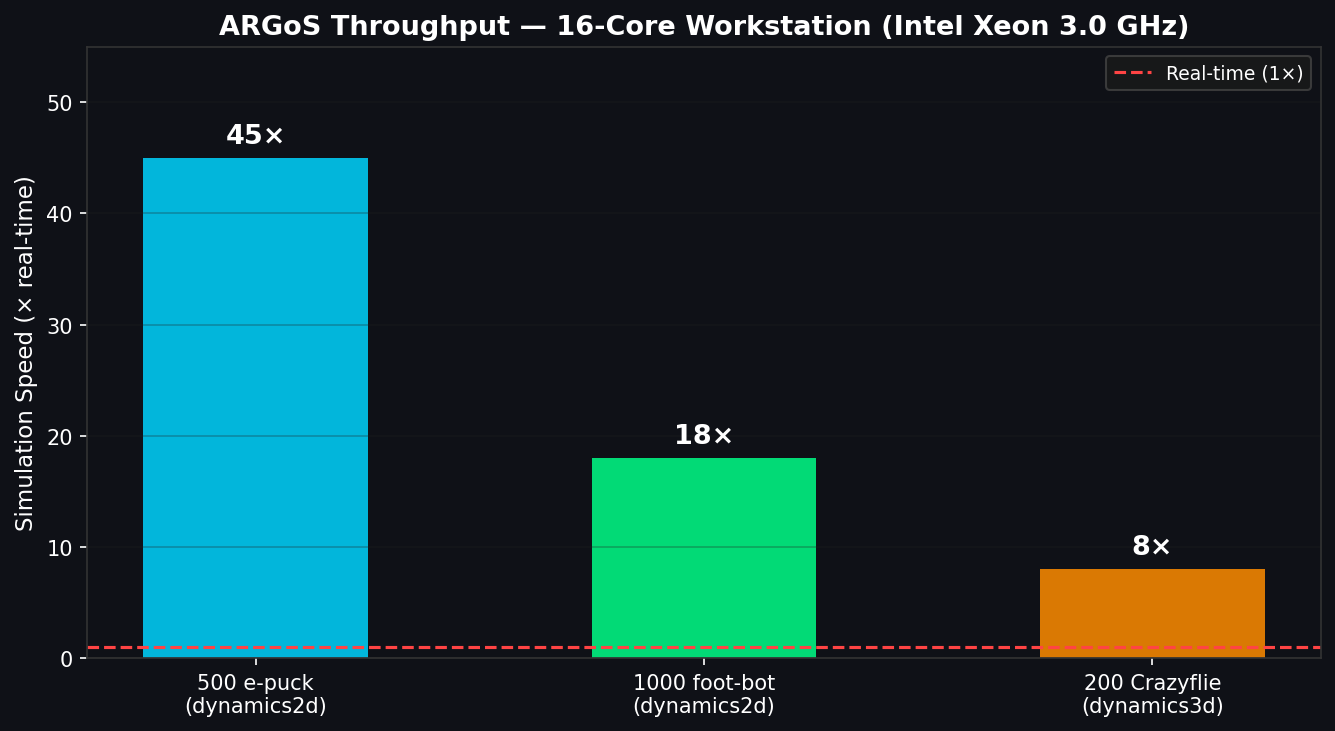
ARGoS ships with three interchangeable physics engines:

- 2D Dynamics (dynamics2d): A fast, planar rigid-body engine based on the Chipmunk library. Ideal for ground-based swarms (e-puck, foot-bot, Khepera IV) where 3D effects are negligible. Typical throughput: 10,000+ robot-steps per second on a 16-core machine.
- 3D Dynamics (dynamics3d): A full 3D rigid-body engine built on the Bullet Physics SDK. Used for aerial swarms (Crazyflie, Spiri) and manipulation tasks requiring accurate contact mechanics.
- Point-Mass 3D (pointmass3d): A simplified kinematic engine for aerial robots when aerodynamic fidelity is less critical than simulation speed. Enables very large drone swarms at minimal computational cost.
Crucially, multiple engines can run simultaneously in the same simulation. A heterogeneous swarm of ground robots and UAVs can have each robot type handled by its most appropriate engine, with ARGoS managing cross-engine interactions transparently.
Robot and Sensor Modeling
ARGoS ships with validated models for a range of real hardware platforms:
| Robot | Type | Key Sensors Modeled |
|---|---|---|
| e-puck | Ground | Proximity IR, omnidirectional camera, range-and-bearing |
| foot-bot | Ground | Proximity IR, ground sensor, range-and-bearing, gripper |
| Khepera IV | Ground | Proximity IR, ultrasound, ground sensor |
| Crazyflie 2.x | Aerial | IMU, optical flow, ToF altimeter |
| Spiri | Aerial | IMU, camera, range-and-bearing |
The range-and-bearing (RAB) sensor deserves special mention. It models infrared-based local communication and ranging—a cornerstone of many swarm algorithms—with configurable range, bearing noise, and packet loss. This allows researchers to prototype and validate communication-dependent behaviors (flocking, self-organized task allocation) before deploying on physical hardware.
Controller Development: C++ and Lua
Robot controllers in ARGoS are implemented as shared libraries loaded at runtime, keeping the simulator core decoupled from experiment logic. Two scripting paths are supported:
C++ controllers provide maximum performance and direct access to the full ARGoS API. A minimal controller inherits from CCI_Controller and overrides Init(), ControlStep(), and Reset(). Sensor readings and actuator commands are accessed through typed handles:
class CMySwarmController : public CCI_Controller {
   CCI_ProximitySensor* m_pcProximity;
   CCI_DifferentialSteeringActuator* m_pcWheels;
public:
   void Init(TConfigurationNode& t_node) override {
      m_pcProximity = GetSensor<CCI_ProximitySensor>("proximity");
      m_pcWheels    = GetActuator<CCI_DifferentialSteeringActuator>("differential_steering");
   }
   void ControlStep() override {
      // Obstacle avoidance: steer away from nearest obstacle
      auto readings = m_pcProximity->GetReadings();
      // ... compute wheel speeds ...
   }
};
Lua controllers allow rapid prototyping without recompilation. The full sensor/actuator API is exposed to Lua, and controllers can be hot-swapped between runs—invaluable during early algorithm development.
Experiment Configuration via XML
Experiments are defined in XML files that specify the arena geometry, robot population, physics engines, and visualization settings. This declarative approach makes it straightforward to sweep parameters programmatically:
<argos-configuration>
  <framework>
    <system threads="8"/>
    <experiment length="300" ticks_per_second="10"/>
  </framework>
  <controllers>
    <my_controller id="fbc" library="libmy_controller.so">
      <actuators><differential_steering .../></actuators>
      <sensors><proximity .../><range_and_bearing .../></sensors>
    </my_controller>
  </controllers>
  <arena size="10,10,2" center="0,0,1">
    <distribute>
      <position method="uniform" min="-4,-4,0" max="4,4,0"/>
      <entity quantity="200" max_trials="100">
        <foot-bot id="fb" rab_range="1.5"><controller config="fbc"/></foot-bot>
      </entity>
    </distribute>
  </arena>
  <physics_engines>
    <dynamics2d id="dyn2d"/>
  </physics_engines>
</argos-configuration>
Parameter sweeps are typically driven by shell scripts or Python wrappers that modify XML attributes and launch ARGoS in headless (--no-visualization) mode, collecting per-run statistics from loop functions.
Loop Functions: Experiment-Level Logic
Loop functions are a powerful ARGoS feature that separates experiment-level logic (fitness evaluation, data logging, environment changes) from robot-level control. A loop function class hooks into the simulator's event cycle—Init(), PreStep(), PostStep(), Reset(), Destroy()—and has full access to the arena state. This is the standard integration point for:
- Automatic parameter optimization via frameworks like irace or SMAC
- Online fitness evaluation for evolutionary robotics (e.g., with the AutoMoDe framework)
- Dynamic environment changes (moving obstacles, resource depletion)
- Structured data export to CSV or HDF5 for downstream analysis
Performance Benchmarks
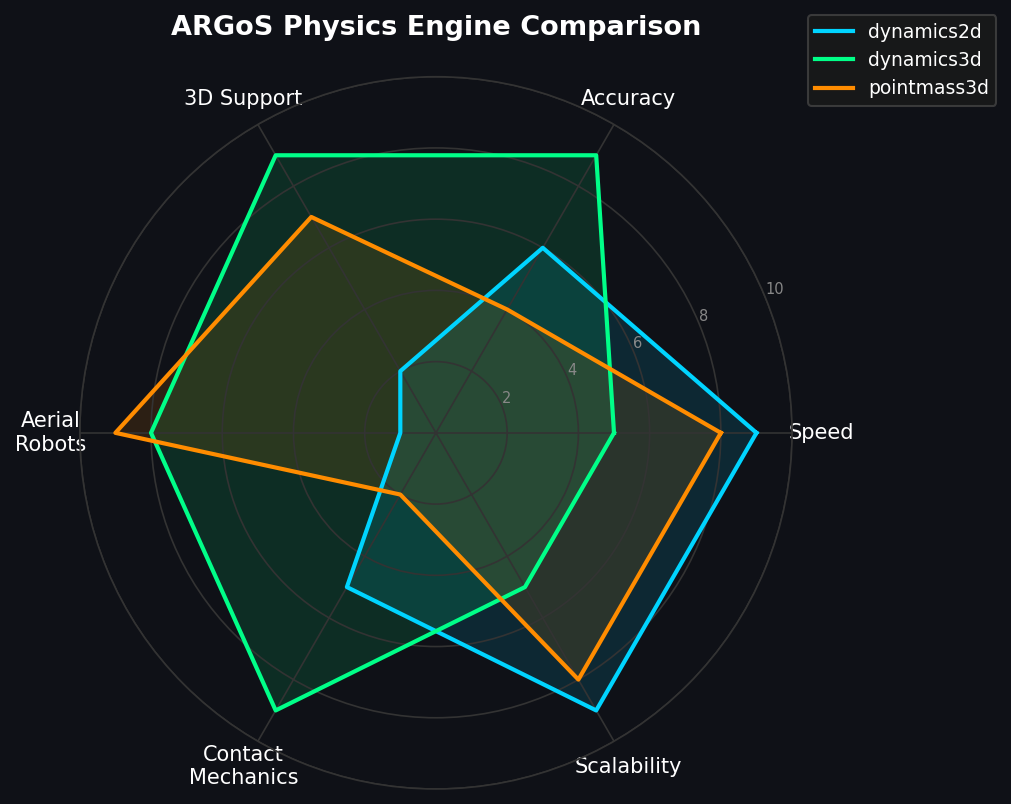
ARGoS's parallel architecture delivers substantial throughput advantages for large swarms. On a 16-core workstation (Intel Xeon, 3.0 GHz), representative benchmarks show:
- 500 e-puck robots, dynamics2d: ~45× real-time (45 simulated seconds per wall-clock second)
- 1,000 foot-bot robots, dynamics2d: ~18× real-time
- 200 Crazyflie UAVs, dynamics3d: ~8× real-time
These figures make overnight parameter sweeps across thousands of random seeds practical on a single server, without requiring HPC cluster access.
Integration with AutoMoDe and Behavior Trees
ARGoS is the reference simulator for AutoMoDe, a framework for automatic design of modular robot controllers using probabilistic finite-state machines and behavior trees. AutoMoDe's optimization loop calls ARGoS in headless mode thousands of times, evaluating candidate controllers against a fitness function defined in a loop function. This tight integration has produced published results on aggregation, foraging, and coverage tasks that transfer reliably to physical e-puck swarms.

Practical Workflow for Swarm Research
A typical ARGoS-based research workflow proceeds as follows:
- Define the task in a loop function (fitness metric, termination condition).
- Prototype the controller in Lua for rapid iteration.
- Port to C++ once the algorithm stabilizes, for 3–5× speed improvement.
- Run parameter sweeps using irace or a custom Python driver, collecting statistics across 30–100 seeds per configuration.
- Validate on hardware using the same controller code compiled for the target platform (e-puck, foot-bot).
The shared C++ codebase between simulation and hardware is a key advantage: ARGoS controllers compile directly against the real robot's SDK with minimal adaptation, reducing the sim-to-real gap.
Getting Started
ARGoS is open-source (MIT license) and available at https://www.argos-sim.info. Binary packages are available for Ubuntu 20.04/22.04; macOS users can install via Homebrew. The official documentation includes step-by-step tutorials covering controller development, custom robot plugins, and loop function design. The ARGoS community forum and GitHub repository (https://github.com/ilpincy/argos3) are active resources for troubleshooting and plugin sharing.
For researchers entering swarm robotics, ARGoS offers a uniquely scalable, extensible, and hardware-validated simulation environment. Its parallel architecture and clean plugin system make it equally suitable for small proof-of-concept experiments and large-scale evolutionary optimization campaigns.