
CoppeliaSim: Distributed Control Architecture and Scripting API for Multi-Robot Simulation
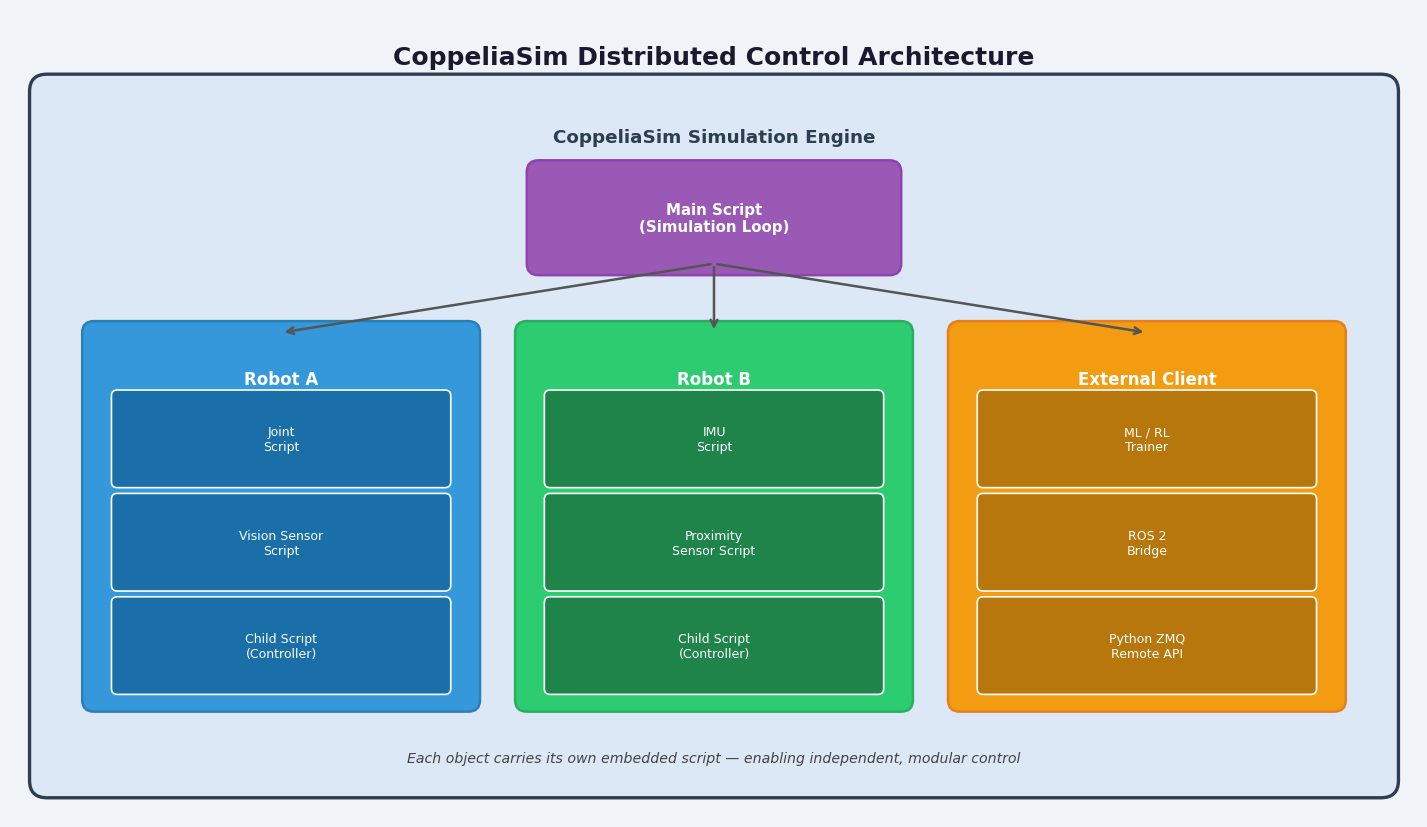
CoppeliaSim (formerly V-REP) is a versatile, cross-platform robot simulator developed by Coppelia Robotics that distinguishes itself through a unique distributed control architecture — every object in the scene can carry its own embedded script, enabling fine-grained, modular simulation logic without a monolithic controller. This article examines CoppeliaSim's scripting model, its Lua and Python remote API, and best practices for building scalable multi-robot simulations.
Distributed Control: The Core Paradigm
Unlike simulators that rely on a single external controller, CoppeliaSim embeds scripts directly into scene objects. There are four script types:
| Script Type | Scope | Typical Use |
|---|---|---|
| Main Script | Entire simulation | Simulation loop orchestration |
| Child Script | Single scene object | Per-robot or per-sensor logic |
| Customization Script | Object (non-threaded) | UI callbacks, property editors |
| Add-on Script | Global (persistent) | Plugin-like background services |
Child scripts run either threaded (blocking, sequential logic) or non-threaded (called every simulation step). For most robot controllers, threaded child scripts are preferred because they allow sim.wait() calls and natural state-machine coding patterns.

-- Threaded child script example: simple P-controller for a joint
function sysCall_threadmain()
    local jointHandle = sim.getObject('/Robot/Joint1')
    local targetPos = math.pi / 4  -- 45 degrees
    while true do
        local currentPos = sim.getJointPosition(jointHandle)
        local error = targetPos - currentPos
        sim.setJointTargetVelocity(jointHandle, error * 2.0)
        sim.switchThread()  -- yield to simulation step
    end
end
This per-object scripting model makes it straightforward to clone a robot model and have each instance run its own independent controller — a significant advantage for swarm and multi-robot scenarios.
Remote API: Python and External Control
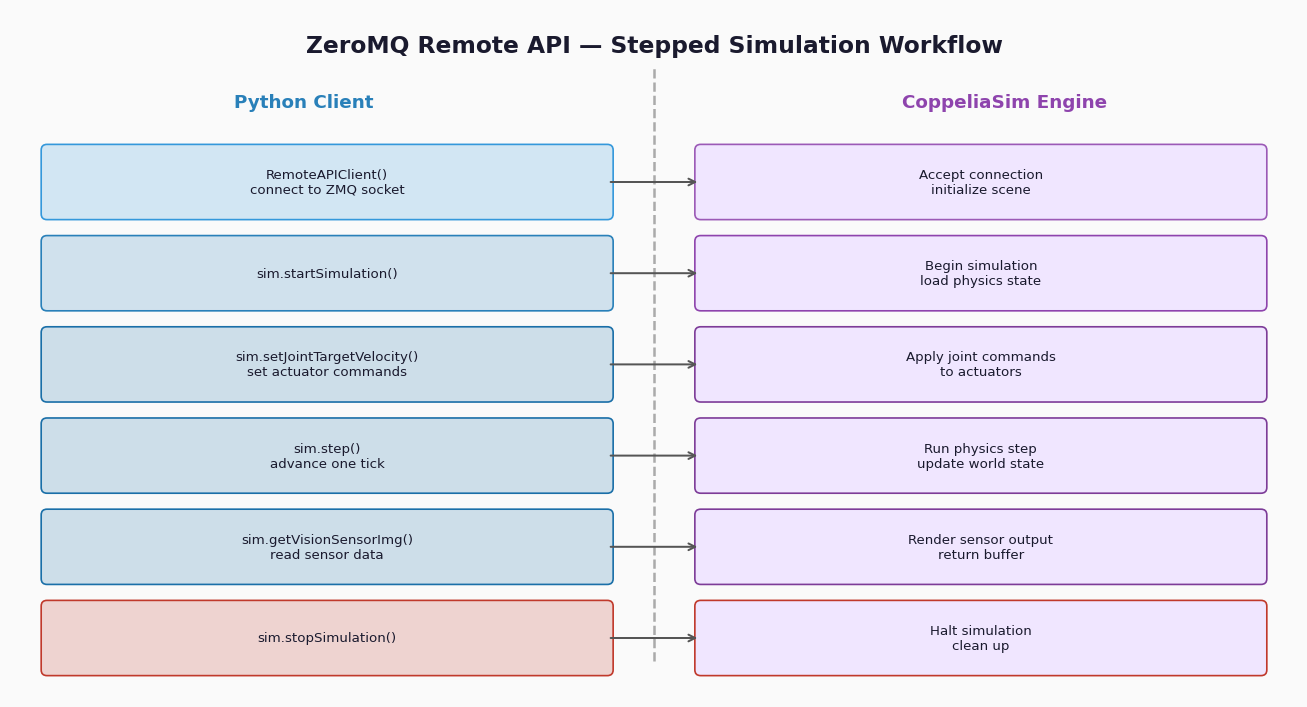
For teams preferring Python or integrating with external frameworks (ROS, ML pipelines), CoppeliaSim exposes a Remote API (legacy B0-based) and the newer ZeroMQ Remote API introduced in CoppeliaSim 4.3+.
ZeroMQ Remote API (Recommended)
The ZMQ API provides a synchronous, request-reply interface over a ZeroMQ socket. It eliminates the polling overhead of the legacy API and supports both blocking and non-blocking calls.
from coppeliasim_zmqremoteapi_client import RemoteAPIClient

client = RemoteAPIClient()
sim = client.require('sim')

sim.startSimulation()

robot_base = sim.getObject('/MobileRobot')
left_motor = sim.getObject('/MobileRobot/LeftMotor')
right_motor = sim.getObject('/MobileRobot/RightMotor')

# Drive forward at 1.5 rad/s for 3 seconds
sim.setJointTargetVelocity(left_motor, 1.5)
sim.setJointTargetVelocity(right_motor, 1.5)
sim.step()  # advance one simulation step

import time
time.sleep(3)

sim.stopSimulation()
Install the client library with:
pip install coppeliasim-zmqremoteapi-clientThe ZMQ API supports stepped simulation — the external client controls when each simulation step advances — which is essential for deterministic reinforcement learning training loops.
Sensor Simulation and Data Retrieval
CoppeliaSim provides built-in models for:
- Proximity sensors (ultrasonic, infrared) — configurable detection volumes
- Vision sensors — RGB, depth, and segmentation outputs
- Force/torque sensors — 6-axis wrench measurement
- IMUs — via the
simIMUplugin
Retrieving vision sensor data in Python:
vision_sensor = sim.getObject('/Robot/VisionSensor')
sim.handleVisionSensor(vision_sensor)

img, resolution = sim.getVisionSensorImg(vision_sensor)
# img is a flat list of RGB bytes; reshape for OpenCV:
import numpy as np, cv2
frame = np.array(img, dtype=np.uint8).reshape(resolution[1], resolution[0], 3)
frame = cv2.flip(frame, 0)  # CoppeliaSim uses bottom-left origin
For depth data, set the sensor to depth map mode and call sim.getVisionSensorDepth() — the returned buffer maps directly to a NumPy float32 array suitable for point-cloud generation.
Multi-Robot Simulation Best Practices
1. Use Model Files (.ttm) for Reusable Robots
Save each robot as a .ttm (scene model) file. Load instances programmatically:
robot_handle = sim.loadModel('/path/to/mobile_robot.ttm')
sim.setObjectPosition(robot_handle, -1, [x, y, 0.1])
This pattern supports spawning dozens of robot instances without manual scene editing.
2. Leverage Simulation Time, Not Wall-Clock Time
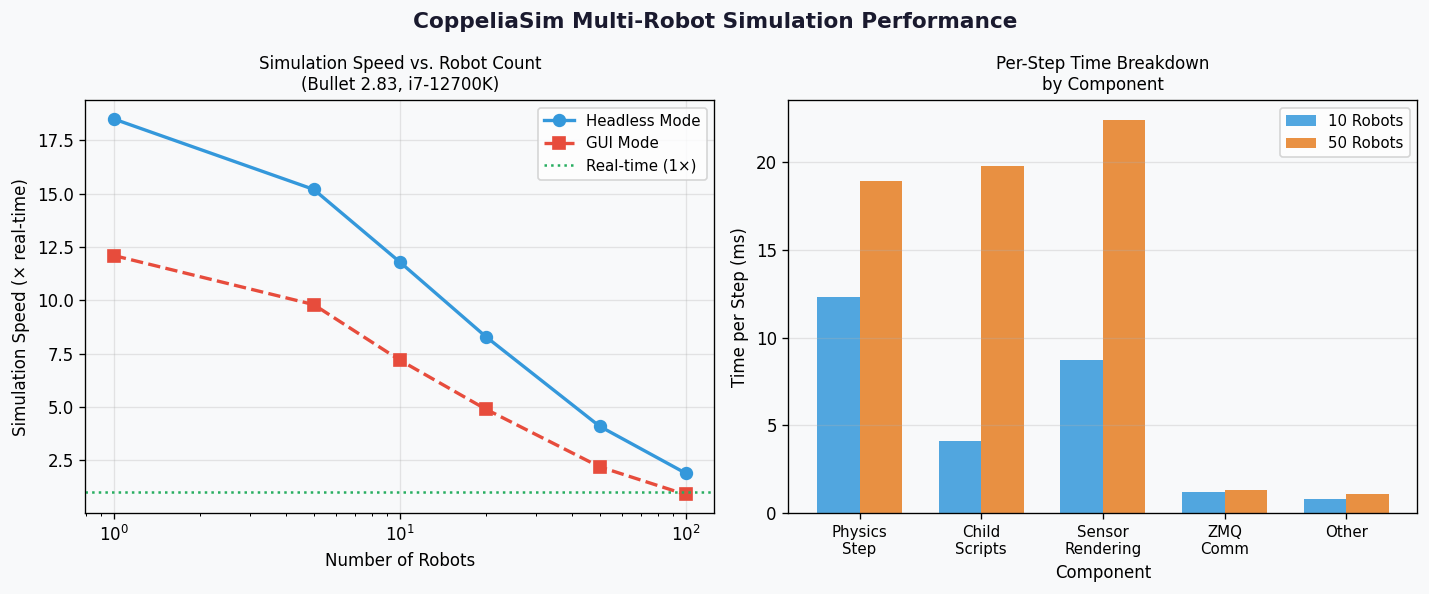
Always use sim.getSimulationTime() for timing logic inside scripts. CoppeliaSim can run faster-than-real-time (up to 10× in headless mode), so wall-clock time.sleep() calls will desynchronize with the simulation.
3. Headless Mode for Batch Experiments
Launch CoppeliaSim without a GUI for CI pipelines or parameter sweeps:
coppeliaSim -h -s5000 -q /path/to/scene.tttFlags: -h (headless), -s5000 (stop after 5000 ms sim time), -q (quit on stop).
4. ROS 2 Integration via simROS2 Plugin
The simROS2 plugin bridges CoppeliaSim topics and services to ROS 2. Enable it in userconfigFile.txt and use sim.ros2.createPublisher() / sim.ros2.createSubscription() from within child scripts to publish sensor data and receive velocity commands — no external bridge node required.
Performance Considerations
| Scenario | Recommended Setting |
|---|---|
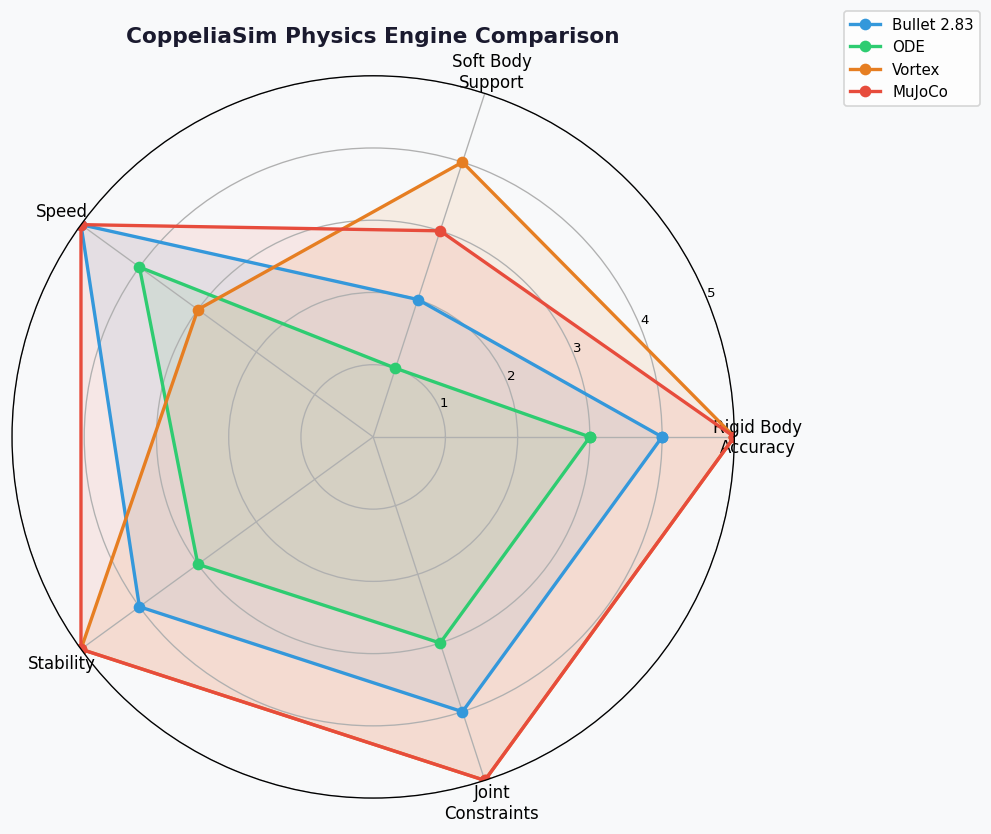
| Many rigid bodies | Enable Bullet 2.83 engine; reduce convex hull resolution |
| Soft-body / cloth | Switch to Vortex or Newton engine |
| Real-time hardware-in-the-loop | Enable real-time simulation mode; pin to a single CPU core |
| RL training (fast rollouts) | Headless + ZMQ stepped mode; disable rendering |
CoppeliaSim's physics engine is selectable per-scene (ODE, Bullet, Vortex, Newton, MuJoCo via plugin), allowing engineers to match the solver to the physical phenomena being modeled.
Comparison with Peer Simulators
| Feature | CoppeliaSim | Gazebo (Classic) | Webots |
|---|---|---|---|
| Embedded scripting | ✅ Per-object | ❌ External plugins | ✅ Per-robot |
| Python remote API | ✅ ZMQ | ✅ (via ROS) | ✅ |
| Physics engine choice | ✅ 5 engines | ✅ 3 engines | ✅ ODE |
| Built-in robot library | ✅ 200+ models | ✅ | ✅ |
| License | Free (Edu) / Commercial | Apache 2.0 | Apache 2.0 |
Getting Started
- Download: https://www.coppeliarobotics.com/downloads — free educational license available
- ZMQ Remote API docs: https://manual.coppeliarobotics.com/en/zmqRemoteApiOverview.htm
- Model library: https://www.coppeliarobotics.com/helpFiles/en/models.htm
- ROS 2 plugin: https://github.com/CoppeliaRobotics/simROS2
- Forum: https://forum.coppeliarobotics.com
CoppeliaSim's distributed scripting model and flexible remote API make it a compelling choice for teams building multi-robot systems, swarm experiments, or reinforcement learning environments where per-agent control granularity and simulation speed are paramount.