
PyBullet: Scriptable Physics Simulation for Robotics Research and Reinforcement Learning
PyBullet: Lightweight Physics Simulation for Robotics and Reinforcement Learning
PyBullet is a Python-accessible physics simulation library built on the Bullet Physics SDK, widely used in robotics research, reinforcement learning (RL) training, and rapid prototyping of manipulation and locomotion controllers. Unlike heavier simulation platforms, PyBullet prioritizes speed and scriptability, making it a go-to choice when researchers need to run thousands of parallel training episodes or iterate quickly on controller designs without the overhead of a full GUI-driven simulator.
Architecture and Core Concepts
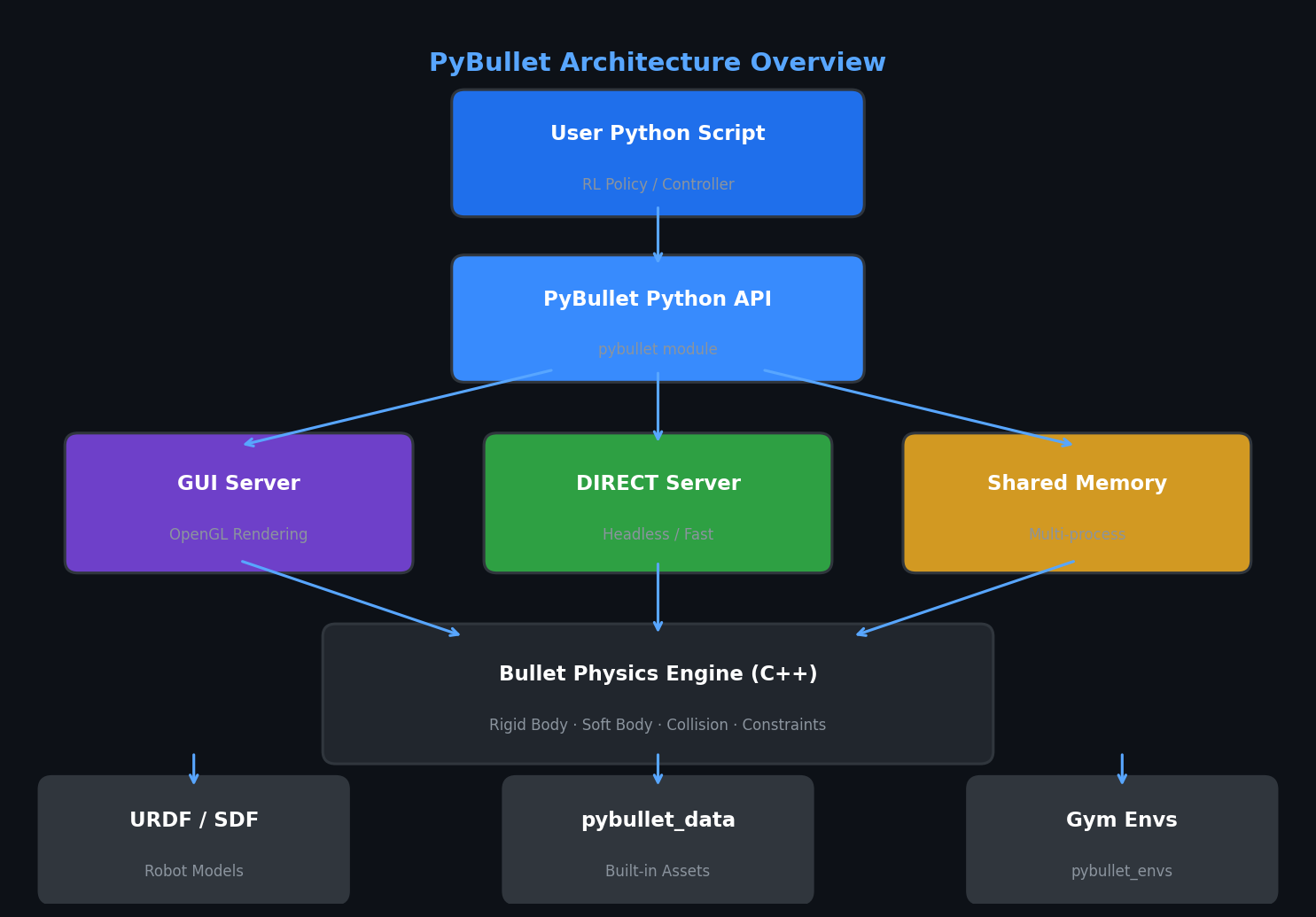
PyBullet exposes the Bullet Physics engine through a clean Python API, enabling direct control over every aspect of the simulation from a script. The library operates in two primary modes:
- GUI mode (
pybullet.GUI): Renders the simulation in an OpenGL window for visual debugging and inspection. - DIRECT mode (
pybullet.DIRECT): Runs headless with no rendering overhead — the preferred mode for RL training loops where throughput matters.
The simulation world is managed through a physics server identified by a physicsClientId. Multiple independent servers can run simultaneously in the same process, enabling parallelized environment rollouts without inter-process communication overhead.

URDF and SDF Loading
PyBullet natively loads robot descriptions in URDF (Unified Robot Description Format) and SDF (Simulation Description Format), the same formats used by ROS and Gazebo. Loading a robot is a single call:
import pybullet as p
import pybullet_data

p.connect(p.DIRECT)
p.setAdditionalSearchPath(pybullet_data.getDataPath())
p.setGravity(0, 0, -9.81)

robot_id = p.loadURDF("kuka_iiwa/model.urdf", basePosition=[0, 0, 0])
plane_id = p.loadURDF("plane.urdf")
The pybullet_data package ships with a curated set of robot URDFs (Kuka IIWA, Franka Panda, Fetch, Minitaur, and others) and environment assets, so researchers can begin experimenting immediately without sourcing external models.
Joint Control and Dynamics
PyBullet supports four joint control modes, each suited to different use cases:
| Control Mode | API Constant | Typical Use |
|---|---|---|
| Position control | POSITION_CONTROL |
Trajectory following, pick-and-place |
| Velocity control | VELOCITY_CONTROL |
Wheeled robots, conveyor systems |
| Torque control | TORQUE_CONTROL |
Impedance control, RL with raw actions |
| PD control | PD_CONTROL |
Legged locomotion, compliant manipulation |
For reinforcement learning, torque control is most common because it exposes the raw action space to the policy network. Switching to torque mode requires disabling the default velocity motor first:
num_joints = p.getNumJoints(robot_id)
for j in range(num_joints):
    p.setJointMotorControl2(robot_id, j,
                            controlMode=p.VELOCITY_CONTROL,
                            force=0)  # disable default motor

# Now apply torques from RL policy
p.setJointMotorControlArray(robot_id,
                             jointIndices=list(range(num_joints)),
                             controlMode=p.TORQUE_CONTROL,
                             forces=policy_output)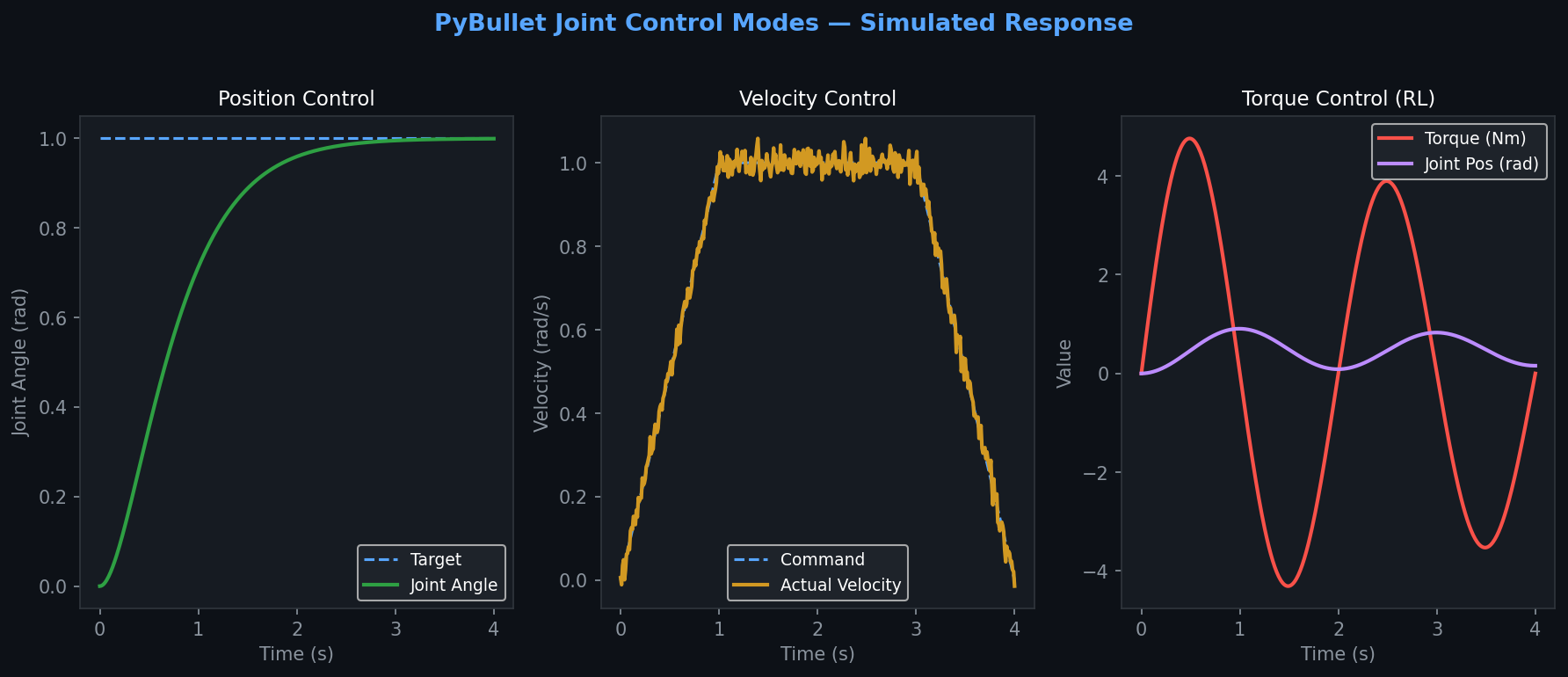
Collision Detection and Contact Queries
One of PyBullet's strengths is its rich contact query API. After each simulation step, engineers can retrieve detailed contact information — contact points, normal forces, friction forces, and penetration depths — enabling reward shaping based on physical contact:
p.stepSimulation()
contacts = p.getContactPoints(bodyA=robot_id, bodyB=object_id)
for c in contacts:
    normal_force = c[9]
    contact_position = c[5]
This is particularly valuable for dexterous manipulation tasks where grasp quality metrics depend on contact geometry and force distribution.
Camera and Sensor Simulation
PyBullet provides a programmable virtual camera through getCameraImage(), returning RGB, depth, and segmentation mask arrays. This enables training vision-based policies directly in simulation:
width, height = 224, 224
view_matrix = p.computeViewMatrix(
    cameraEyePosition=[0.5, 0, 0.5],
    cameraTargetPosition=[0, 0, 0],
    cameraUpVector=[0, 1, 0]
)
proj_matrix = p.computeProjectionMatrixFOV(
    fov=60, aspect=1.0, nearVal=0.01, farVal=10.0
)
_, _, rgb, depth, seg = p.getCameraImage(width, height, view_matrix, proj_matrix)
Depth images can be converted to point clouds for 6-DoF pose estimation pipelines, and segmentation masks allow object-centric observation spaces without requiring a separate perception stack.
Integration with OpenAI Gym and Stable-Baselines3
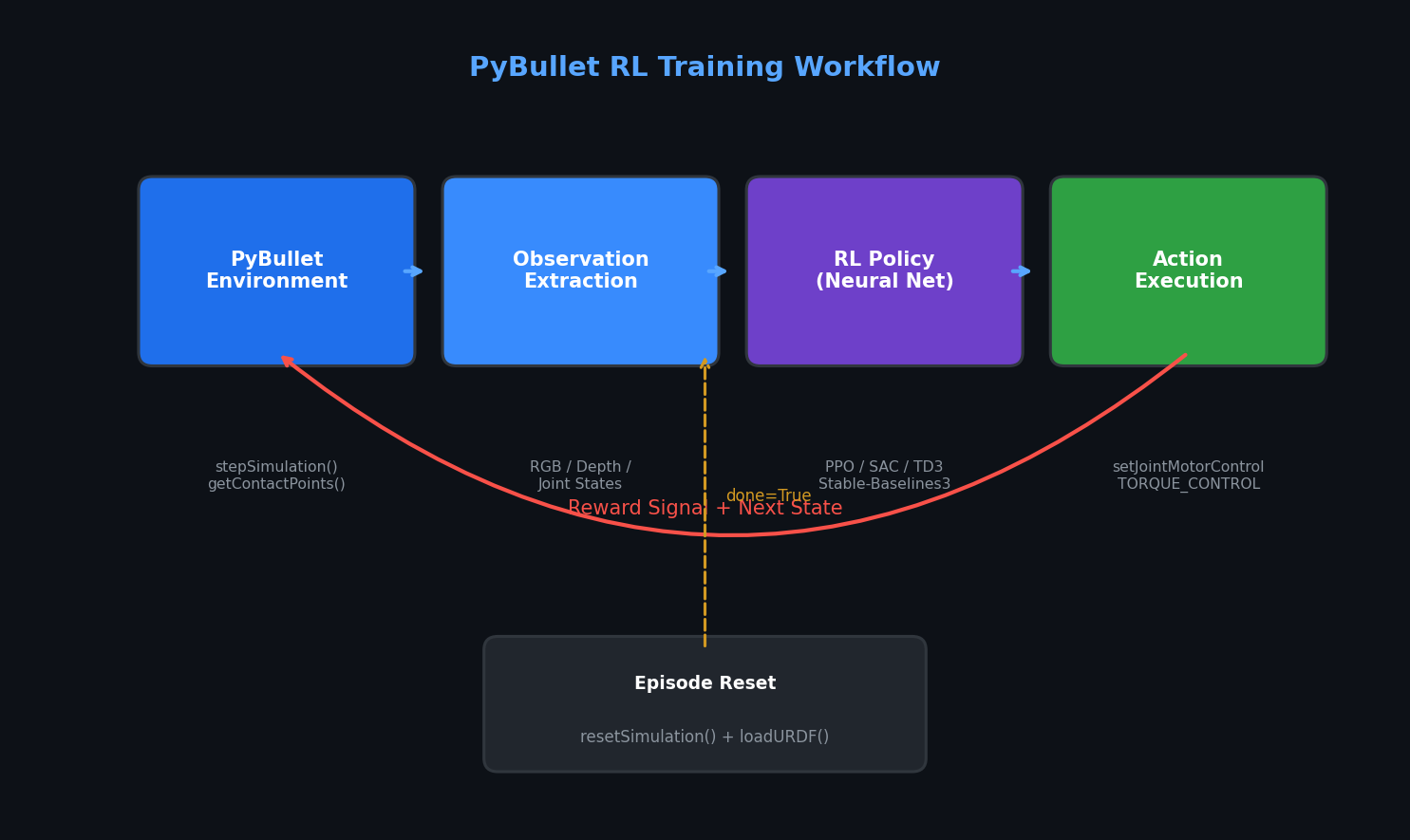
The pybullet_envs package wraps many standard PyBullet environments as OpenAI Gym-compatible interfaces, enabling drop-in use with popular RL frameworks:
import gym
import pybullet_envs  # registers environments

env = gym.make("KukaBulletEnv-v0")
obs = env.reset()
For custom environments, the standard pattern is to subclass gym.Env, implement reset() and step(), and call p.stepSimulation() internally. This integrates seamlessly with Stable-Baselines3, RLlib, and CleanRL for training PPO, SAC, or TD3 policies.
Performance Considerations and Best Practices
Simulation timestep: The default timestep is 1/240 s. For locomotion tasks, 1/500 s improves stability of contact dynamics. For manipulation with rigid objects, 1/240 s is generally sufficient.
Substeps: Use p.setPhysicsEngineParameter(numSubSteps=4) to improve contact resolution without reducing the control frequency seen by the policy.
Determinism: PyBullet is deterministic given the same seed and timestep. Set p.resetSimulation() between episodes and reload assets to guarantee reproducibility across training runs.
Parallel environments: For large-scale RL, spawn multiple pybullet.DIRECT servers in separate processes using Python's multiprocessing module or a vectorized environment wrapper. Each server is independent and thread-safe.
Limitations and When to Choose Alternatives
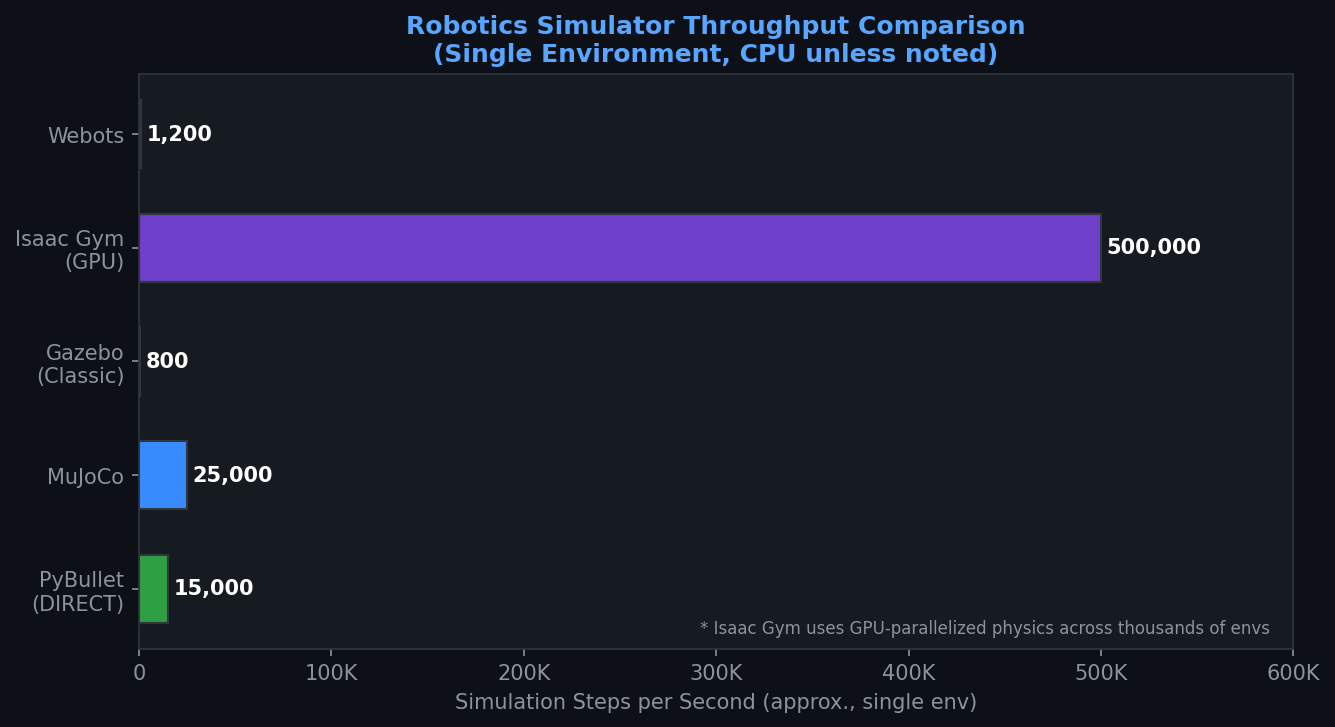
PyBullet's physics fidelity is adequate for most manipulation and locomotion research but falls short of production-grade simulators in specific areas:
- Soft-body simulation is limited; consider MuJoCo or SOFA for deformable objects.
- Photorealistic rendering is not available; use Isaac Sim or Gazebo with Ignition for sim-to-real transfer requiring visual realism.
- Large-scale multi-robot scenarios with hundreds of agents benefit from Isaac Gym's GPU-parallelized physics.
For rapid prototyping, RL research, and educational robotics, PyBullet remains one of the most accessible and productive simulation environments available.
Further Resources
- PyBullet Quickstart Guide — the official reference manual
- pybullet_envs GitHub — standard Gym environments
- Bullet Physics SDK — underlying C++ engine source
- Stable-Baselines3 Documentation — RL training framework compatible with PyBullet environments