
OpenMole: Scalable Model Exploration and Calibration for Agent-Based Social Simulations
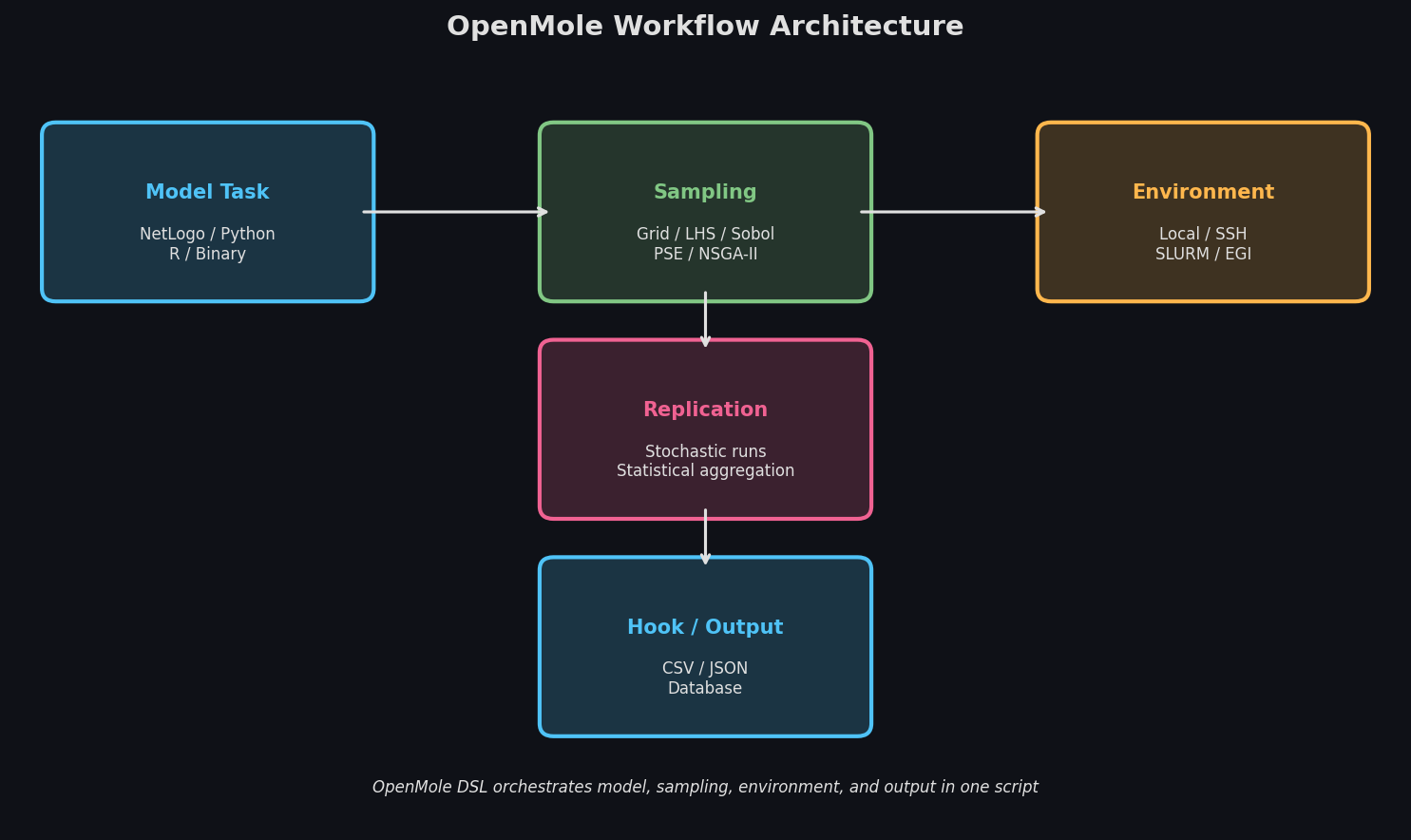
Agent-based models (ABMs) of social systems are notoriously difficult to validate. A model of opinion polarization, residential segregation, or organizational diffusion may behave very differently across its parameter space — and the only way to understand that behavior is systematic exploration. OpenMole (Open MOdeL Experiment) is an open-source scientific workflow platform purpose-built for exactly this task: running large-scale parameter sweeps, sensitivity analyses, and evolutionary calibrations of any simulation model, on any computing infrastructure, without rewriting the model itself.
What OpenMole Does Differently
Most ABM platforms (NetLogo, Mesa, Repast) focus on building and running individual simulations. OpenMole sits one layer above: it wraps your existing model — regardless of language or platform — and orchestrates thousands to millions of runs across distributed computing resources. The key design principle is model-agnosticism: OpenMole communicates with models through a standardized task interface, so a NetLogo model, a Python script, or a compiled C++ binary are all treated identically.
This separation of concerns is powerful. Modelers can develop and test their ABM in their preferred environment, then hand it to OpenMole for exploration without any code changes.

Core Workflow: The DSL and Task System
OpenMole uses a Scala-based domain-specific language (DSL) to define exploration workflows. A typical workflow has three components:
- Task — wraps the model execution (e.g.,
NetLogoTask,PythonTask,SystemExecTask) - Sampling — defines how the parameter space is explored (grid, Latin hypercube, Sobol sequence, evolutionary algorithm)
- Environment — specifies where runs execute (local, SSH cluster, EGI grid, Slurm HPC)
A minimal example for a NetLogo opinion-dynamics model might look like:
val epsilon = Val[Double]   // bounded-confidence threshold
val mu      = Val[Double]   // convergence speed
val clusters = Val[Int]     // output: number of opinion clusters

val model = NetLogoTask(workDirectory / "opinion_model.nlogo", "run-simulation") set (
  inputs  += (epsilon, mu),
  outputs += clusters
)

val exploration = DirectSampling(
  evaluation = model on LocalEnvironment(4),
  sampling   = (epsilon in (0.1 to 0.5 by 0.05)) x (mu in (0.1 to 0.5 by 0.05))
)

exploration hook CSVHook(workDirectory / "results.csv")
This launches 100 runs in parallel on 4 local cores and writes results to CSV — with no changes to the NetLogo model itself.
Sensitivity Analysis: Beyond Simple Sweeps
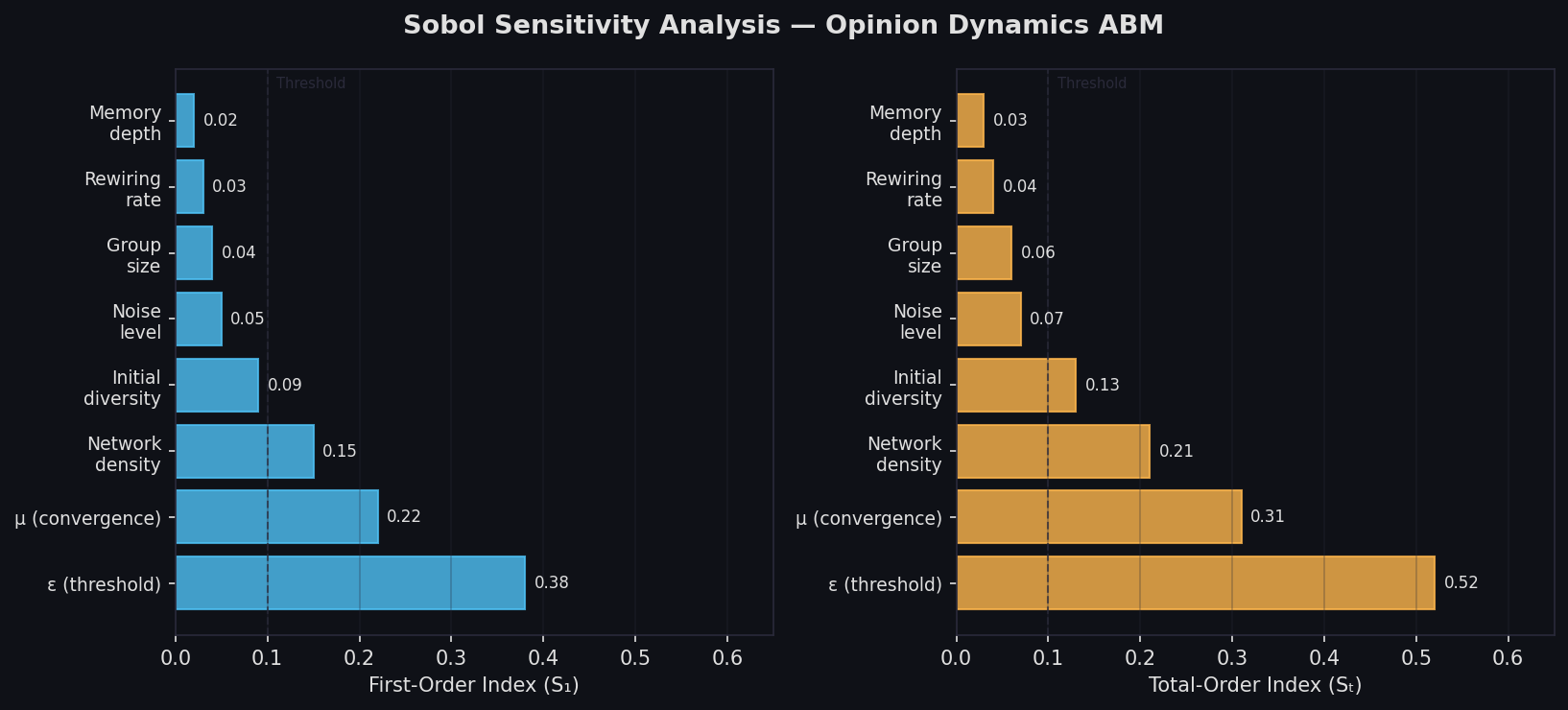
For social ABMs with many parameters, exhaustive grid sweeps are computationally infeasible. OpenMole provides first-class support for Saltelli-Sobol sensitivity analysis, which estimates how much variance in model output is attributable to each input parameter and to parameter interactions.
The SensitivitySaltelli method in OpenMole generates the required quasi-random sample sequences automatically, runs the model, and computes first-order and total-order Sobol indices. For a model of organizational knowledge diffusion with eight parameters (network density, learning rate, forgetting rate, hierarchy depth, etc.), this can identify which two or three parameters actually drive output variance — dramatically focusing subsequent calibration effort.
Evolutionary Calibration with PSE and NSGA-II
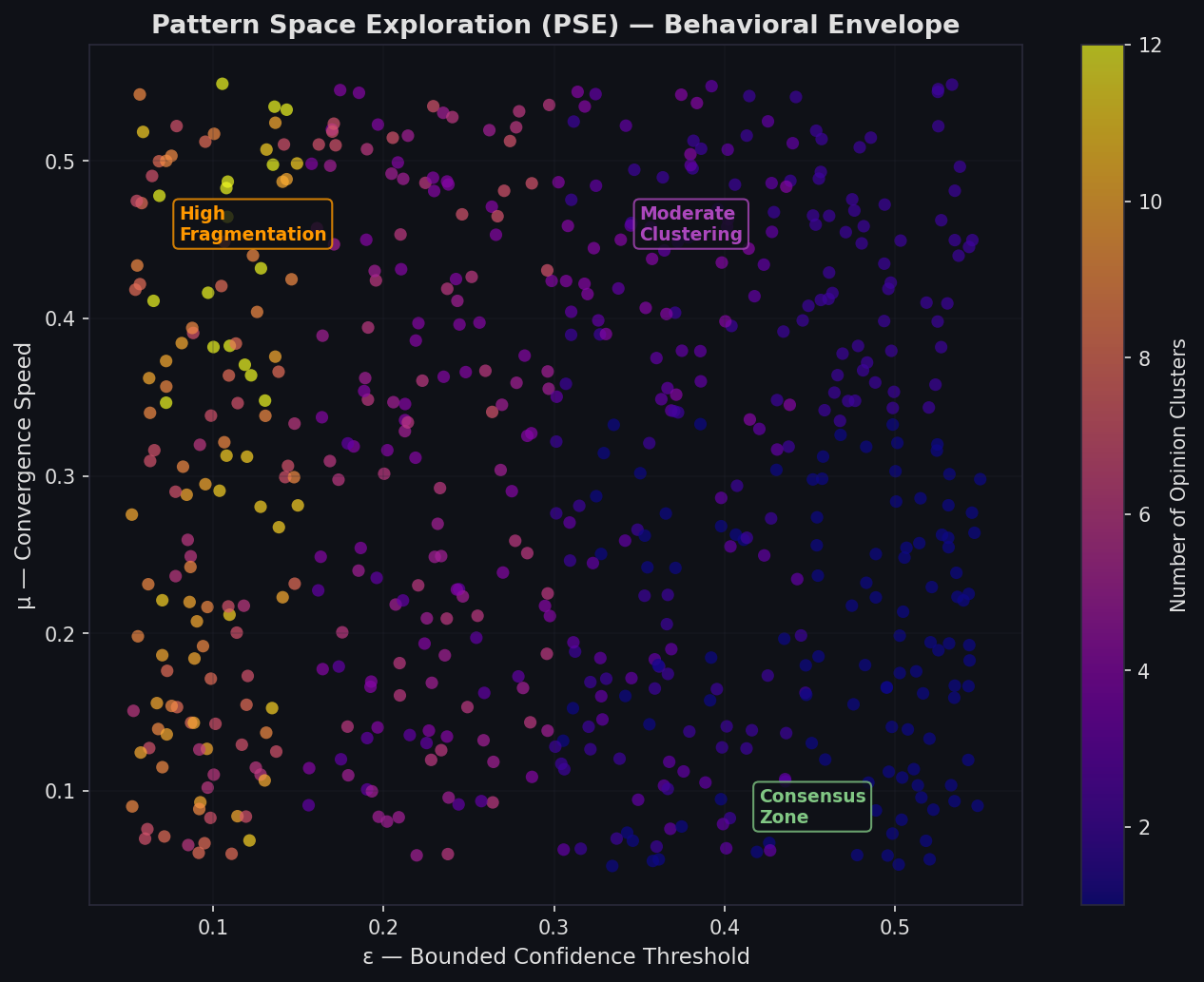
OpenMole's most distinctive capability is Pattern Space Exploration (PSE), an evolutionary algorithm designed specifically for ABMs. Unlike traditional calibration (which minimizes distance to a single target), PSE searches for the diversity of behaviors a model can produce. It maps the full behavioral envelope of the model — revealing which parameter combinations produce segregation, which produce integration, which produce oscillation.
For social system modelers, PSE answers the question: "What is this model capable of?" before asking "What parameters match my empirical data?"
For empirical calibration, OpenMole also supports NSGA-II multi-objective optimization. Given observed data (e.g., empirical opinion survey distributions), NSGA-II finds Pareto-optimal parameter sets that simultaneously minimize multiple error metrics. This is essential when no single parameter set perfectly reproduces all observed statistics.
Computing Environments: From Laptop to Grid
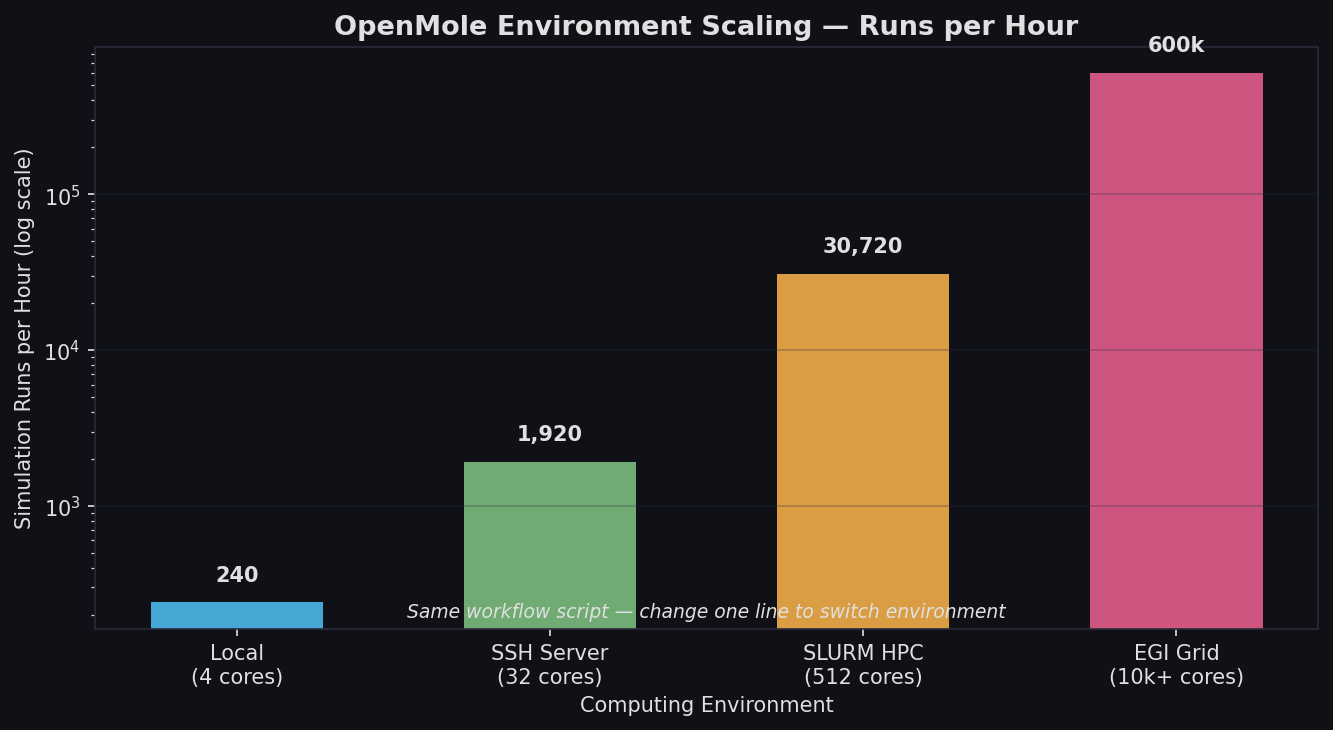
OpenMole's environment abstraction means the same workflow script runs on:
- LocalEnvironment — developer laptop, using all available cores
- SSHEnvironment — remote server via SSH, with automatic file transfer
- SLURMEnvironment / PBSEnvironment — HPC clusters with job schedulers
- EGIEnvironment — the European Grid Infrastructure (hundreds of thousands of cores)
Switching from local testing to HPC deployment requires changing one line in the workflow script. OpenMole handles job submission, file staging, result collection, and fault tolerance automatically.
Practical Considerations for Social ABM Researchers
Stochastic replication: Social ABMs are typically stochastic. OpenMole's Replication combinator wraps any sampling method to run each parameter combination multiple times and aggregate statistics (mean, standard deviation, quantiles) before returning results.
Model containers: For Python or R models with complex dependencies, OpenMole supports Singularity/Apptainer containers, ensuring reproducible execution across different computing environments.
GUI vs. script: OpenMole provides a browser-based GUI (the OpenMole application) for interactive workflow construction and monitoring, alongside the DSL for scripted, version-controlled workflows. Both access the same underlying engine.
Output analysis: Results are written to CSV or JSON files compatible with standard analysis tools (R, Python/pandas, Julia). OpenMole does not impose a proprietary analysis format.
When to Use OpenMole
OpenMole is the right tool when:
- Your ABM has more than 3–4 parameters and you need to understand the full parameter space
- You need to calibrate against empirical data with multiple competing objectives
- You want to run thousands of replications for robust statistical inference
- You have access to HPC or grid computing and want to use it without writing job scripts
It is less appropriate for real-time interactive exploration (use BehaviorSpace or Mesa's batch runner) or for models that cannot be wrapped as command-line executables.
Getting Started
OpenMole is freely available at openmole.org. The platform runs as a local web application — download, unzip, and launch with a single command. Extensive documentation covers NetLogo, Python, R, and binary model integration. The community forum at community.openmole.org is active and responsive.
For social system modelers who have built an ABM and now face the challenge of understanding it, OpenMole provides a principled, scalable path from model construction to validated insight.
Further Reading
- Reuillon, R., Leclaire, M., & Rey-Coyrehourcq, S. (2013). OpenMOLE, a workflow engine specifically tailored for the distributed exploration of simulation models. Future Generation Computer Systems, 29(8), 1981–1990.
- Saltelli, A. et al. (2010). Variance based sensitivity analysis of model output. Design and estimator for the total sensitivity index. Computer Physics Communications, 181(2), 259–270.
- Schmitt, C. et al. (2015). Half a billion simulations: Evolutionary algorithms and distributed computing for calibrating the SimpopLocal geographical model. Environment and Planning B, 42(2), 300–315.