

Webots: Open-Source Robot Simulation with Cross-Platform Physics and Sensor Fidelity
Webots is a free, open-source robot simulator developed and maintained by Cyberbotics. Originally created at EPFL (École Polytechnique Fédérale de Lausanne) and now widely adopted in both academia and industry, Webots provides a complete development environment for modeling, programming, and simulating robots. Unlike many commercial alternatives, Webots ships with a built-in physics engine, a rich sensor library, and support for multiple programming languages—making it a compelling choice for engineers who need rapid prototyping without licensing overhead.
Why Webots Stands Apart
The existing robotics simulation landscape already includes Gazebo (tightly coupled to ROS), MoveIt (focused on manipulator motion planning), and RViz (a visualization layer rather than a full simulator). Webots occupies a distinct niche: it is a self-contained simulation environment that does not require ROS to function, yet integrates cleanly with ROS 2 when needed. This makes it particularly valuable for teams working on embedded controllers, educational curricula, or cross-platform CI pipelines where a full ROS stack would be excessive.
Core Architecture
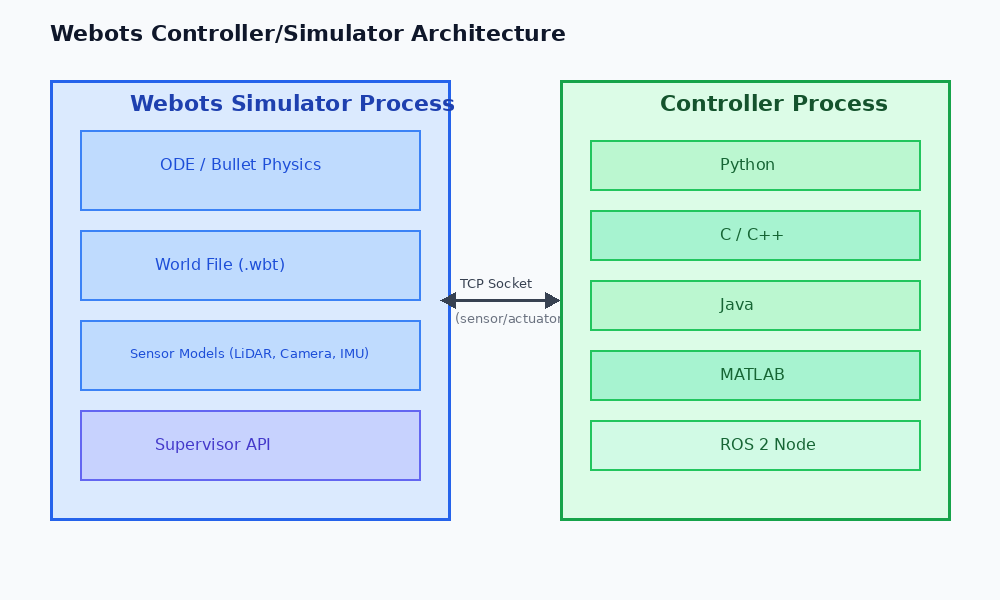
Webots organizes a simulation around a world file (.wbt), a scene-graph-based description of the environment, robots, and objects. Each robot node contains:

- Physics body – mass, inertia tensor, and contact properties handled by the ODE (Open Dynamics Engine) or optionally Bullet physics backend.
- Device nodes – cameras, LiDARs, IMUs, GPS, distance sensors, force/torque sensors, and motors, each exposing a consistent C API.
- Controller – an external process (C, C++, Python, Java, MATLAB, or ROS 2 node) that reads sensor data and writes actuator commands via a local TCP socket.
The controller/simulator split means you can swap controllers without recompiling the world, and you can run hardware-in-the-loop tests by replacing the simulated controller with a real embedded binary.
Physics Fidelity and Sensor Modeling
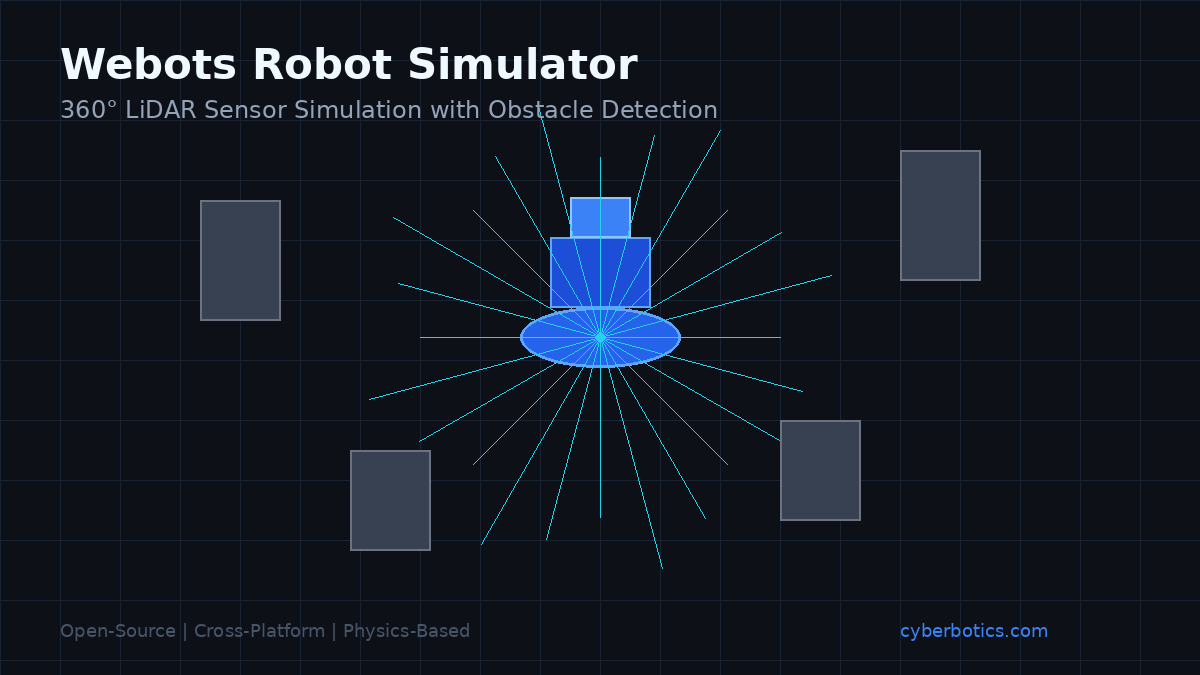
One of Webots' strengths is its per-device noise and latency modeling. A simulated LiDAR, for example, can be configured with:
lidar {
  horizontalResolution 512
  fieldOfView 6.28318  # 360 degrees
  numberOfLayers 16
  maxRange 100
  noise 0.01           # Gaussian noise std-dev in meters
}
This level of parameterization lets engineers characterize sensor behavior that closely mirrors datasheets for real hardware (e.g., Velodyne VLP-16, Intel RealSense D435). The result is that perception algorithms—point-cloud filtering, SLAM, object detection—can be validated in simulation before being deployed on physical hardware, reducing costly field-testing cycles.
ROS 2 Integration via the webots_ros2 Package
For teams already invested in the ROS 2 ecosystem, the official webots_ros2 package bridges Webots controllers to ROS 2 topics, services, and actions. A single launch file can spin up a Webots world alongside a ROS 2 node graph:
from launch import LaunchDescription
from webots_ros2_driver.webots_launcher import WebotsLauncher

def generate_launch_description():
    webots = WebotsLauncher(world='my_robot.wbt')
    return LaunchDescription([webots])
Sensor data is automatically published to standard ROS 2 message types (sensor_msgs/LaserScan, sensor_msgs/Image, nav_msgs/Odometry), so existing ROS 2 navigation stacks (Nav2) and perception pipelines integrate without modification.
Benchmarking Controller Performance with Webots' Supervisor API
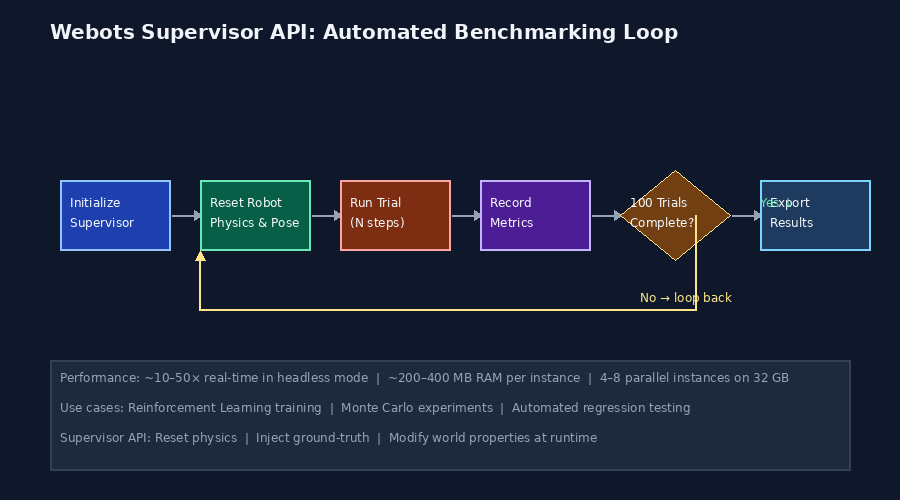
A less-known but powerful feature is the Supervisor API, which grants a privileged controller direct access to the simulation state—bypassing the physics engine's normal sensor abstraction. Engineers use the Supervisor to:
- Reset robot pose programmatically between test runs, enabling automated Monte Carlo experiments.
- Inject ground-truth data (exact position, velocity) for algorithm benchmarking without sensor noise.
- Modify world properties at runtime (e.g., change friction coefficients, spawn/remove obstacles) to stress-test adaptive controllers.
A typical benchmarking loop in Python:
from controller import Supervisor

robot = Supervisor()
timestep = int(robot.getBasicTimeStep())
robot_node = robot.getSelf()

for trial in range(100):
    robot_node.resetPhysics()
    robot_node.getField('translation').setSFVec3f([0, 0, 0.1])
    # run trial ...
This pattern is invaluable for reinforcement learning workflows where thousands of episodes must be executed reproducibly.
Performance Considerations
Webots runs in real-time by default but supports fast simulation mode (no rendering, maximum CPU speed), which is essential for RL training. On a modern 8-core workstation, Webots can achieve approximately 10–50× real-time speedup in headless mode depending on scene complexity. For distributed training, multiple Webots instances can be launched on separate ports, each controlled by an independent RL agent process.
Memory footprint is modest: a typical mobile robot world with 10 sensors consumes roughly 200–400 MB of RAM, making it feasible to run 4–8 parallel instances on a 32 GB machine.
Best Practices for Production-Grade Simulations
- Version-control your
.wbtfiles alongside your controller source. Webots world files are plain text and diff cleanly in Git. - Use PROTO nodes to encapsulate reusable robot definitions. A PROTO file defines a parameterized robot template (wheel radius, sensor placement) that can be instantiated multiple times with different configurations.
- Validate physics parameters against real hardware by running a simple drop test: simulate a known object falling under gravity and compare the simulated contact time to a physical measurement. Discrepancies reveal misconfigured mass or restitution coefficients.
- Profile controller step time to ensure it stays within the simulation timestep (typically 32 ms). Overrunning the timestep causes the simulation to slow below real-time, invalidating timing-sensitive control loops.
Further Resources
- Webots Official Documentation – comprehensive reference for all nodes, APIs, and tutorials.
- webots_ros2 GitHub Repository – ROS 2 integration package with example launch files.
- Webots Discord Community – active community for troubleshooting and sharing custom PROTO nodes.
- Cyberbotics YouTube Channel – video tutorials covering installation, sensor configuration, and ROS 2 integration.
Webots' combination of zero licensing cost, cross-platform support (Windows, macOS, Linux), and deep sensor/physics configurability makes it a strong candidate for any robotics team evaluating simulation infrastructure. Its Supervisor API and headless fast-simulation mode in particular set it apart for teams building automated testing pipelines or training reinforcement learning agents at scale.