
CAPE-OPEN Middleware: Integrating Third-Party Unit Operation Models into Process Simulators
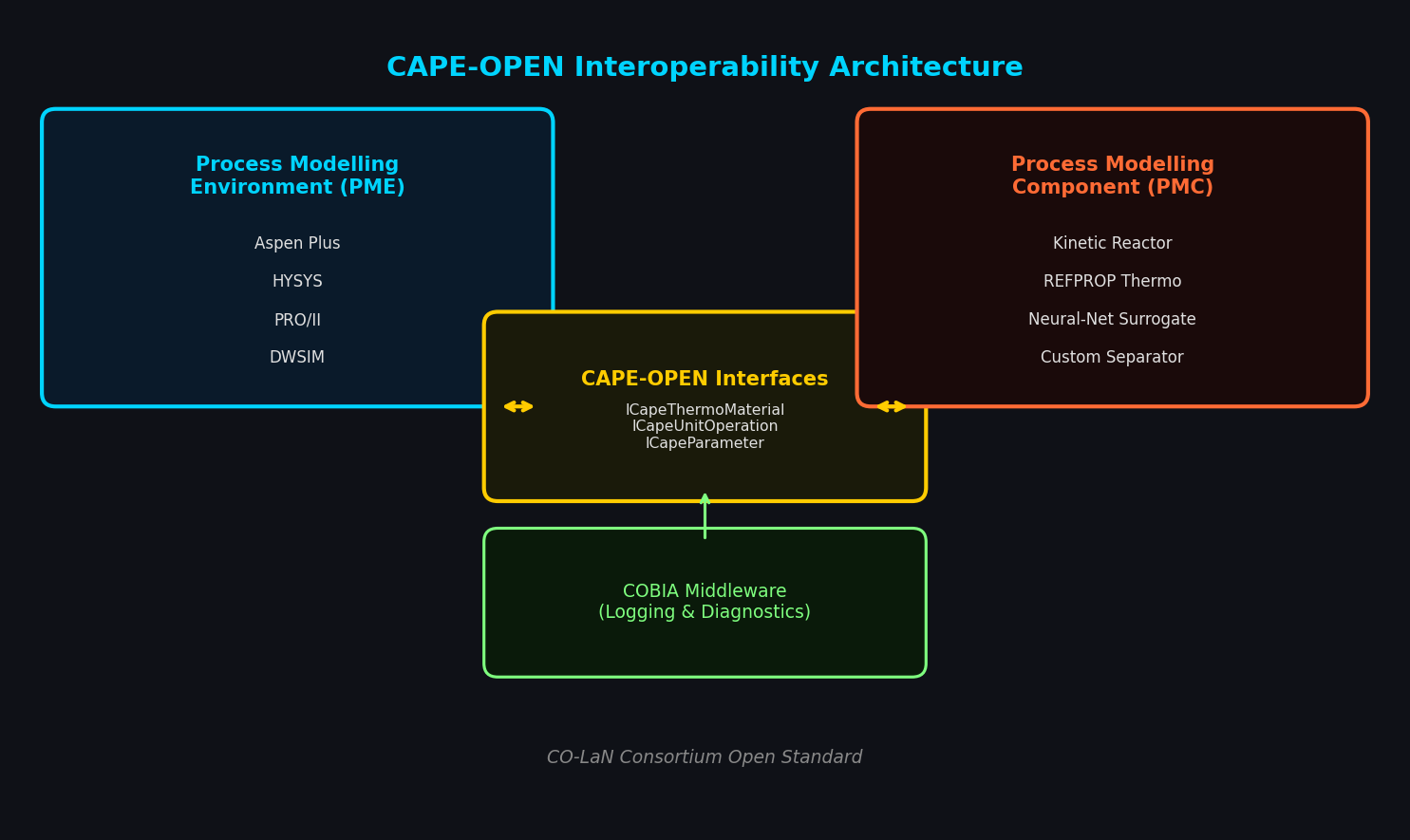
Process simulation workflows in the chemical and petrochemical industries rarely rely on a single vendor's toolset. Reaction kinetics may be best captured by a specialized kinetic solver, while thermodynamic property packages, custom column internals, or proprietary reactor models live in separate codebases. The CAPE-OPEN (CO) standard — developed by the CO-LaN consortium — provides the interoperability layer that lets these components plug into any compliant simulator without rewriting a line of solver code.
What CAPE-OPEN Actually Does
CAPE-OPEN defines a set of COM/CORBA interface specifications that govern how a Process Modelling Component (PMC) — a unit operation, thermodynamic package, or numerical solver — communicates with a Process Modelling Environment (PME) such as Aspen Plus, HYSYS, PRO/II, or DWSIM. The standard covers:
- Thermodynamic and Physical Properties (CAPE-OPEN Thermo 1.1): Standardized calls for phase equilibrium, enthalpy, entropy, and transport properties. A PME can swap its native property package for a third-party engine (e.g., NIST REFPROP, Multiflash, or an in-house cubic EOS) without modifying the flowsheet.
- Unit Operations (CAPE-OPEN Unit Operation 1.0/1.1): Defines how a custom reactor, separator, or heat exchanger exposes its ports, parameters, and
Calculate()method to the host simulator. - Numerical Solvers: Allows external equation-oriented solvers to drive convergence loops inside a sequential-modular PME.
The practical result: a kinetic reactor model written in Python or C++ can appear as a native block inside Aspen Plus, receive stream compositions from the simulator's tear-stream convergence, and return updated outlet conditions — all through standardized interface calls.

Setting Up a CAPE-OPEN Unit Operation in Aspen Plus
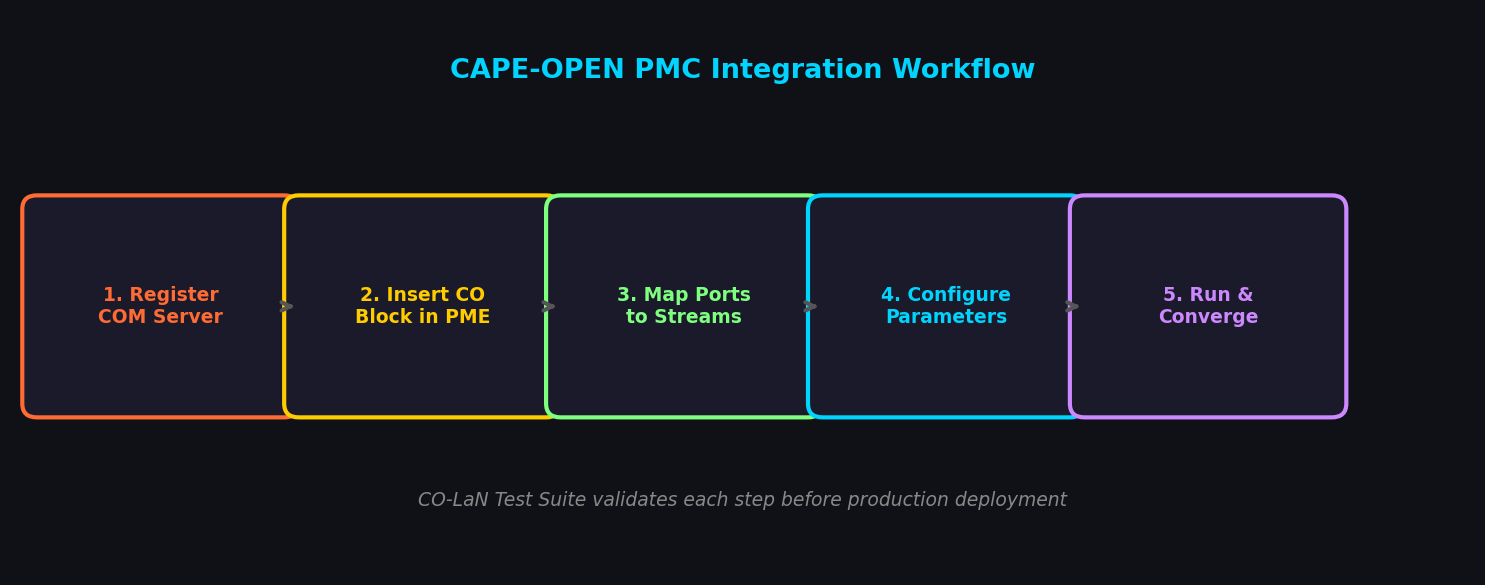
The workflow for integrating a custom CO unit operation follows a consistent pattern regardless of the host simulator:
-
Register the COM server. The PMC DLL (or Python wrapper via
pythoncom) must be registered in the Windows registry so the PME can discover it. Useregsvr32for native DLLs or the CO-LaNCapeOpenManagerutility for managed components. -
Insert a CAPE-OPEN block. In Aspen Plus, drag a CAPE-OPEN block from the Model Palette onto the flowsheet. In the block's Setup sheet, select the registered PMC from the dropdown. The PME queries the PMC's
ICapeIdentificationinterface to retrieve its name, description, and version. -
Map ports to streams. The PMC declares inlet and outlet
ICapeCollectionport objects. The PME maps these to flowsheet streams, passing composition, temperature, pressure, and flow viaICapeThermoMaterialcalls. -
Configure parameters. PMC parameters exposed through
ICapeParameterappear in the block's parameter sheet. Sensitivity analyses and optimization runs in the PME can vary these parameters just like native block inputs. -
Convergence. During simulation, the PME calls
PMC.Calculate(). The PMC retrieves feed conditions, runs its internal model (kinetic ODE, CFD surrogate, neural-network proxy, etc.), and writes outlet conditions back to the material object. The PME then continues its tear-stream convergence loop.
Thermodynamic Package Interoperability
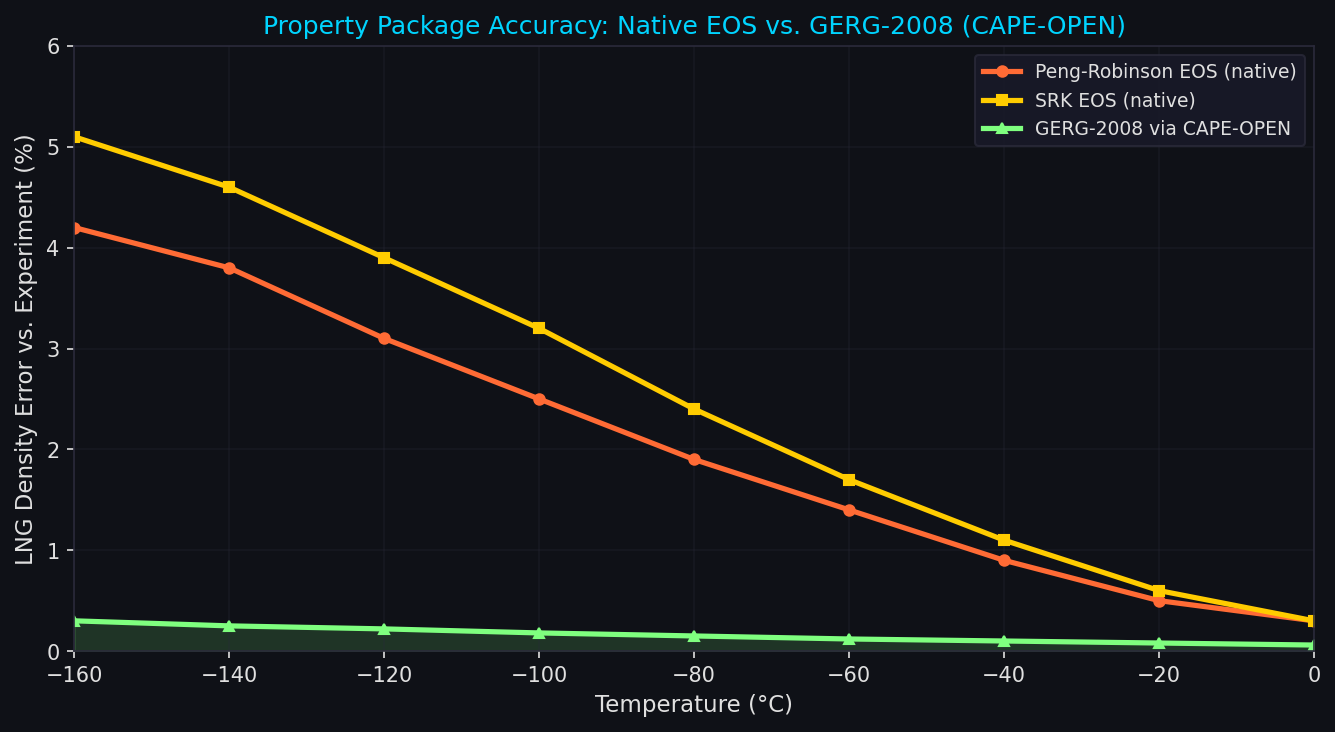
One of the most impactful CAPE-OPEN use cases is property package substitution. Consider a natural gas liquefaction flowsheet in HYSYS where the default Peng-Robinson EOS underestimates liquid densities at cryogenic conditions. By connecting a CAPE-OPEN–compliant GERG-2008 property package (available from NIST or commercial vendors), engineers can:
- Retain the full HYSYS flowsheet, heat-exchanger sizing, and compressor curves.
- Replace only the thermodynamic calls with GERG-2008 multi-fluid equations.
- Validate the improvement by comparing predicted vs. measured LNG densities without rebuilding the model.
The ICapeThermoPropertyRoutine interface handles single-phase property calls, while ICapeThermoEquilibrium manages flash calculations. Both are invoked transparently by the PME's stream objects.
Debugging and Diagnostics
CAPE-OPEN integrations introduce an additional failure mode: interface mismatches between PMC and PME versions. Practical debugging strategies include:
- CO-LaN COBIA middleware: The open-source COBIA (CAPE-OPEN Binary Interoperability Architecture) layer provides detailed logging of every interface call, making it straightforward to identify which
ICapeThermoMaterialgetter returned an unexpectedECapeUnknownexception. - Unit test harness: The CO-LaN Test Suite allows a PMC to be exercised against a reference PME stub before deployment, catching port-mapping errors and parameter-type mismatches early.
- Version pinning: Always declare the CAPE-OPEN version your PMC targets (
CAPE-OPEN 1.1vs.1.0) in theICapeIdentification.ComponentDescriptionfield. PMEs use this to select the correct interface variant.
Performance Considerations
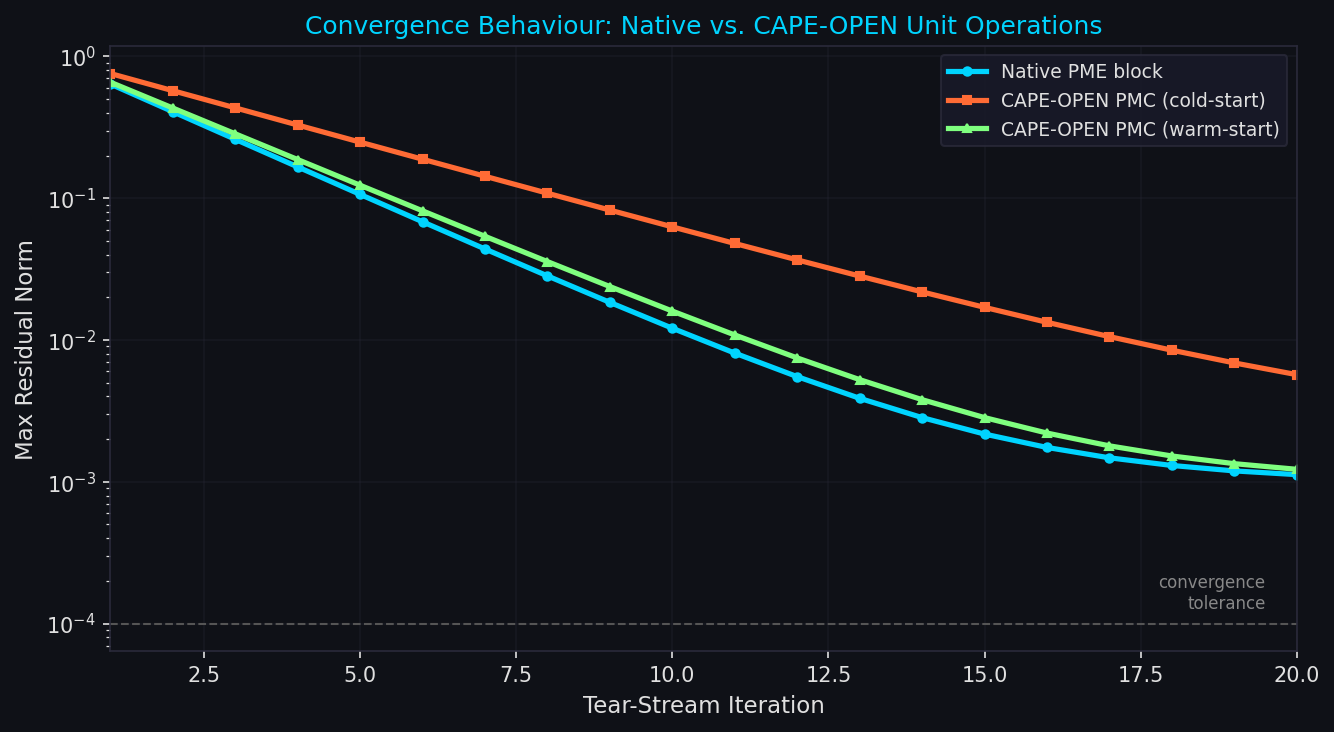
Sequential-modular PMEs call PMC.Calculate() once per convergence iteration. For computationally expensive PMCs (CFD-based reactors, detailed kinetic networks with hundreds of species), this can dominate simulation time. Mitigation strategies:
- Surrogate models: Train a polynomial chaos expansion or Gaussian process on the PMC's input-output space and expose the surrogate as the CAPE-OPEN block. Aspen Plus's built-in ACM (Aspen Custom Modeler) supports this pattern.
- Warm-starting: Cache the previous iteration's solution as the initial guess inside the PMC, reducing ODE integration steps.
- Parallel tear-stream convergence: Some PMEs (gPROMS, Aspen Plus with EO mode) can evaluate multiple PMC instances simultaneously when flowsheet topology permits.
Practical Applications
| Application | PMC Type | Host PME |
|---|---|---|
| Detailed kinetic reactor (e.g., steam reformer with 50+ species) | Unit Operation | Aspen Plus / HYSYS |
| GERG-2008 / REFPROP property package | Thermo Package | PRO/II, DWSIM |
| Neural-network distillation tray model | Unit Operation | CHEMCAD |
| Custom relief-valve sizing (API 520) | Unit Operation | AVEVA Process Simulation |
| Electrolyte thermodynamics (OLI engine) | Thermo Package | Aspen Plus |
Getting Started
The CO-LaN consortium maintains the CAPE-OPEN specification documents and a reference implementation library under open-source licenses. The COBIA middleware and the CO-LaN Test Suite are freely downloadable. For Python-based PMCs, the capeopen PyPI package provides COM wrapper classes that handle IDispatch marshalling, letting engineers write unit operations in pure Python and register them as COM servers with minimal boilerplate.
CAPE-OPEN interoperability is not a niche concern — it is the mechanism by which specialized simulation IP developed in academia, national laboratories, and engineering firms reaches production flowsheets without vendor lock-in. Mastering the standard is a high-leverage skill for any process simulation engineer working across tool boundaries.
Further Reading
- CO-LaN CAPE-OPEN Standards — official specification documents
- COBIA Open-Source Middleware — logging, diagnostics, and interoperability layer
- NIST REFPROP CAPE-OPEN Interface — reference property package
- OLI Systems CAPE-OPEN Electrolyte Engine — electrolyte thermodynamics integration
- Aspen Technology CAPE-OPEN Support — PMC integration guide for Aspen Plus and HYSYS