

EnergyPlus: Building Energy Simulation for Demand Response and Grid-Interactive Building Design
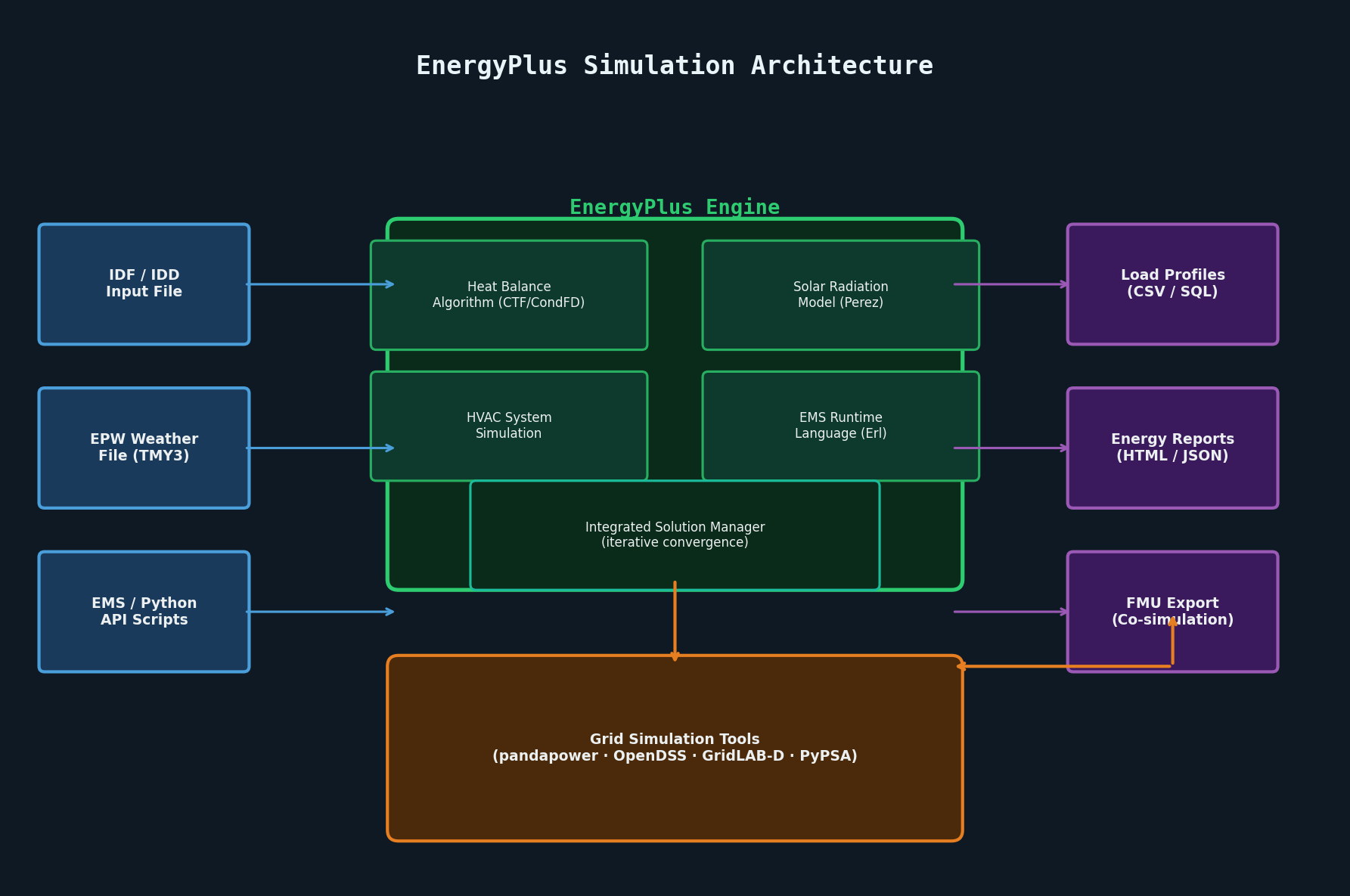
EnergyPlus: Advanced Building Energy Simulation for Load Forecasting and Grid Interaction Studies
EnergyPlus, developed and maintained by the U.S. Department of Energy (DOE), is the industry-standard whole-building energy simulation engine used by engineers, researchers, and utilities to model the thermal and electrical behavior of buildings with high fidelity. Unlike simplified degree-day or bin-hour methods, EnergyPlus performs sub-hourly time-step simulation of heat transfer, HVAC system dynamics, lighting, plug loads, and on-site generation — making it an essential tool for demand-side management studies, grid-interactive efficient building (GEB) design, and utility load forecasting.
Why EnergyPlus Matters for Power System Engineers
Buildings account for roughly 40% of total energy consumption in most developed economies, and their electrical demand profiles directly shape grid dispatch requirements. EnergyPlus bridges the gap between building physics and power systems analysis by producing high-resolution load profiles that can feed directly into grid simulation tools such as pandapower, OpenDSS, or GridLAB-D.
Key use cases include:

- Peak demand characterization for distribution feeder planning
- Demand response (DR) potential assessment — quantifying how much load can be shed or shifted during grid stress events
- Grid-interactive efficient building (GEB) control — co-simulating building HVAC with grid price signals
- Distributed energy resource (DER) sizing — evaluating rooftop PV, battery storage, and combined heat-and-power (CHP) systems in the context of actual building loads
Core Simulation Architecture
EnergyPlus uses a heat balance algorithm as its thermal engine. Every surface in the building model participates in a simultaneous heat balance that accounts for:
- Conduction through opaque constructions via the Conduction Transfer Function (CTF) or Conduction Finite Difference (CondFD) method
- Solar radiation — direct, diffuse, and reflected — computed using the Perez sky model
- Long-wave radiation exchange between interior surfaces using a gray-body radiation network
- Convective heat transfer with user-selectable correlations (TARP, DOE-2, MoWiTT, etc.)
The HVAC simulation runs on a separate, shorter time step (typically 1–6 minutes) and is coupled to the thermal zone model through an integrated solution manager that iterates until convergence. This split time-step approach allows accurate modeling of fast-responding systems like variable refrigerant flow (VRF) units and chilled-beam terminals without sacrificing simulation speed.
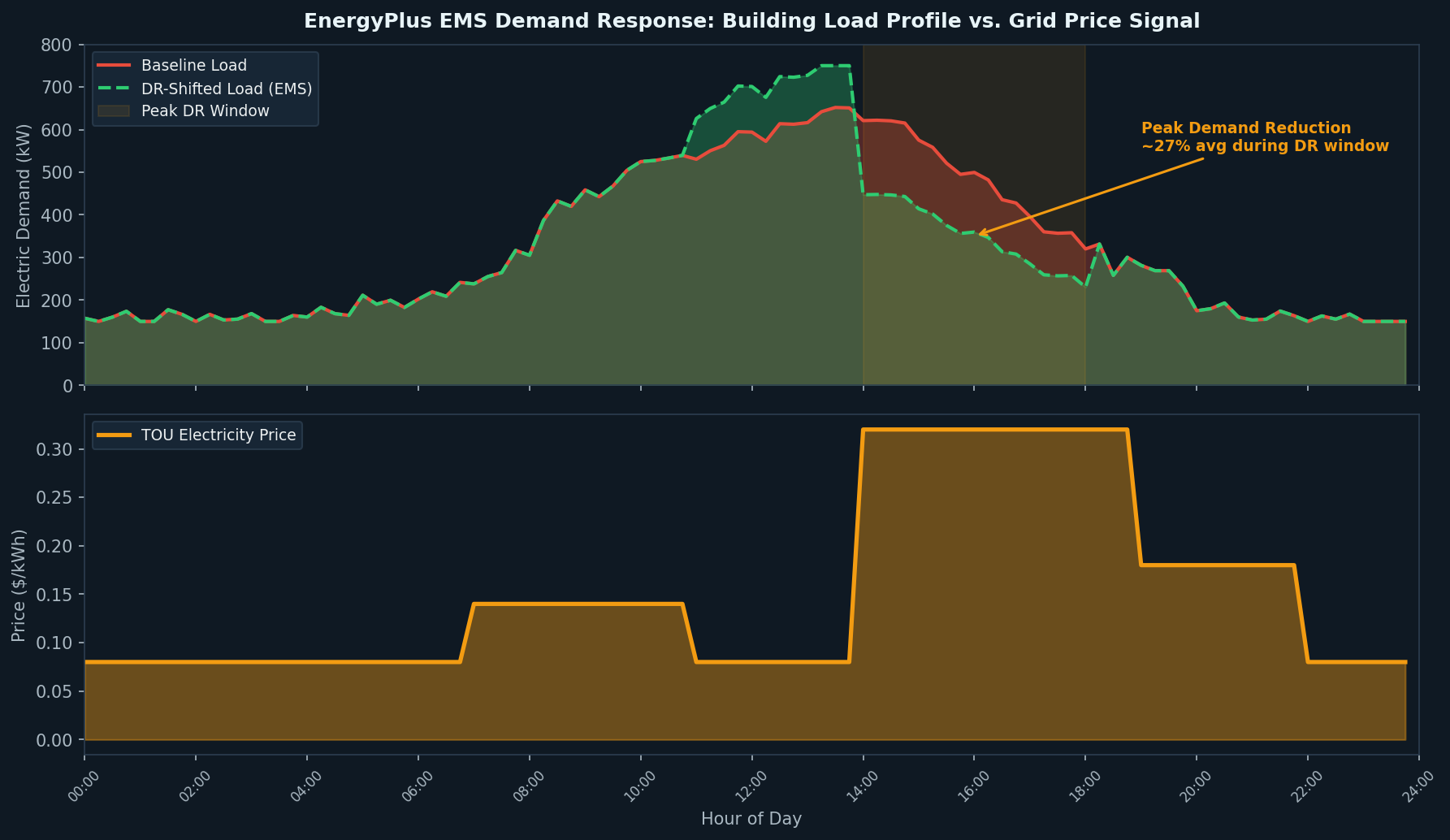
EnergyManagementSystem (EMS): Scripting Custom Control Logic
One of EnergyPlus's most powerful — and underutilized — features is the EnergyManagementSystem (EMS), a built-in scripting environment based on a simple interpreted language called EnergyPlus Runtime Language (Erl). EMS allows engineers to implement custom control sequences that override default HVAC operation, enabling:
- Demand-limiting setpoint resets: Automatically raise cooling setpoints when building demand exceeds a threshold, simulating a utility DR event
- Pre-cooling strategies: Shift thermal mass charging to off-peak hours to reduce on-peak demand
- Battery dispatch logic: Implement time-of-use (TOU) arbitrage or peak shaving algorithms for on-site storage
- Fault injection: Simulate sensor drift, stuck dampers, or degraded chiller performance for fault detection and diagnostics (FDD) research
A typical EMS program consists of Sensors (reading simulation variables), Actuators (overriding component setpoints or schedules), and Programs (Erl scripts executed at defined calling points such as BeginTimestepBeforePredictor or InsideHVACSystemIterationLoop).
EnergyManagementSystem:Sensor,
  ZoneCoolingLoad,          ! Name
  Zone1,                    ! Output:Variable or Output:Meter Index Key Name
  Zone Predicted Sensible Load to Cooling Setpoint Heat Transfer Rate;

EnergyManagementSystem:Actuator,
  CoolingSetpointActuator,  ! Name
  Zone1 Thermostat,         ! Component Type
  Zone Temperature Control, ! Control Type
  Cooling Setpoint;         ! Actuated Component Control Type

EnergyManagementSystem:Program,
  DemandLimitingProgram,
  IF ZoneCoolingLoad > 50000,
    SET CoolingSetpointActuator = 26.0,  ! Raise setpoint to 26°C
  ELSE,
    SET CoolingSetpointActuator = 24.0,
  ENDIF;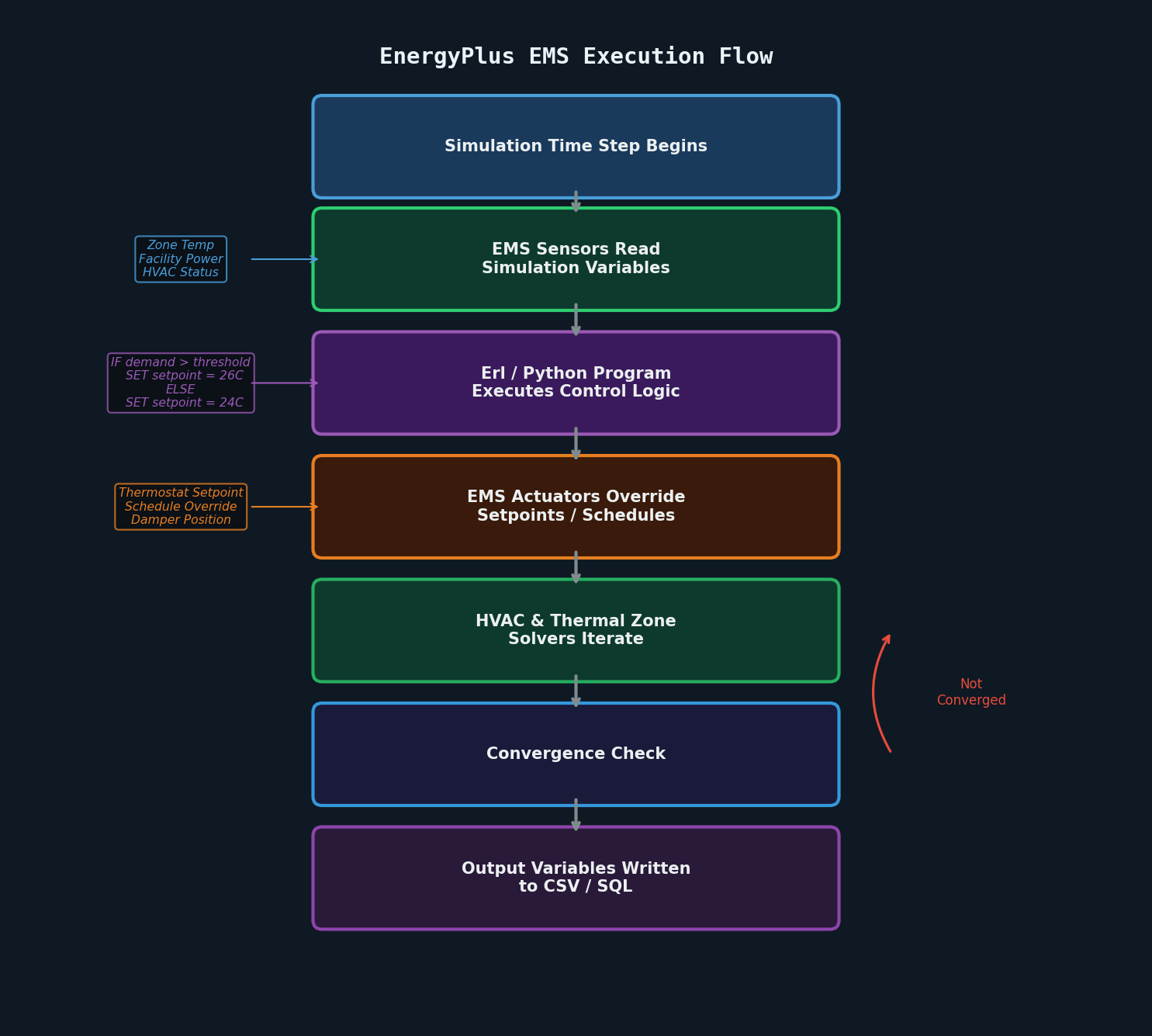
Python API and Co-Simulation with OpenStudio
EnergyPlus 9.3+ introduced a Python API (pyenergyplus) that exposes the full EMS callback system to Python scripts, enabling far more sophisticated control logic than Erl alone can provide. Engineers can now implement model predictive control (MPC), reinforcement learning agents, or real-time optimization routines that interact with the simulation at every time step.
For larger workflows, OpenStudio provides a Ruby/Python SDK and a graphical interface that wraps EnergyPlus, enabling:
- Parametric analysis via the OpenStudio Analysis Framework (OSAF)
- Measure-based model transformation (e.g., applying an ECM to hundreds of prototype buildings)
- Integration with URBANopt for district-scale energy modeling
The Functional Mock-up Interface (FMI/FMU) export capability allows EnergyPlus models to be embedded as co-simulation components in tools like Modelica/OpenModelica or MATLAB/Simulink, enabling true multi-domain building-grid co-simulation.
Practical Workflow: Generating Load Profiles for Grid Studies
A typical workflow for producing distribution-level load profiles proceeds as follows:
- Build or obtain a prototype model — DOE provides 16 commercial prototype building models and residential reference models in EnergyPlus IDF format, covering climate zones 1–8
- Assign a TMY3/TMY weather file matching the study location
- Run baseline simulation and export
Output:VariableforFacility Total Purchased Electric Powerat a 15-minute interval - Apply DR or GEB scenarios via EMS or schedule overrides
- Export the load profile as a CSV and import into the grid simulation tool
For fleet-level studies (e.g., all commercial buildings on a feeder), the ResStock and ComStock datasets from NREL provide statistically representative building stock models that can be run in batch using the OpenStudio-HPXML workflow or the EnergyPlus command-line interface.
Performance and Scalability
A single EnergyPlus simulation of a medium-sized commercial building (50,000 ft²) with a 6-minute HVAC time step typically completes an annual simulation in 30–120 seconds on a modern workstation. For large parametric studies, simulations are embarrassingly parallel and can be distributed across HPC clusters or cloud instances using tools like OpenStudio-PAT (Parametric Analysis Tool) or custom Python orchestration with subprocess and concurrent.futures.
Key Resources
- EnergyPlus Documentation and Downloads — official DOE site with IDD reference, input-output reference, and engineering reference
- OpenStudio SDK — higher-level modeling and analysis framework
- NREL ResStock / ComStock — large-scale building stock datasets
- EnergyPlus GitHub Repository — source code, issue tracker, and release notes
- Building Energy Codes Program — ASHRAE 90.1 and IECC compliance simulation guidance
Conclusion
EnergyPlus occupies a unique position in the energy simulation ecosystem: it provides the physical rigor needed to accurately characterize building electrical demand while offering the scripting and co-simulation interfaces required to integrate building models into broader grid and energy system studies. For power system engineers working on distribution planning, demand response program design, or grid-interactive building research, mastering EnergyPlus — particularly its EMS and Python API — is an increasingly valuable skill as buildings become active participants in grid operations.