

SIMDIS: NRL''s Track Visualization and Analysis Platform for Defense Simulation Environments
SIMDIS: NRL's Track Visualization and Analysis Platform for Defense Simulation Environments
Overview
SIMDIS (Simulation Data Interchange Standard) is a free, government-developed 3D visualization and analysis tool produced by the U.S. Naval Research Laboratory (NRL). Originally designed to support Navy test and evaluation programs, SIMDIS has grown into a widely adopted platform across all U.S. military services and allied defense organizations for visualizing, replaying, and analyzing track data from live exercises, hardware-in-the-loop (HIL) simulations, and constructive simulation environments.
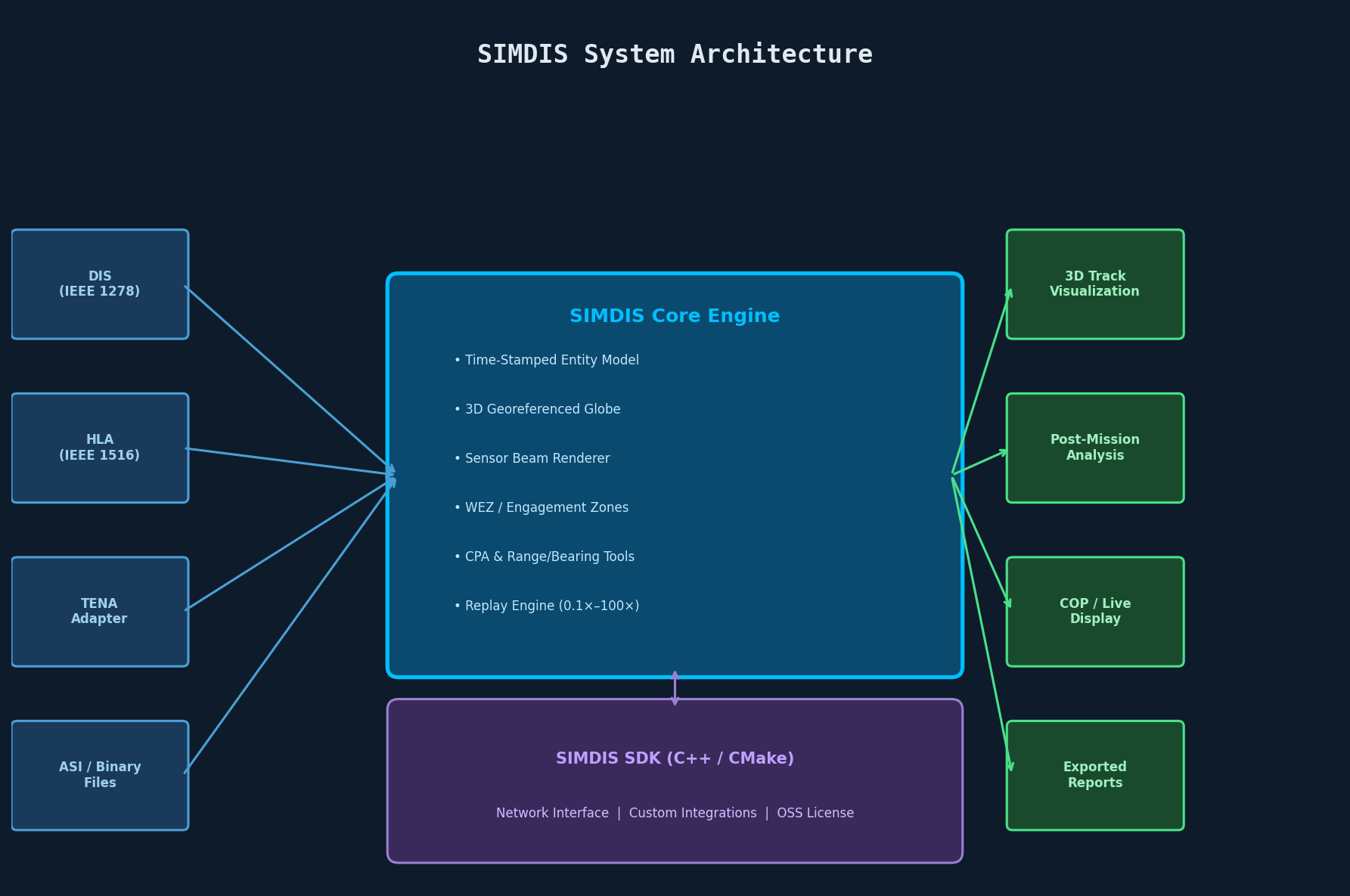
Unlike general-purpose GIS tools or commercial flight visualization packages, SIMDIS is purpose-built for the defense simulation domain. It natively ingests track data from distributed simulation protocols—DIS (Distributed Interactive Simulation), HLA (High Level Architecture), and TENA (Test and Training Enabling Architecture)—and renders entity tracks, sensor beams, weapon engagement zones, and communication links in a georeferenced 3D environment.

Core Architecture and Data Model
SIMDIS operates on a time-stamped entity model. Every platform (aircraft, ship, missile, ground vehicle, or space asset) is represented as an entity with:
- Position and orientation (latitude, longitude, altitude, roll, pitch, yaw) at each time step
- Sensor beams (radar, sonar, EO/IR) with configurable cone geometry and coverage arcs
- Data tables attached to each entity for custom telemetry (e.g., fuel state, RCS, signal strength)
- Gates and range rings for depicting detection envelopes and engagement zones
The SIMDIS SDK (available separately under a government open-source license) exposes a C++ API that allows developers to embed SIMDIS rendering capabilities directly into simulation frameworks or inject live data streams into a running SIMDIS instance via its network interface.
Key Capabilities for Defense Engineers
1. Multi-Source Track Fusion
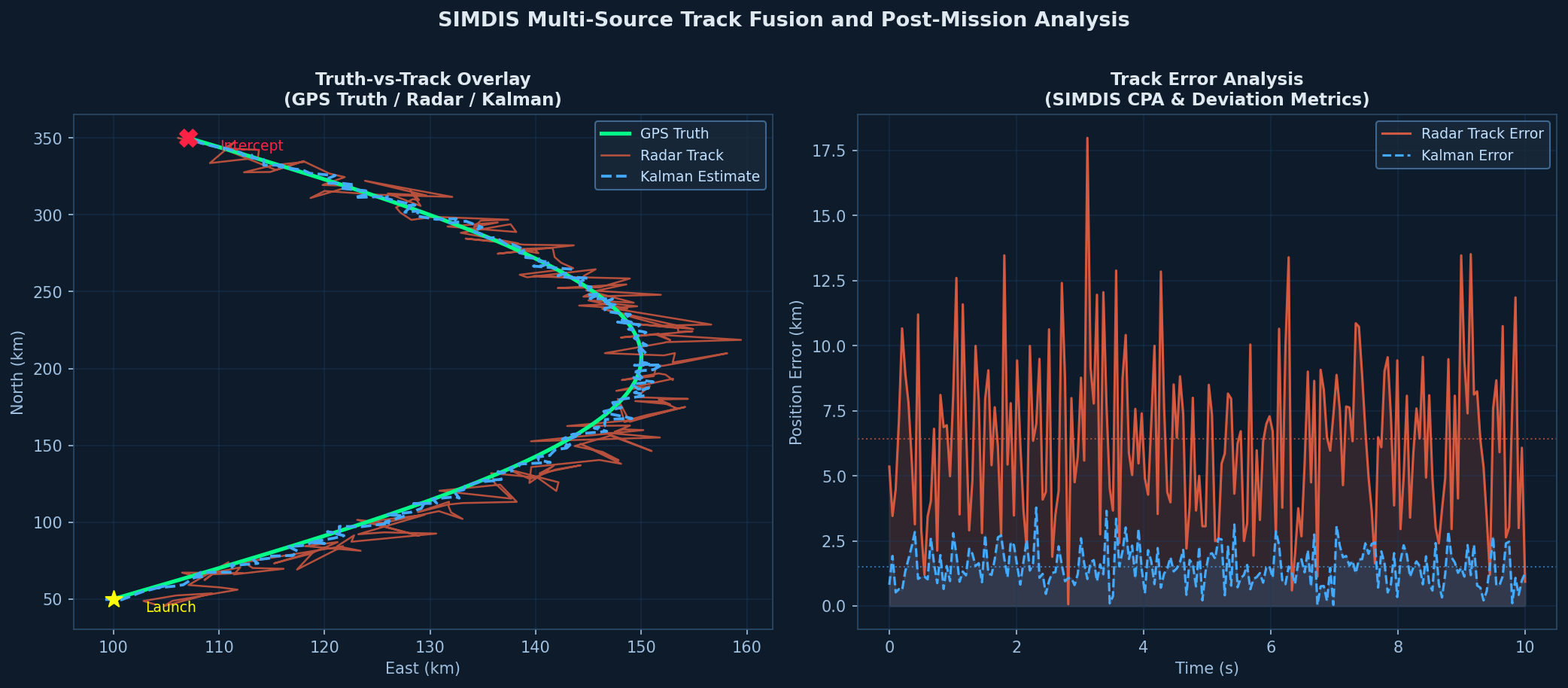
SIMDIS can simultaneously ingest tracks from multiple sources: live radar feeds, simulation outputs, GPS truth data, and recorded exercise files. This makes it invaluable for truth-vs-track analysis—overlaying a radar track against GPS truth to quantify tracker bias, lag, and drop-out events. Defense test engineers routinely use this capability during flight test campaigns to evaluate fire control radar performance against maneuvering targets.
2. Time-Synchronized Replay and Analysis
All ingested data is stored in SIMDIS's internal .asi (SIMDIS ASCII) or binary .simdis format, enabling precise time-synchronized replay. Engineers can:
- Scrub through an engagement timeline frame-by-frame
- Annotate specific events (missile launch, intercept, miss distance)
- Export time-sliced data windows for post-mission analysis
- Synchronize replay with external video feeds (e.g., range camera footage)
The replay engine supports variable playback speed (0.1× to 100×), making it practical to review both slow-moving maritime scenarios and high-speed missile intercept events within the same session.
3. Sensor Beam and Engagement Geometry Visualization
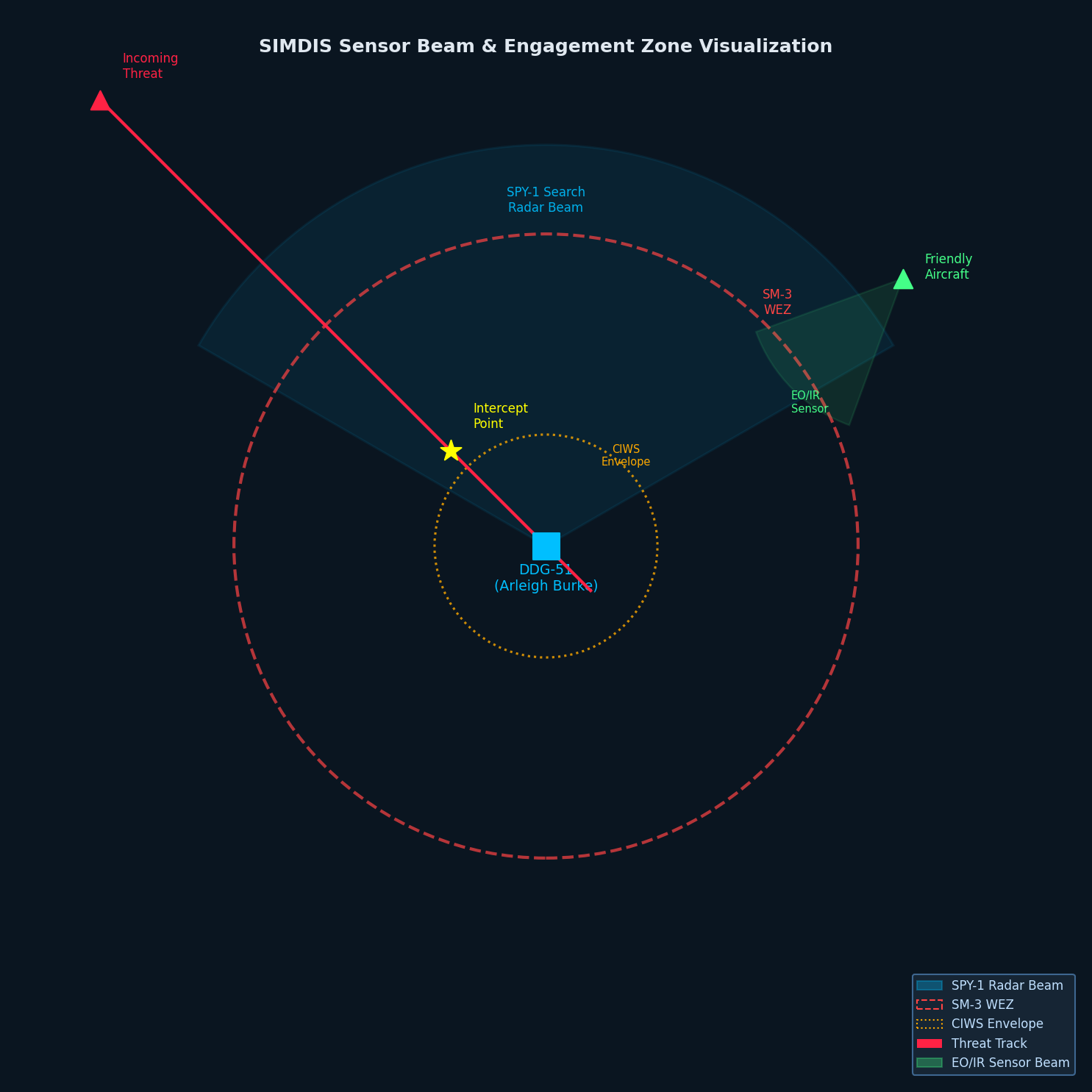
One of SIMDIS's most operationally useful features is its ability to render sensor beams and engagement envelopes in 3D. A radar beam can be displayed as a frustum with configurable half-angle, range, and azimuth/elevation limits. Weapon engagement zones (WEZ) can be rendered as dynamic 3D volumes that update as the launching platform maneuvers.
This geometry visualization is critical for:
- Wargame analysis: Identifying coverage gaps in a ship's air defense envelope
- Deconfliction studies: Ensuring UAV corridors do not intersect active radar search volumes
- Sensor placement optimization: Evaluating ground-based radar siting for maximum coverage
4. TENA and DIS/HLA Integration
SIMDIS integrates natively with the major distributed simulation middleware stacks used across DoD test ranges:
- TENA: SIMDIS ships with a TENA adapter that subscribes to TENA objects and renders them in real time, making it the de facto visualization layer for TENA-based range instrumentation systems
- DIS: The SIMDIS SDK includes a DIS reader that maps PDU entity state updates directly to SIMDIS entities
- HLA: Via the SIMDIS HLA adapter, federates in an HLA federation can stream object updates to SIMDIS for live visualization during distributed simulation exercises
This protocol breadth means SIMDIS can serve as a common operating picture (COP) layer across heterogeneous simulation architectures without requiring data format conversion.
Practical Workflow: Post-Mission Track Analysis
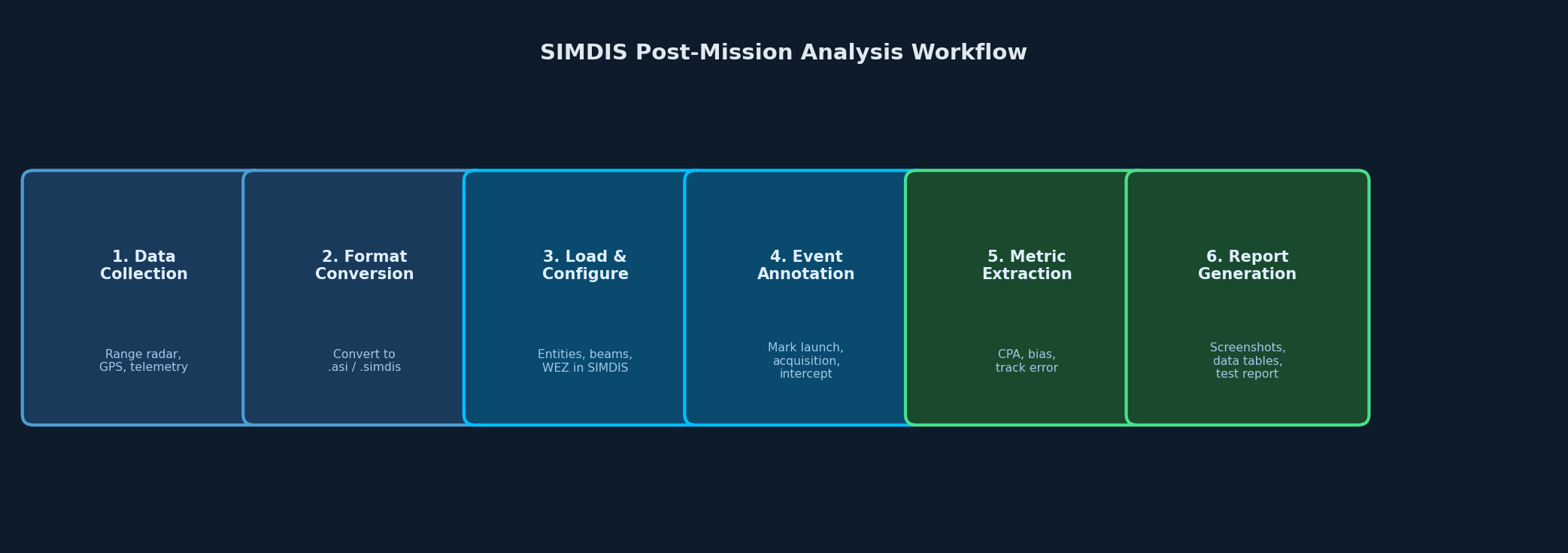
A typical post-mission analysis workflow using SIMDIS proceeds as follows:
- Data collection: Range instrumentation (radar, GPS, telemetry) records entity states during the exercise. Data is converted to
.asiformat using NRL-provided conversion utilities or custom scripts. - File loading: The
.asifile is loaded into SIMDIS. Entities appear on the 3D globe at their initial positions. - Sensor configuration: Radar beams and WEZ volumes are configured using SIMDIS's beam editor, referencing the actual sensor parameters from the system under test.
- Event annotation: Key events (weapon release, target acquisition, intercept) are marked as time-stamped annotations.
- Analysis views: Engineers use SIMDIS's range/bearing plots, altitude profiles, and closest-point-of-approach (CPA) tools to extract quantitative metrics.
- Reporting: Screenshots and exported data tables are incorporated into test reports.
Integration with Broader Simulation Ecosystems
SIMDIS is frequently paired with other tools in the defense simulation stack:
- AFSIM: AFSIM scenarios can export entity tracks in SIMDIS-compatible format, enabling post-run visualization of constructive simulation results
- STK: STK's
.eephemeris files can be converted to SIMDIS format for space situational awareness visualization - MATLAB: Custom MATLAB scripts using the SIMDIS SDK's network interface can inject computed tracks (e.g., Kalman filter estimates) into a live SIMDIS session for real-time comparison against truth
Availability and Licensing
SIMDIS is available at no cost to U.S. government agencies, contractors, and allied nation defense organizations through the NRL SIMDIS website (https://simdis.nrl.navy.mil). The SIMDIS SDK is released under a government open-source license. Requestors must complete a brief registration form confirming eligibility.
Pre-built binaries are available for Windows (primary platform) and Linux. The SDK supports compilation on both platforms with CMake.
Best Practices
- Use binary
.simdisformat for large datasets (>1M time steps); ASCII.asifiles are human-readable but significantly slower to load - Pre-filter data to the time window of interest before loading; SIMDIS performance degrades with very long time series containing many entities
- Leverage the SIMDIS SDK network interface for live simulation integration rather than file-based workflows to minimize latency
- Standardize coordinate reference frames across all data sources before ingestion; mixing WGS-84 and local flat-earth coordinates is a common source of track offset errors