

STK Systems Tool Kit: Advanced Aerospace and Defense Mission Simulation
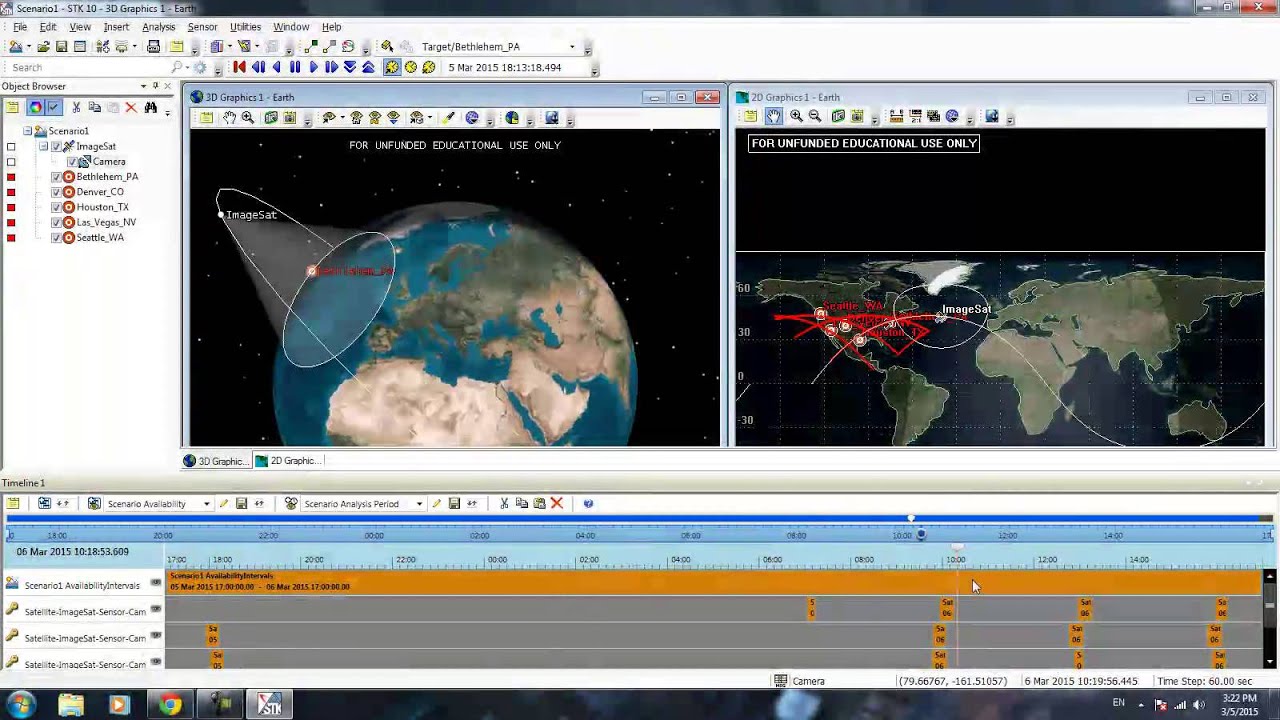
Systems Tool Kit (STK), often referred to by its initials, is a sophisticated multi-physics software application developed by Analytical Graphics, Inc. (AGI), which is now part of Ansys. Since its inception in 1989, STK has evolved from a tool primarily designed to solve problems involving Earth-orbiting satellites into an indispensable digital mission engineering application widely utilized across the aerospace, defense, telecommunications, and other industries.
Overview and Evolution
At its core, STK functions as a robust geometry engine, meticulously determining the time-dynamic position and attitude of objects, as well as the intricate spatial relationships among them, even under a multitude of complex and simultaneous constraining conditions. STK provides essential services such as hardware abstraction, low-level device control, implementation of commonly used functionalities, message-passing between processes, and robust package management.
STK provides a highly accurate, physics-based modeling environment that enables engineers, scientists, mission analysts, operators, and decision-makers to analyze platforms and payloads within a realistic mission context. This integrated environment facilitates the performance of complex analyses of ground, sea, air, and space platforms, allowing users to share and visualize results comprehensively. The software is designed to simulate intended missions and communicate outcomes through detailed reports, graphs, and stunning 3D animations.

Core Features and Capabilities
STK's comprehensive suite of features is built upon a foundation of physics-based simulation, offering unparalleled precision and flexibility for digital mission engineering.
Physics-Based Modeling and Simulation Environment
STK provides a high-fidelity, physics-based modeling environment that ensures accuracy in simulating real-world scenarios. This environment allows for the interaction of system and component models, enabling users to measure their performance within the context of the complete mission. It incorporates realistic elements such as high-resolution terrain, detailed imagery, and accurate radio frequency (RF) environments.
Time-Dynamic Geometry Engine
Central to STK's functionality is its time-dynamic, physics-based geometry engine. This engine is responsible for calculating the precise position and attitude of objects over time, as well as their spatial relationships, including line-of-sight and access calculations, under various complex constraints. This capability is crucial for understanding how objects interact and perform throughout a mission.
Comprehensive Object Modeling
STK supports the modeling of a vast array of complex systems, including aircraft, satellites, ground vehicles, sea platforms, and their associated sensors. Users can select from a library of pre-defined models, build custom models, or import precise models from external sources, combining them to represent existing or proposed systems accurately.
Key analysis capabilities include:
- Line of Sight and Access Determination: Calculating when and for how long objects can "see" each other, which is fundamental for communication, surveillance, and navigation tasks.
- Performance Evaluation: Assessing the performance of systems in real or simulated time, providing a clear understanding of their behavior and mission effectiveness.
- Ground Track Calculation: Determining the path a satellite traces over the Earth's surface, essential for mission planning and ground station contact.
- Solar Irradiance and Power Generation: Analyzing solar panel performance, including calculating solar irradiance, input surface area, and efficiency to determine power generated. This extends to conducting comprehensive power generation/consumption studies over time.
- RF Link Modeling: Establishing and analyzing communication links, including link and telemetry budgets, and examining the effects of environmental losses.
Advanced Output and Visualization
STK excels in presenting complex simulation results in an understandable and actionable format:
- Reports and Graphs: Generating detailed reports and various types of graphs to quantify mission performance and system behavior.
- 3D Animations: Providing stunning 3D visualizations of missions, allowing for intuitive understanding of complex dynamics and interactions.
- Time-Based Plots: Visualizing critical performance metrics over time, such as altitude, speed, fuel burn, and orientation.
- Exportable Metrics: Enabling the export of simulation data for further post-processing in external tools like Excel, Python, or MATLAB.
Automation and Scripting Support
For advanced users and complex analyses, STK offers robust automation capabilities:
- API Access: Full access to the STK Application Programming Interface (API) through popular programming languages such as Python, MATLAB, C#, and Java.
- Batch Scenario Generation: Facilitating the creation and execution of multiple scenarios in batch mode, which is invaluable for sensitivity studies and comparative analysis.
- Workflow Compatibility: Supporting both graphical user interface (GUI) and command-line workflows, catering to different user preferences and integration needs.
- Code Examples Repository: Analytical Graphics, Inc. (now Ansys) maintains a public GitHub repository (STKCodeExamples) offering fully functional tools and libraries of example code for automating and developing with STK.
Integration with External Data Sources
STK can incorporate external data, such as weather feeds, satellite data, or air traffic restrictions, into its simulations, enhancing the realism and accuracy of the analyses. This capability is crucial for comprehensive mission planning that accounts for dynamic environmental factors.
STK Product Tiers and Specialized Modules
Ansys STK is offered in various configurations, each tailored to specific industry needs and levels of complexity:
Ansys STK Pro
This version provides the foundational physics-based modeling environment for analyzing platforms and payloads in a realistic mission context. It includes capabilities for modeling complex systems within a time-dynamic 3D simulation, incorporating high-resolution terrain, imagery, and RF environments. STK Pro is often a prerequisite for more advanced features, such as detailed solar panel simulations.
Ansys STK Premium Space
Specifically designed for space mission systems design and operations, this tier includes specialized capabilities for simulating entire space systems in action, providing a clear understanding of their behavior and mission performance. It offers advanced orbital mechanics, spacecraft modeling, and space environment simulation capabilities.
Ansys STK Premium Air
Focused on air mission systems design, this version allows for physics-based modeling of connected air systems and subsystems. It notably includes the Aviator module, which provides comprehensive flight simulation capabilities.
Ansys STK Enterprise
This is the most comprehensive offering, encompassing all the capabilities of the Pro, Premium Space, and Premium Air versions. It is designed for users who require the integration of various development phases and representation of different domains, facilitating faster delivery of complex systems.
The Aviator Module: High-Fidelity Flight Simulation
The Aviator module, part of Ansys STK Premium Air, is a dynamic aircraft simulation engine engineered to model complete flight trajectories using physics-based calculations. It is essential for assessing UAV patrol routes, optimizing commercial flight paths, and planning defense operations, providing a high-fidelity simulation environment.
Key Capabilities of STK Aviator
- Modular Phase-Based Mission Design: Flight paths are divided into individual procedure segments (e.g. climb at constant CAS or Mach, bank turns, cruise, idle descent, controlled approach), which can be linked to model entire missions from runway to runway. Each segment is parameterized by real aircraft limits like thrust, drag, climb rate, and bank angle.
- Aircraft Performance Models (APMs): Aviator utilizes APMs to define and analyze realistic aircraft missions, combining them with segment-based mission planning and environmental constraints.
- Airport and Runway Modeling: Users can simulate realistic airport procedures and constraints by using real-world coordinates and terrain elevation to create site-specific airfield environments. This includes modeling takeoff and landing profiles with rotation speeds, climb-out paths, and gear/flap configurations.
- Sensor and Payload Integration: Aviator can be integrated with other STK modules to simulate EO/IR, radar, and communication payloads. This allows for the simulation of line-of-sight, sensor coverage, and detection footprints throughout the flight.
- Terrain and Weather Impacts: Aviator automatically accounts for terrain conflicts, aiding in simulating nap-of-the-earth flight and safe descents into mountainous regions. It also modifies speed and fuel burn based on wind and air density factors for enhanced accuracy.
- Batch and Comparative Analysis: Engineers can simulate multiple aircraft, routes, or weather scenarios in batch mode and use comparative plots to inform design or planning decisions.
Applications Across Industries
STK's versatility makes it applicable across a wide range of domains, particularly in aerospace and defense.
Aerospace and Defense
- Digital Mission Engineering: STK is a cornerstone for digital mission engineering, enabling the analysis of platforms and payloads in realistic mission contexts. It allows for the design, modeling of constraints, variation of parameters, and analysis of performance within the entire space system.
- Space Systems Design and Operations: Originally created for satellite problems, STK is extensively used for designing and operating space missions, including CubeSats. It helps in understanding orbital elements, optimizing observation times for ground targets, and analyzing solar panel power generation for satellites.
- Aircraft and UAV Operations: The Aviator module is crucial for comprehensive flight simulation, planning, and analysis. This includes assessing UAV patrol routes, optimizing commercial flight paths, planning defense operations, and simulating complex military operations involving low-altitude ingress, terrain masking, and multi-aircraft coordination.
- Sensor Performance Analysis: Simulating how sensors (e.g. EO/IR, radar) perform throughout a mission, considering factors like altitude, terrain, and aircraft orientation.
- Communication System Design: Characterizing end-to-end communication links between space and ground assets, choosing optimal spacecraft components, establishing link and telemetry budgets, and examining environmental losses.
Telecommunications
STK is used to interact with data from platforms across the telecommunications industry, likely for satellite communication planning, link budget analysis, and coverage assessment. This includes modeling satellite constellations, analyzing coverage patterns, and optimizing communication networks.
Research and Academia
STK is a valuable tool for academic and research purposes, allowing for the modeling of aircraft dynamics, aerodynamic testing, and propulsion behavior under various flight conditions. Educational programs utilize STK to teach students practical skills in digital mission modeling.
Educational institutions use STK to provide hands-on experience with:
- Orbital mechanics and spacecraft design
- Mission planning and analysis
- Systems engineering principles
- Space situational awareness
Best Practices for Effective STK Usage
Effective utilization of STK involves understanding its workflow, leveraging its capabilities, and adhering to recommended practices.
Familiarization and Training
- Start with Fundamentals: For new users, it is highly recommended to begin with basic simulations and AGI's Level 1 Training, which familiarizes users with the STK workflow and how to model systems and missions.
- Utilize Tutorials and Demos: AGI provides numerous tutorials and demos, which are excellent for first-time users to understand the software's capabilities and workflow.
- Access Advanced Training: For more complex features and professional applications, AGI offers Level 2 and Level 3 training, often requiring STK Pro or specific licenses.
System Requirements and Setup
- Operating System: The desktop version of STK primarily requires a Windows OS, though cloud-based options are available for other platforms.
- Hardware: A computer mouse is highly recommended for navigating the 3D environment effectively.
- Licensing: Users must register and create an account on agi.com to obtain a license. Free licenses are available for basic use, while professional features require specific product licenses.
- Installation: Follow the detailed installation instructions, including extracting files, running installation executables, and correctly installing license files.
- STK Cloud: For users without a Windows OS or those preferring web-browser access, STK Cloud offers a subscription-based alternative after a free trial.
Workflow and Design Principles
- Scenario Creation: Begin by creating a scenario in STK, which serves as the foundation for your mission analysis. This includes defining the time period, coordinate systems, and basic environmental parameters.
- Object Definition: Accurately add and modify objects relevant to your mission, ensuring their physical properties and operational parameters are correctly defined. This includes satellites, aircraft, ground stations, sensors, and other mission-critical components.
- Constraint Modeling: Incorporate all relevant physical, environmental, and operational constraints to ensure the simulation is as realistic as possible. This includes terrain masking, atmospheric effects, and operational limitations.
- Iterative Design and Validation: Use STK to continually validate your design against the operational environment. This iterative process is common in digital mission engineering and helps overcome design challenges.
- Data Analysis and Interpretation: Generate reports and graphs to analyze desired outcomes, such as ground tracks, solar irradiance, power generation, and RF link performance. Understand how to interpret these results to make informed design decisions.
Leveraging Automation
- Scripting for Efficiency: Utilize STK's API with Python, MATLAB, or other supported languages for automating repetitive tasks, performing sensitivity studies, and integrating STK with other analysis tools. The STKCodeExamples repository is a valuable resource for this.
- Batch Processing: For analyses involving multiple variations or scenarios, leverage batch processing capabilities to save time and ensure consistency.
- Integration with Other Tools: Take advantage of STK's ability to integrate with other software tools and data sources to create comprehensive analysis workflows.
Collaboration and Communication
STK's integrated environment facilitates sharing results, which is crucial for collaborative projects involving multiple stakeholders. The ability to generate stunning 3D animations aids in communicating complex mission concepts and outcomes effectively to diverse audiences, from technical teams to executive leadership.
Advanced Features and Capabilities
Real-Time Operations
STK supports real-time operations, allowing users to:
- Monitor live missions and compare actual performance to predicted behavior
- Update scenarios with real-time data feeds
- Perform real-time analysis and decision support
High-Performance Computing
For large-scale analyses, STK can leverage:
- Distributed computing capabilities for complex scenarios
- Cloud-based processing for scalability
- Parallel processing for parameter studies and Monte Carlo analyses
Standards Compliance
STK supports various industry standards and formats:
- CCSDS standards for space data systems
- NATO standards for defense applications
- Commercial satellite industry standards
- Integration with government and commercial databases
Future Directions and Innovations
Digital Twin Technology
STK is evolving to support digital twin concepts, where virtual models are continuously updated with real-world data to provide accurate, real-time representations of physical systems.
Artificial Intelligence Integration
Future developments include:
- AI-assisted mission planning and optimization
- Machine learning for pattern recognition in large datasets
- Automated anomaly detection and response recommendations
Enhanced Visualization
Ongoing improvements in visualization include:
- Virtual and augmented reality interfaces
- Enhanced 3D rendering capabilities
- Interactive dashboards for real-time monitoring
Cloud-Native Architecture
STK is moving toward cloud-native architectures that provide:
- Improved scalability and accessibility
- Enhanced collaboration capabilities
- Reduced infrastructure requirements for users
Conclusion
Systems Tool Kit (STK) stands as a leading simulation tool for real-world mission analysis, commanding the future of aerospace and defense with its unmatched precision. Its evolution from a satellite-focused tool to a comprehensive digital mission engineering application underscores its adaptability and power.
By providing a physics-based modeling environment, robust analysis capabilities, advanced visualization, and extensive automation features, STK empowers engineers and scientists to design, analyze, and optimize complex systems across space, air, and ground domains. The software's ability to handle the entire mission lifecycle—from initial concept through detailed design, analysis, and operations—makes it an indispensable tool for modern aerospace and defense applications.
STK's continued development and integration with emerging technologies such as artificial intelligence, cloud computing, and digital twin concepts ensure its position at the forefront of mission engineering technology. As aerospace and defense systems become increasingly complex and interconnected, STK's comprehensive capabilities and proven track record make it an essential platform for ensuring mission success in an increasingly complex operational landscape.
The platform's emphasis on accuracy, flexibility, and integration capabilities positions it as a cornerstone technology for addressing the challenges of modern aerospace and defense missions, from traditional satellite operations to emerging applications in commercial space, autonomous systems, and multi-domain operations.
References
- Ansys STK Official Website (https://www.ansys.com/products/missions/ansys-stk)
- STK Documentation and Training (https://help.agi.com/stk/)
- AGI STK Code Examples (https://github.com/AnalyticalGraphicsInc/STKCodeExamples)
- STK Academic Programs (https://www.agi.com/products/stk-systems-toolkit/academic)
- Digital Mission Engineering Resources (https://www.agi.com/solutions/digital-mission-engineering)