
SuperPro Designer: Batch Scheduling and Techno-Economic Analysis for Bioprocess and Pharmaceutical Manufacturing
SuperPro Designer: Batch Process Simulation and Economic Analysis for Bioprocess and Pharmaceutical Manufacturing
SuperPro Designer, developed by Intelligen, Inc., is the industry-standard simulation platform for batch and semi-continuous bioprocess and pharmaceutical manufacturing. Unlike steady-state simulators such as Aspen Plus or HYSYS—which excel at continuous petrochemical flowsheets—SuperPro Designer is purpose-built for the time-dependent, recipe-driven processes that define biologics production, API synthesis, and specialty chemical manufacturing. This article examines SuperPro Designer's core capabilities in batch scheduling, equipment sizing, and techno-economic analysis, with practical guidance for process engineers working in life sciences and fine chemicals.
Why Batch Simulation Requires a Different Paradigm
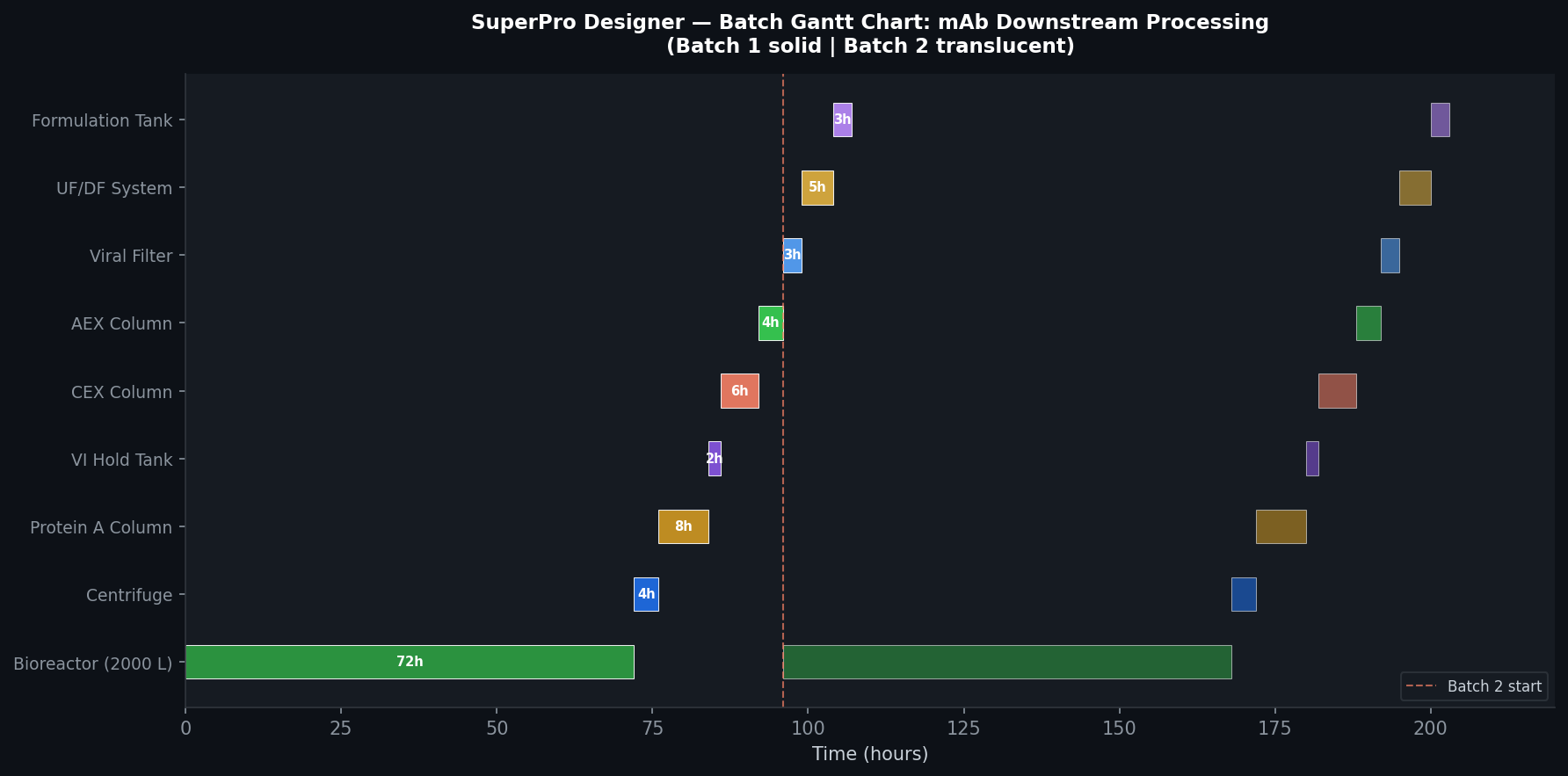
Continuous process simulators assume steady-state mass and energy balances, making them poorly suited for batch operations where equipment is shared across multiple tasks, cycle times govern throughput, and scheduling conflicts directly impact plant economics. SuperPro Designer addresses this with a recipe-centric architecture: each unit procedure is defined by a sequence of operations (charge, react, filter, dry, etc.) with explicit start times, durations, and resource requirements. The simulator propagates these through a Gantt chart-based scheduling engine to compute:
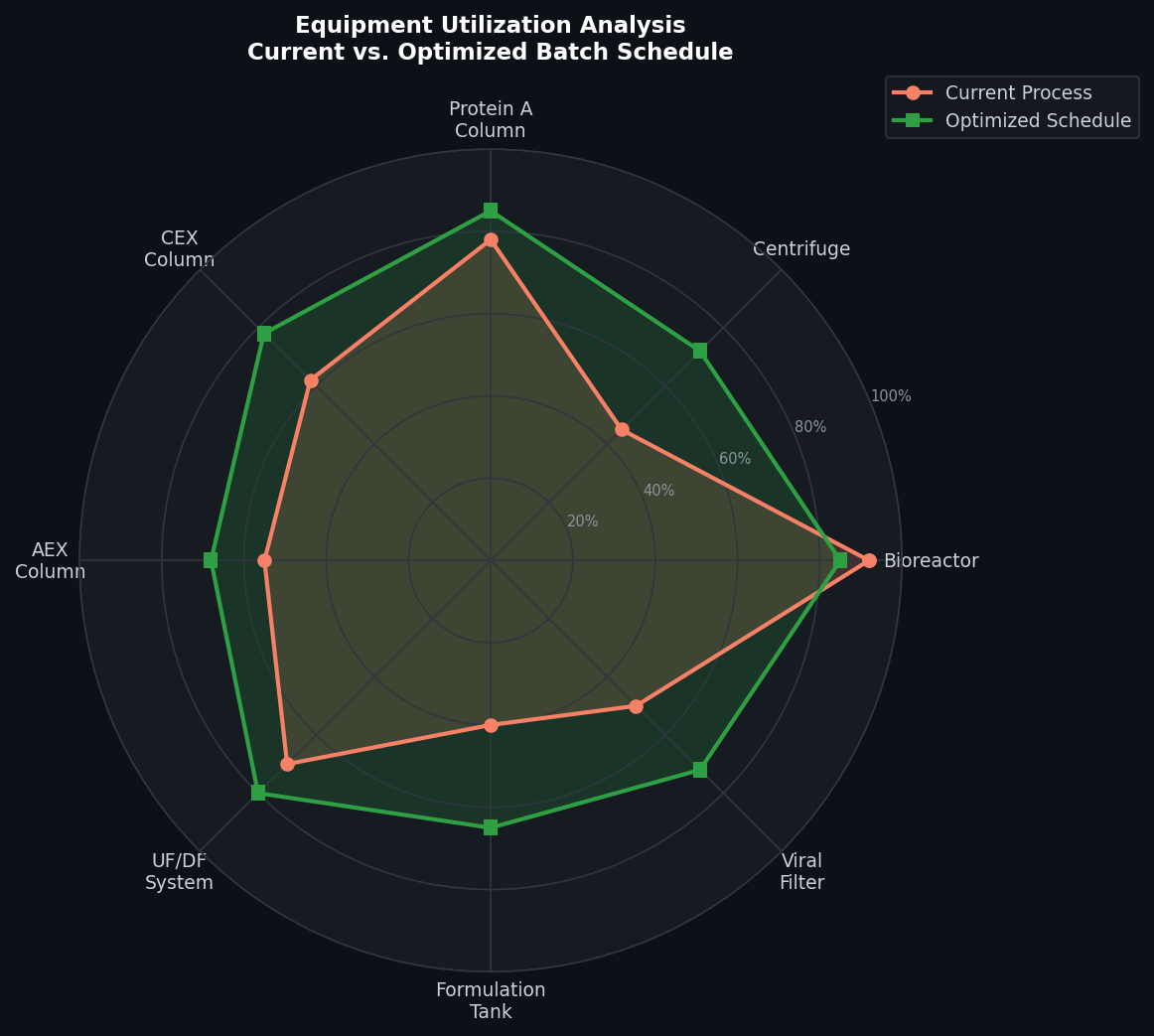
- Equipment occupancy and utilization rates across the full batch cycle
- Cycle time and annual batch count given a defined operating calendar
- Bottleneck identification — which unit procedure limits plant throughput
- Cleaning-in-place (CIP) and sterilization-in-place (SIP) scheduling integrated into the equipment timeline
This scheduling fidelity is critical for GMP manufacturing environments where regulatory submissions require documented cycle times and equipment utilization data.

Key Simulation Capabilities
Bioprocess Unit Operations
SuperPro Designer ships with over 140 built-in unit procedures covering the full spectrum of bioprocess and pharmaceutical operations:
- Upstream: Fermentation (batch, fed-batch, continuous), cell culture bioreactors with dissolved oxygen and pH control models, seed train propagation
- Downstream: Centrifugation, depth filtration, tangential flow filtration (TFF), chromatography (bind-and-elute, flow-through), viral inactivation/filtration
- Formulation and fill-finish: Lyophilization (freeze-drying) with sublimation kinetics, aseptic filling, vial/syringe inspection
- Chemical synthesis: Reaction with conversion or equilibrium kinetics, crystallization, liquid-liquid extraction, distillation
Each operation carries thermodynamic and mass-transfer parameters that can be fitted to lab-scale data, enabling scale-up projections from bench to pilot to commercial scale.
Equipment Sizing and Selection
SuperPro Designer performs automatic equipment sizing based on batch size and volumetric requirements, then matches results against a user-defined equipment database. Engineers can specify:
- Discrete equipment sizes (e.g., 500 L, 2,000 L, 10,000 L bioreactors) to reflect actual procurement options
- Shared equipment pools where multiple procedures compete for the same vessel, triggering scheduling conflicts that the Gantt engine resolves
- Auxiliary utilities — steam, cooling water, clean steam, WFI — automatically tracked per operation for utility balance reporting
This capability is particularly valuable during facility fit studies, where the goal is to determine whether an existing plant can accommodate a new product without capital investment.
Techno-Economic Analysis (TEA)
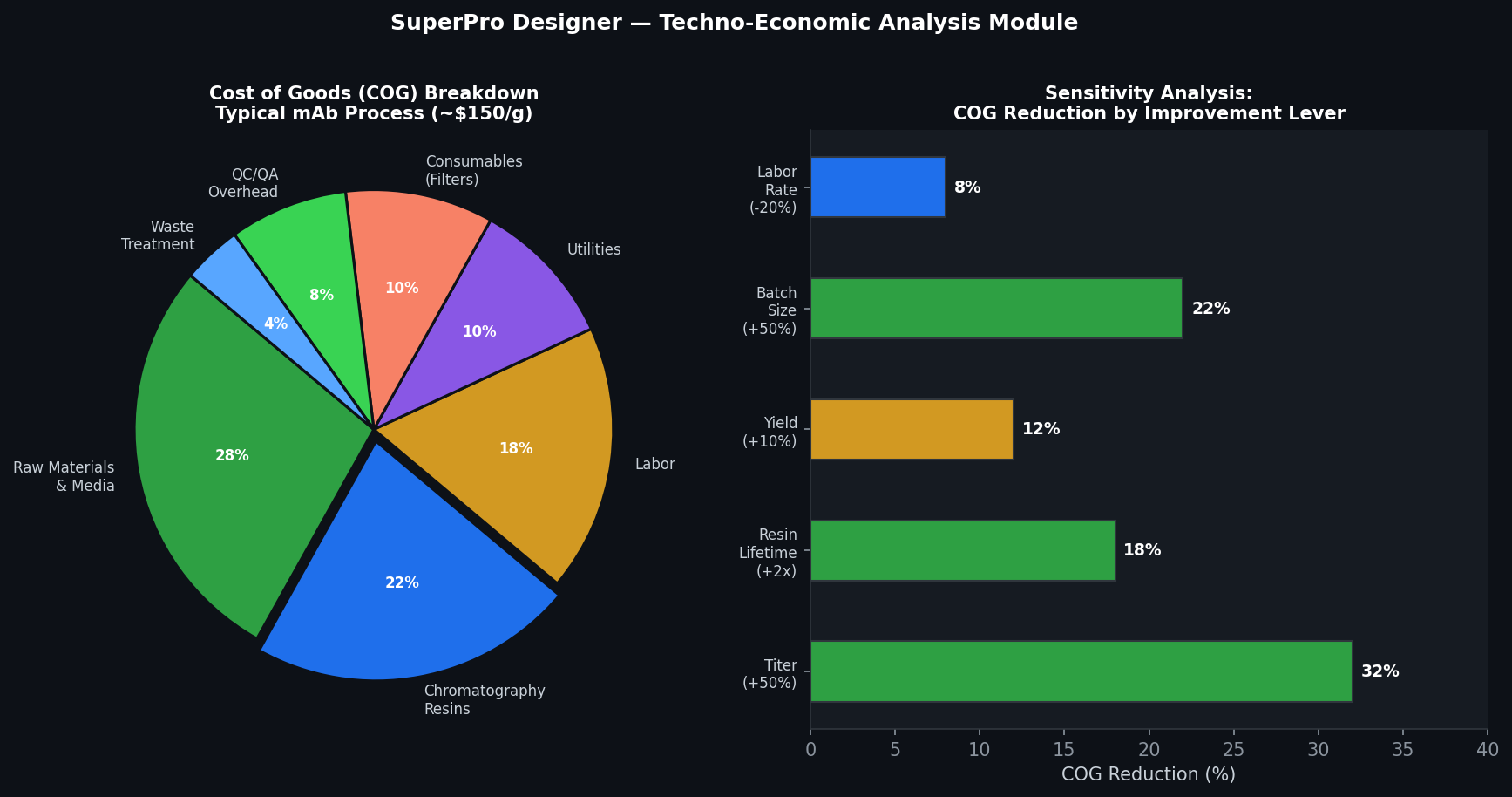
One of SuperPro Designer's most powerful differentiators is its integrated economic module. After completing the process simulation, engineers can generate a full cost of goods (COG) analysis including:
- Capital cost estimation using built-in cost correlations (Lang factor, Chilton method) or user-supplied vendor quotes
- Operating cost breakdown: raw materials, labor (with shift scheduling), consumables (chromatography resin, filter membranes), utilities, waste treatment, and QC/QA overhead
- Annual cash flow and NPV analysis with configurable depreciation schedules, tax rates, and discount rates
- Sensitivity analysis on key cost drivers — titer, yield, resin lifetime, batch size — to identify the highest-leverage improvement opportunities
The COG output is structured to align with industry reporting standards, making it directly usable in business cases, regulatory filings, and technology transfer packages.
Practical Workflow: Monoclonal Antibody Downstream Processing
A typical SuperPro Designer workflow for mAb downstream processing proceeds as follows:
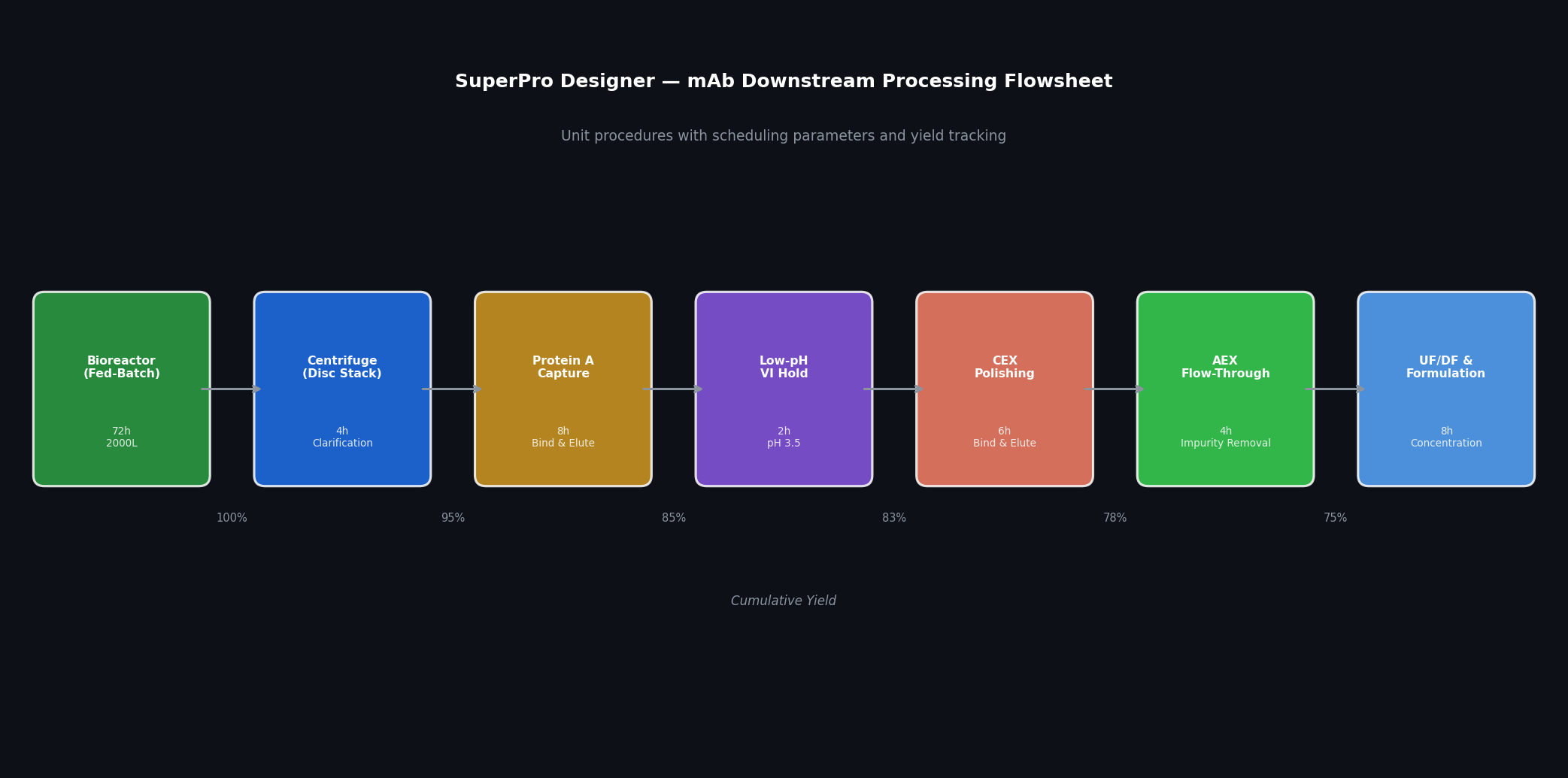
- Define the recipe: Import or manually enter the unit procedure sequence — Protein A capture, low-pH viral inactivation, cation exchange polishing, anion exchange flow-through, viral filtration, UF/DF concentration, and formulation.
- Set batch size and titer: Specify the harvest volume and product concentration from the bioreactor, which propagates through yield assumptions at each step.
- Configure scheduling: Assign equipment to each procedure, set CIP/SIP durations, and define the operating calendar (shifts per day, days per year).
- Run simulation: SuperPro Designer solves mass balances, sizes equipment, and generates the Gantt chart showing equipment occupancy across a representative batch cycle.
- Analyze bottlenecks: The scheduling report identifies which step has the highest equipment occupancy or longest cycle time — often the Protein A column due to resin binding capacity constraints.
- Perform TEA: Generate the COG report, then run sensitivity analysis on resin lifetime and titer to quantify the economic impact of process improvements.
This workflow can be completed in a few days for a well-characterized process, making SuperPro Designer an efficient tool for rapid process economics screening during early development.
Integration with Other Tools
SuperPro Designer supports data exchange with external tools through Excel-based interfaces and its scripting API (SchedulePro integration for multi-product facility scheduling). Process engineers commonly use it alongside:
- Aspen Plus or HYSYS for rigorous thermodynamic modeling of specific unit operations, with results imported into SuperPro for scheduling and economics
- JMP or Minitab for design-of-experiments (DoE) analysis, with SuperPro providing the process model for scale-up projections
- SchedulePro (Intelligen's companion product) for multi-product, multi-suite facility scheduling at the campaign level
Licensing and Getting Started
SuperPro Designer is available under annual or perpetual licenses from Intelligen, with academic pricing for universities. A free demonstration version with limited saving capability is available at intelligen.com. Intelligen also provides an extensive library of example files covering mAb production, vaccine manufacturing, API synthesis, and food processing — an excellent starting point for new users.
For engineers transitioning from continuous process simulators, Intelligen's training workshops (available online and on-site) cover the batch scheduling paradigm in depth, which is the conceptual shift most critical for productive use of the tool.
Conclusion
SuperPro Designer occupies a unique and essential niche in the process simulation landscape: it is the only widely adopted commercial tool that combines rigorous batch scheduling, bioprocess-specific unit operations, and integrated techno-economic analysis in a single environment. For process engineers in biologics, pharmaceuticals, and specialty chemicals, it provides the quantitative foundation needed to make defensible decisions on process design, facility fit, and capital investment — from early feasibility through commercial manufacturing.